.svg)
Twilio: Building Programmable Communication into Modern Applications
Twilio: Building Programmable Communication into Modern Applications
Customer communication is no longer limited to emails and traditional phone systems. Modern applications are expected to send timely notifications, verify users, support conversations, automate calls, and connect customers through the channels they already use.
Twilio provides communication APIs and services that allow businesses to build these capabilities directly into their software. Instead of developing telecom infrastructure from scratch, development teams can connect applications to programmable messaging, voice, verification, and conversational communication services.
For businesses building custom applications, CRM systems, marketplaces, mobile apps, booking platforms, or AI-powered services, Twilio can become an important communication layer between the application and its users.
What Is Twilio?
Twilio is a communications platform that exposes programmable communication capabilities through APIs and developer tools. Its services can be integrated into websites, mobile applications, backend systems, customer-support platforms, and business workflows.
The important concept is programmability. Instead of asking employees to manually send messages or make routine calls, an application can trigger communication automatically when a business event occurs.
For example, when an online order changes from Processing to Shipped, the application can automatically trigger a customer notification. When a new user registers, the system can initiate a verification workflow. When a support team needs to contact a customer, a business application can initiate or manage a voice interaction.
How Twilio Fits into an Application Architecture
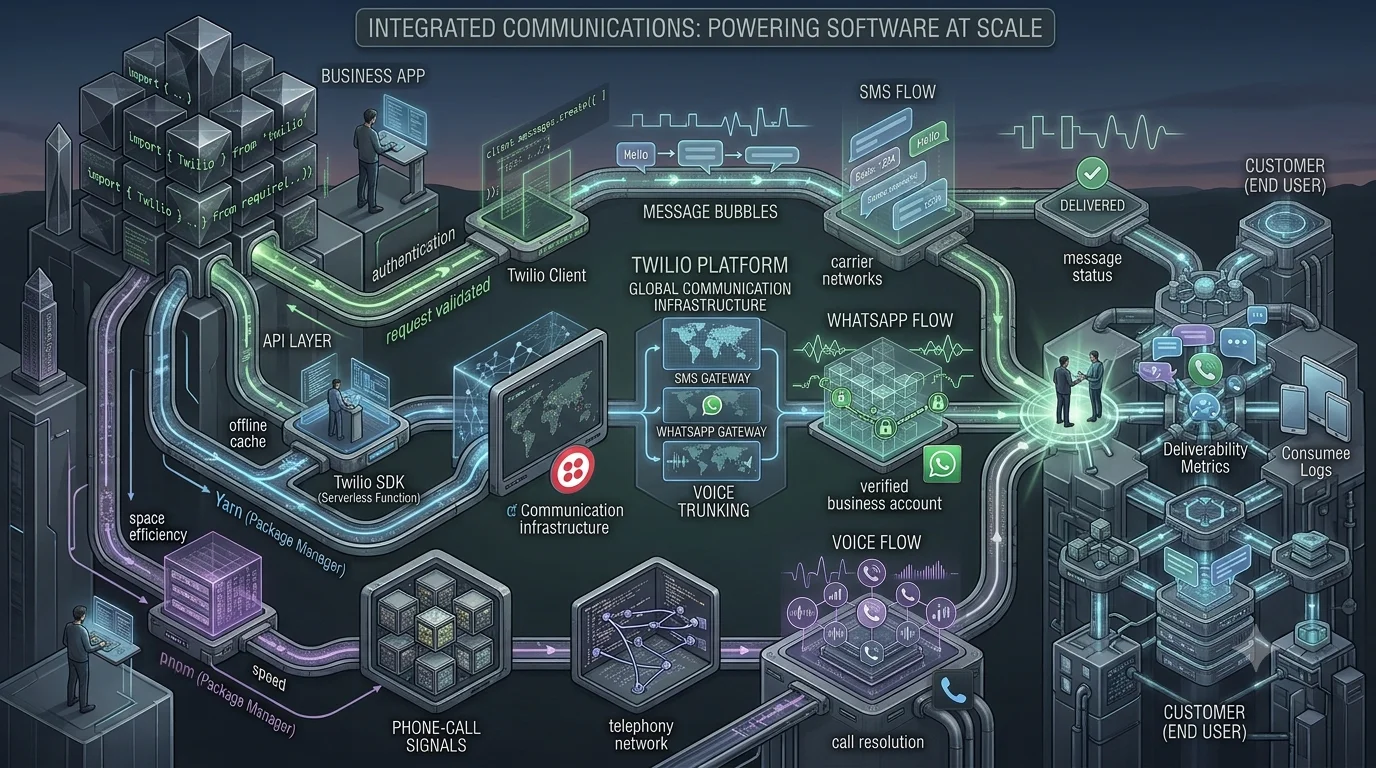
Twilio generally works as a communication layer connected to an application's backend.
User Action
    ↓
Business Application
    ↓
Backend / API
    ↓
Twilio
    ↓
SMS / WhatsApp / Voice / Other Communication Channel
    ↓
Customer
Consider an appointment-management application. A customer books an appointment through a web application. The backend stores the appointment and triggers a communication workflow. Twilio can then be used to send a confirmation and later reminder through an appropriate supported channel.
The application remains responsible for business logic, while Twilio handles communication capabilities.
Twilio Programmable Messaging
One of Twilio's core capabilities is programmable messaging. Applications can send and receive communications programmatically rather than relying on manually operated messaging systems.
Twilio's messaging platform supports channels including SMS, MMS, RCS, and WhatsApp, allowing businesses to build transactional and conversational communication into their applications.
Practical Example: Order Notifications
Imagine an e-commerce platform processing thousands of orders every day.
Instead of requiring employees to notify customers manually, the application can trigger messages based on order events:
- Order confirmation
- Payment confirmation
- Order preparation
- Shipment notification
- Delivery updates
- Service or return notifications
This turns communication into part of the application's workflow rather than a separate manual operation.
WhatsApp Communication
For businesses whose customers prefer WhatsApp, programmable WhatsApp communication can become part of customer-service and notification workflows.
For example, a service company could send an appointment confirmation, provide an update about a service request, or communicate order information through WhatsApp.
The advantage is not simply sending another message. The real value comes from connecting the communication channel to the underlying business system.
A CRM record, support ticket, order, appointment, or delivery status can become the event that triggers communication.
Twilio Programmable Voice
Twilio also provides programmable voice capabilities for applications that need to make, receive, route, or manage phone calls programmatically.
Voice functionality can support use cases such as:
- Automated customer calls
- Interactive voice response systems
- Call queues
- Conference calls
- Call recording
- Call transcription workflows
- Application-based calling
For example, a logistics platform could automatically initiate a call workflow when a delivery requires customer confirmation. A support platform could route incoming calls into a queue while maintaining customer and ticket context in the application.
Building Interactive Voice Experiences
Programmable voice becomes more powerful when an application responds dynamically to callers.
A typical workflow might look like this:
Incoming Call
      ↓
Twilio
      ↓
Application Backend
      ↓
Identify Customer
      ↓
Retrieve Business Data
      ↓
Generate Response / Menu
      ↓
Customer Interaction
      ↓
Update Application
For example, a customer calling a service company could enter an account number, select an option through the keypad, and receive information based on the company's backend data.
This creates a connection between traditional telephone communication and modern software systems.
Twilio Verify for User Authentication
Authentication is another important Twilio use case. Twilio Verify provides verification capabilities through channels such as SMS, voice, WhatsApp, email, TOTP, passkeys, push, and other supported authentication methods.
A common example is phone-number verification during account registration.
- The user enters their phone number.
- The application starts a verification request.
- A verification code is delivered through the selected channel.
- The user enters the code.
- The application checks the verification result.
- The account can then continue through the registration workflow.
This removes the need for developers to build an entire verification-delivery infrastructure themselves while allowing the authentication flow to remain part of the application's user experience.
Twilio for Appointment and Booking Systems
Appointment platforms are a practical example of where programmable communication can have an immediate operational impact.
Consider a clinic, salon, consulting company, or repair business managing hundreds of appointments each week.
When an appointment is created, the application can trigger a confirmation. Before the appointment, it can send a reminder. If the appointment is rescheduled, the communication can be updated automatically.
The workflow becomes:
Appointment Created
        ↓
Database Event
        ↓
Communication Service
        ↓
Customer Notification
        ↓
Appointment Confirmation / Reminder
Instead of communication being an isolated task, it becomes an automated part of the business process.
Twilio in Customer Support
Customer-support systems can also use Twilio to connect conversations with business records.
For example, when a customer sends a message or calls a support number, the system can associate the interaction with an existing customer record or support ticket.
A support workflow might combine:
- Customer identification
- Conversation history
- Support tickets
- Order information
- Agent assignment
- Automated notifications
- Escalation workflows
This is especially valuable when a business operates across multiple communication channels and needs customer context to remain consistent.
Twilio and AI-Powered Communication
Twilio can also serve as the communication infrastructure around AI-powered applications.
For example, an AI customer-service system may contain several layers:
Customer
   ↓
Twilio Communication Layer
   ↓
Speech / Message Processing
   ↓
AI Model
   ↓
Business Logic / Tools
   ↓
CRM / ERP / Database
   ↓
Response
   ↓
Customer
An AI voice assistant could receive a customer call, process the conversation, retrieve information from a business system, perform an allowed action, and communicate the result back to the customer.
The important architectural principle is that the AI should not automatically receive unrestricted access to business systems. Tool permissions, validation, approval requirements, logging, and escalation rules should be designed around the AI workflow.
Connecting Twilio with CRM and ERP Systems
Twilio becomes significantly more useful when connected to the systems that already contain business information.
For example, a CRM could trigger communication when:
- A new lead is created
- A sales representative schedules a meeting
- A quotation is accepted
- A customer becomes inactive
- A support ticket requires an update
An ERP system could trigger messages when:
- An order is confirmed
- An invoice is generated
- A payment is received
- A shipment is dispatched
- A service request changes status
This integration allows communication to follow actual business events instead of relying on employees to remember when messages need to be sent.
Webhook-Based Communication Workflows
Communication is not only about sending messages. Applications also need to process events coming back from communication services.
A webhook-based architecture can allow the application to receive events and update its own records.
Twilio Event
     ↓
Webhook Endpoint
     ↓
Application Validation
     ↓
Business Logic
     ↓
Database Update
     ↓
CRM / ERP / Dashboard
For example, a messaging workflow might need to record whether a communication was sent, received, failed, or requires further action.
For production systems, webhook endpoints should be designed with authentication or signature validation, idempotency, appropriate logging, retries, and failure handling.
Security and Reliability Considerations
Communication APIs become part of a production application's infrastructure, so integration should not stop at simply making an API call.
Development teams should consider:
- Secure storage of API credentials
- Webhook validation
- Rate limiting
- Retry strategies
- Duplicate-message prevention
- Audit logging
- Failure monitoring
- Regional and regulatory requirements
- User consent and communication preferences
- Protection against messaging abuse
For example, an automated notification service should not repeatedly send the same message simply because a backend job was retried. Idempotency and event tracking can prevent this type of operational problem.
Twilio Is More Than an SMS API
It is easy to think of Twilio as an SMS provider, but that view misses much of its application-development value.
The more useful way to understand Twilio is as a programmable communication layer.
Depending on the product and use case, developers can build workflows around messaging, voice, verification, conversational communication, and customer engagement.
This makes Twilio particularly useful when communication needs to react to events happening inside another application.
When Should a Business Use Twilio?
Twilio can be a strong fit when communication is an important part of the product or business workflow.
Typical scenarios include:
- Customer notifications
- OTP and account verification
- Appointment reminders
- Delivery notifications
- Customer support
- Transactional messaging
- Automated phone calls
- Interactive voice applications
- AI-powered communication
- CRM and ERP communication automation
However, adopting Twilio does not automatically solve communication architecture. Businesses still need to design the workflow, select appropriate channels, handle failures, protect credentials, manage customer preferences, and integrate communication events with their internal systems.
How Code-Ox Can Build Twilio-Powered Applications
At Code-Ox, Twilio can be integrated as part of a broader custom software, ERP, CRM, mobile application, or AI solution rather than treated as an isolated API.
For example, a business could combine a custom web application with Twilio messaging, an Odoo ERP backend, and automated workflows so that customer communication is triggered directly by operational events.
Another project could combine Twilio-based communication with an AI assistant, allowing customers to interact through supported communication channels while the AI connects to approved business tools and data.
The architecture should be designed around the actual business workflow:
Business Process
      ↓
Application / Odoo / CRM
      ↓
Integration Layer
      ↓
Twilio
      ↓
Customer Communication
      ↓
Status / Response
      ↓
Business System
This approach helps businesses move beyond disconnected communication tools and create communication workflows that are part of the software itself.
Conclusion
Twilio provides developers with programmable building blocks for integrating communication into modern software products. Messaging, voice, verification, and related communication capabilities can be connected to websites, mobile applications, CRMs, ERPs, support platforms, and AI systems.
The real value comes from the integration architecture around it. A message should not simply be sent because an API exists; it should be triggered by a meaningful business event, tracked properly, protected against failures, and connected to the customer's broader journey.
For companies building custom digital products or modernizing existing business workflows, Twilio can provide the communication layer needed to turn application events into timely, automated customer interactions.
Need to connect communication, automation, ERP, CRM, or AI into one business workflow? Code-Ox can help design and develop the integration around your specific operational requirements.