Sep 30, 2026
Odoo 20 Inventory Valuation: Four New Accrual Accounts to Explain Your Stock Variation
Finally know why your stock variation isn't zero
The Problem This Solves
If you've closed the books in Odoo 18 or 19 under Perpetual (Automated) inventory valuation, you know this pain: goods are received but the vendor bill hasn't landed yet, or a bill is posted before the goods physically arrive. On the sales side, the same gap exists — deliveries go out before invoices are raised, or invoices go out before goods are delivered. Odoo would dump all of this into a single Stock Variation account. The total was accurate, but at month-end you had no way to tell why the number wasn't zero. You'd end up manually creating extra accounts and posting your own journal entries just to find out.
Odoo 20 fixes this natively by splitting that one variance account into four purpose-built accrual accounts and automating the entries around them.
Odoo 19 vs. Odoo 20: What Actually Changed
Aspect
Odoo 19
Odoo 20
Variance visibility
Single Stock Variation account absorbs every timing gap
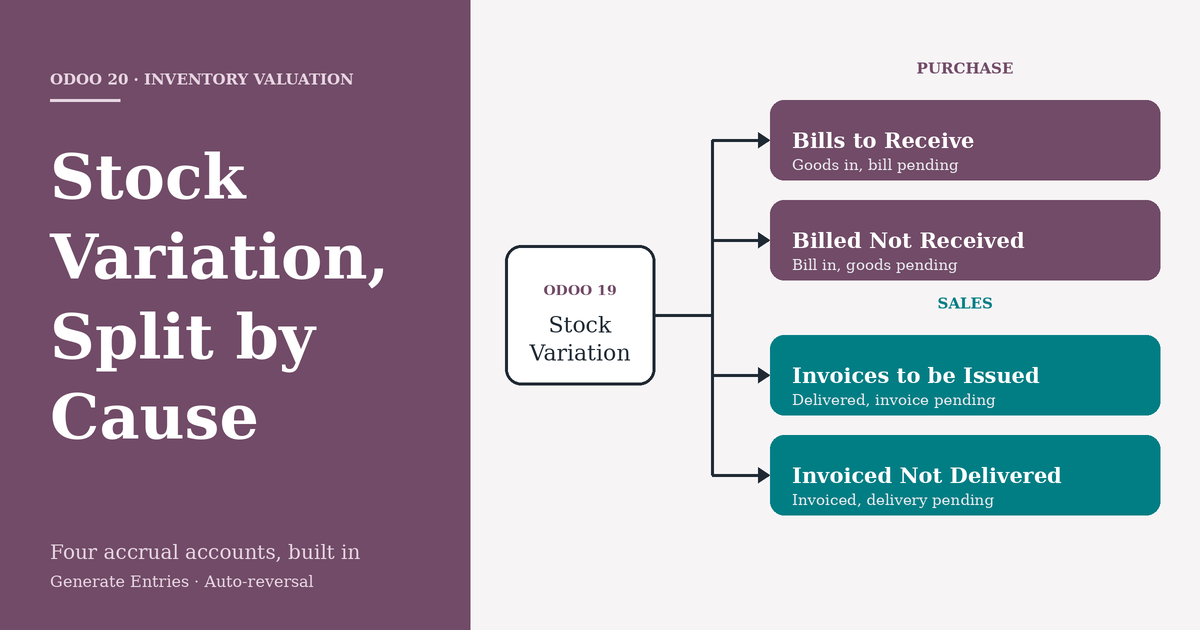
Split into 4 dedicated accounts: Invoices to be Issued, Invoiced Not Delivered, Bills to Receive, Billed Not Received
Where configured
Product Category only
Product Category and a new central General Settings → Accounting → "Accruals" section, inherited by every category
Setup effort
Consultant/user had to manually create these 4 GL accounts and wire up journal entries every month
Standard chart of accounts ships with them pre-built (e.g. 121200, 212000, 211100, 141000) — just map and go
Inventory Valuation label
"Perpetual" / "Periodic"
Renamed to "Perpetual (at invoicing)" / "Periodic (at closing)" — states explicitly when valuation posts
Accrual + reversal entries
Manual journal entries required to accrue the variance and manually reverse them next period
Generate Entries creates the accrual automatically, and Odoo posts the reversal entry on the next day by itself
Month-end diagnosis
Investigate the Stock Variation balance manually to figure out the cause
Inventory Valuation report shows the exact account (and therefore the exact cause) in its own section
The two screenshots below show this concretely: the General Settings → Accruals screen lets you set Invoices to be Issued (121200), Invoiced Not Delivered (212000), Bills to Receive (211100), and Billed Not Received (141000) once at the company level — every product category (like "Goods" below) then inherits these unless overridden, alongside the renamed Inventory Valuation: Perpetual (at invoicing) setting and the existing Stock Account / Stock Variation fields.
Figure 1 — General Settings → Accounting → Accruals: company-wide default accounts for Sale and Purchase accruals.
Figure 2 — Product Category ("Goods") inheriting the four accrual accounts, plus the renamed "Perpetual (at invoicing)" valuation method.
The Four New Accounts
Account
Type
Side
Triggered When
Bills to Receive
Current Liability
Purchase
Goods received, vendor bill not yet created
Billed Not Received
Current Asset
Purchase
Vendor bill created, goods not yet received
Invoices to be Issued
Current Asset
Sales
Goods delivered, invoice not yet created
Invoiced Not Delivered
Current Liability
Sales
Invoice created, goods not yet delivered
Setting It Up
Chart of Accounts: the four accounts ship by default (e.g. 121200, 212000, 211100, 141000) — create your own if you want custom codes.
General Settings → Accounting → Accruals: set the company-wide defaults for Sale Accruals and Purchase Accruals here — every product category inherits them automatically.
Product Category → Inventory Valuation: choose the costing method (e.g. Perpetual (at invoicing) / Average Cost), then override any of the four accounts per category if needed. You can also rename the default "Stock Variation" account to something clearer like "Cost of Revenue."
Once mapped, no manual journal entries are needed — Odoo routes timing differences into the correct account by itself.
Purchase Side: Two Scenarios
Goods Received, Bill Pending
A purchase receipt is validated for $100 but no vendor bill exists yet.
The Inventory Valuation Report shows the $100 under Bills to Receive instead of a generic variance line.
Generate Entries at month-end creates the accrual: Stock Valuation is debited on receipt; the accrual entry knocks Stock Variation to zero and credits Bills to Receive $100.
Balance Sheet: Current Assets +100 (inventory), Current Liabilities +100 (Bills to Receive) — a clean accrual, P&L variance nets to zero.
Odoo automatically reverses this entry the next day, so once the real bill posts, the accrual unwinds cleanly.
Bill Received, Goods Not Yet Delivered by Vendor
A second purchase order (cost $200) has its bill confirmed, but the receipt hasn't happened.
The report now shows Billed Not Received at $200 alongside the earlier Bills to Receive at $100.
Generate Entries nets Cost of Goods Sold to zero, debits Billed Not Received, and credits Stock Variation.
Balance Sheet: Current Assets = $100 (actual inventory) + $200 (Billed Not Received, representing prepayment for goods in transit) = $300; Current Liabilities carry the $100 Bills to Receive.
Once goods are actually received, this account clears automatically.
Sales Side: Two Scenarios
Delivered, Invoice Still Pending
A sales order is confirmed and delivered, but the customer invoice hasn't been raised — the most common month-end situation.
The Inventory Valuation Report shows the delivered value under Invoices to be Issued instead of an unexplained variance.
Generate Entries produces the accrual, in two parts: Entry 1 — Product Sales credited → Invoices to be Issued debited (functionally the same role as Odoo 18's "Stock Interim Delivered" account) → Stock Variation credited → Cost of Goods Sold debited. Entry 2 — Stock Variation debited against Entry 1's credit → nets to zero → Inventory Valuation credited.
Reversal (automatic, next day): Odoo posts this on its own — no manual reversal required.
P&L: Cost of Sales and Stock Variation both net to zero; revenue and COGS are matched for the period even before the invoice exists.
Balance Sheet: Invoices to be Issued sits as a Current Asset — revenue earned but not yet billed.
When the real invoice is created afterward, it debits Accounts Receivable and credits Income as normal; the auto-reversal ensures nothing is double-counted.
Invoiced, Delivery Still Pending
The reverse gap: the customer invoice is confirmed, but goods haven't physically left the warehouse.
The report shows the value under Invoiced Not Delivered — flagging that revenue has been booked ahead of the physical delivery.
This posts as a Current Liability: you've billed the customer but still owe them the goods.
Why the Underlying Logic Matters
This is really Odoo 18 and Odoo 19 merged into one model:
Like Odoo 18, it uses interim-style accounts to bridge the timing gap between physical stock movement and the financial document.
Like Odoo 19, those accounts stay visible in the Inventory Valuation report drill-down, so you can trace why a variance exists without leaving the report.
Unlike either version, Generate Entries automates the full accrual-and-reversal cycle, and the accounts are now standard chart-of-account defaults set centrally, not something you build yourself.
Key Takeaway
For any business running Perpetual (at invoicing) valuation — which covers most Odoo Inventory + Accounting deployments — this is a genuine functional upgrade, not a cosmetic one. It takes the "black box" stock variation account, splits it by cause, exposes company-wide defaults in General Settings, and automates the entire close process around it. That's worth factoring into your Odoo 20 upgrade evaluation.
Sep 30, 2026
ODOO APPOINTMENTS Booking Straight From Google How Odoo Appointments and Google Reserve turn a search into a confirmed booking
How Odoo Appointments and Google Reserve turn a search into a confirmed booking
For many local businesses, the customer's journey no longer begins at the company website. It begins with a search. A prospective patient, diner or client types a service and a location into Google, scans the listings that appear, and decides within moments whom to contact. The businesses that make it easiest to act on that decision are the ones that win the booking.
Odoo's Appointments app can now meet customers at that moment. Through its Google Reserve integration, customers book directly from Google Search, Google Maps and the Google Assistant, and the booking is created in Odoo without the customer having to visit the company's website. This article explains how the integration works, what else Odoo 19 adds to Appointments, and what to verify before recommending it to a client.
Key Points
Customers can book from Google Search, Google Maps and the Google Assistant, and the booking is created directly in Odoo.
Setup is configuration rather than development: one module, one merchant record and one synchronization.
Eligibility is set by Google, and the business address must match its Google Maps listing exactly.
Why the Booking Channel Matters
A conventional online booking asks a lot of the customer. They find the listing, open the website, locate the booking page, choose a time and complete a form. Every step is a chance to lose them. Behind the scenes, each channel that accepts bookings, whether a phone line, a web form or a walk-in, also creates work for staff, who must reconcile the results in a single system.
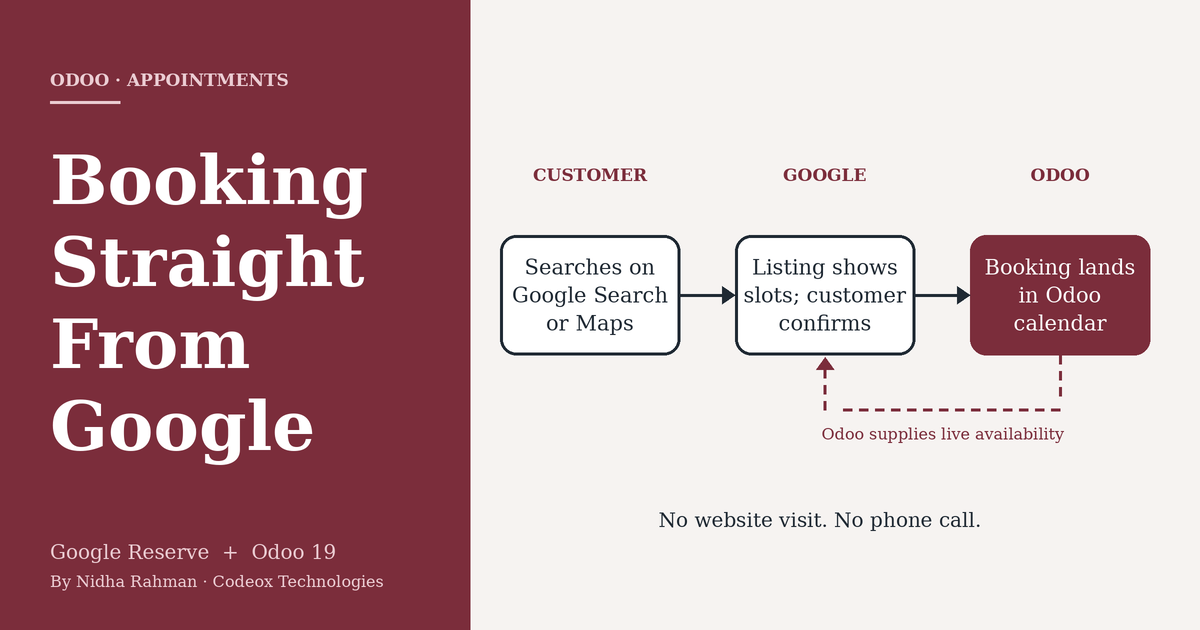
Consider an illustrative case: a physiotherapy clinic that closes at six. A prospective patient finds it on Google Maps at 9:40 in the evening. Without an online option, the best likely outcome is that the patient remembers to call the next day. With Google Reserve connected to Odoo, the patient can choose from the availability Odoo supplies and confirm a slot on the spot. The patient's details are written to Odoo Contacts, and the appointment is already in the therapist's calendar the next morning. Nobody has to answer a call, and nobody has to re-enter anything.
Figure 1. How a booking travels from a Google search to an Odoo calendar.
How the Integration Works
Configuration takes place entirely inside Odoo. According to Odoo's documentation, the process has four steps:
Install the module. Install Appointment Google Reserve from the Apps menu. The default Apps filter must be removed before searching for "Google".
Open an appointment type. In the Appointments app, open an existing appointment type or create a new one, then go to its Google Bookings tab.
Add the merchant. Select or create a Google Reserve Merchant and complete the business details. The business address must match the Google Maps listing exactly.
Synchronize. Select Synchronize with Google Reserve. The first synchronization can take up to 24 hours to propagate to Google's systems.
Figure 2. The setup flow, including the address check flagged in Odoo's documentation.
Odoo also exposes the settings Google expects from a booking partner. These include availability based on resources such as staff members or tables, automatic assignment, a scheduling window of up to 31 days, minimum lead times for booking and cancelling, and email reminders. Once the connection is live, the details a customer enters on Google are written to Odoo Contacts, and the booking appears in Odoo alongside those made through any other channel.
Restaurants follow a variation of the same model. Tables defined on the Point of Sale floor plan, each with a maximum number of guests, act as the bookable resources, and reservations made through Google appear in the floor plan and the booking pipeline.
Other Appointments Improvements in Odoo 19
The Google integration sits alongside several other additions to Appointments listed in Odoo 19's release notes. Group sessions allow a capacity limit and multiple bookings in a single slot, which suits classes and workshops. An appointment type can move from a weekly recurring schedule to a flexible one, with durations shown on the booking page. Booking calendars can be embedded on external websites using an iframe, which is useful for clients whose sites are not built on Odoo. Reusable default questions keep intake forms consistent and make the answers easier to report on. And when a confirmed appointment creates a Field Service task, the appointment details are carried into that task automatically.
Practical Considerations
Eligibility is determined by Google rather than Odoo. Google's documentation requires a business with a physical location whose address can be matched to its Maps database, and eligibility may further depend on business type and country. It should be confirmed for each client before the feature is proposed.
Address matching deserves particular care. Odoo's documentation warns that mismatches in formatting or unit numbers can cause synchronization to fail or prevent the listing from appearing, and because the first synchronization can take up to a day, testing should be planned accordingly.
The integration is an Enterprise feature; Odoo has described synchronization with Google Bookings as available from Odoo Enterprise 18 onward. Finally, customers see the availability that Odoo supplies, so the integration is only as reliable as the calendars behind it. Out-of-date staff availability will lead to bookings the business cannot honour.
Conclusion
Google Reserve addresses a simple problem: customers who are ready to book at a moment when the business is unreachable. For clients whose revenue depends on appointments or reservations, and who already use or are considering Odoo Appointments, the integration adds a channel customers already rely on, at the cost of a modest amount of configuration. The real work lies in verifying eligibility and aligning the business's details with its Google listing, and doing that before the feature is promised is what keeps the rollout smooth.
Sources and Further Reading
Google reserve integration. Odoo 19.0 documentation, Appointments. odoo.com/documentation/19.0/applications/productivity/appointments/google_reserve.html
Odoo 19 Release Notes. Appointments section. odoo.com/odoo-19-release-notes
POS Restaurant: Reservations with Google Bookings. Odoo blog. odoo.com/blog/business-hacks-1/pos-restaurant-reservations-with-google-bookings-2211
Skip the line, book online with Google table reservation integrated with Odoo. Odoo Experience 2025 session summary. oduist.com/blog/odoo-experience-2025-ai-summaries-2/261-skip-the-line-book-online-with-google-table-reservation-integrated-with-odoo-263
Reservations: Overview and Eligibility. Google Actions Center documentation. developers.google.com/actions-center/verticals/reservations/bl/overview
Sep 4, 2026
Mobile Application Development: Why Businesses Need a Mobile App in 2026
Mobile applications have become an important part of how businesses connect with customers, streamline operations, and deliver digital services. In 2026, customers increasingly expect businesses to provide fast, convenient, and personalized experiences through smartphones and tablets. A well-designed mobile application can help businesses improve customer engagement, increase efficiency, strengthen brand visibility, and create new opportunities for growth.
Mobile application development involves designing, developing, testing, and maintaining applications for platforms such as Android and iOS. Depending on business requirements, companies can choose native app development or cross-platform technologies such as Flutter and React Native. The right approach depends on factors such as functionality, performance, budget, scalability, security, and the target audience.
What Is Mobile Application Development?
Mobile application development is the process of creating software applications specifically designed to run on mobile devices. These applications can provide services such as online shopping, payments, customer support, booking, communication, business management, and many other digital experiences.
Modern mobile apps can also integrate with APIs, cloud platforms, payment gateways, databases, artificial intelligence services, analytics tools, and enterprise software. This allows businesses to build connected digital ecosystems rather than standalone applications.
Why Does Your Business Need a Mobile App?
A mobile application can provide businesses with a direct digital channel for interacting with customers. Instead of relying entirely on a website or third-party platforms, businesses can create their own branded mobile experience.
Better customer engagement: Mobile apps provide a convenient way for customers to interact with products and services. Personalized experiences: Apps can use customer preferences and behavior to deliver more relevant content and services. Improved accessibility: Customers can access business services directly from their mobile devices. Push notifications: Businesses can send timely updates, offers, reminders, and important information. Operational efficiency: Custom applications can automate workflows and simplify internal business processes. Brand visibility: A mobile app keeps a business visible on customers' devices. Scalable digital services: Applications can evolve as business requirements and customer expectations change.
Native vs Cross-Platform Mobile App Development
Businesses generally have two major approaches when developing mobile applications: native development and cross-platform development.
Native App Development
Native applications are developed specifically for a particular operating system, such as Android or iOS. Native development can provide excellent performance, platform-specific functionality, and a highly optimized user experience.
Cross-Platform App Development
Cross-platform frameworks allow developers to build applications that work across multiple platforms using a shared codebase. Technologies such as Flutter and React Native can help reduce development time and simplify maintenance while still delivering modern mobile experiences.
The best approach depends on the application's complexity, required performance, device integrations, development budget, and long-term business goals.
Key Features of a Modern Business Mobile App
A successful mobile application should focus on both user experience and business functionality. Depending on the project, important features may include:
Secure user authentication User profiles and account management Push notifications Online payments and subscriptions Search and filtering Real-time communication Location and map integration Booking and appointment management Product catalogs and e-commerce functionality Analytics and reporting API and third-party service integration Cloud-based data synchronization
Mobile App Security
Security should be considered throughout the entire mobile application development lifecycle. Businesses may handle sensitive customer information, payment data, authentication credentials, and other important information through their applications.
Secure authentication, encrypted communication, appropriate authorization, secure API integration, data protection, and regular security testing are important components of a reliable mobile application.
How Much Does Mobile App Development Cost?
The cost of developing a mobile application depends on several factors, including application complexity, number of platforms, features, UI/UX requirements, integrations, backend infrastructure, security requirements, and ongoing maintenance.
A simple application may require significantly less development effort than a large marketplace, fintech application, healthcare platform, or enterprise business application. Defining the minimum viable product (MVP) and prioritizing essential features can help businesses control initial development costs while creating a foundation for future expansion.
How to Choose the Right Mobile App Development Company
Choosing the right development partner is an important decision because mobile applications often require long-term development, maintenance, and improvement.
Businesses should evaluate a development company's technical expertise, previous projects, development methodology, UI/UX capabilities, security practices, communication process, testing approach, and post-launch support.
A reliable development partner should also understand the business problem behind the application rather than focusing only on writing code.
Mobile Application Development with Code-OX
At Code-OX Technologies, we help businesses transform their ideas into modern digital products through custom software and mobile application development. Our approach focuses on understanding business requirements, designing intuitive user experiences, developing scalable applications, integrating required technologies, and supporting the product beyond launch.
Whether you need a customer-facing mobile application, an e-commerce app, an internal business application, or a custom digital platform, choosing the right technology and development strategy can help create a solution that is scalable, secure, and aligned with your business objectives.
Conclusion
Mobile applications are no longer limited to large technology companies. Businesses across industries can use mobile apps to improve customer experiences, automate processes, provide digital services, and build stronger relationships with their audiences.
The key to successful mobile application development is not simply creating an app, but building a solution that addresses a genuine business need. With the right strategy, technology, user experience, security, and development partner, a mobile application can become an important part of a company's long-term digital growth.
Sep 3, 2026
GitHub Actions vs Jenkins: Two Ways to Build a Modern CI/CD Pipeline
GitHub Actions vs Jenkins: Two Ways to Build a Modern CI/CD Pipeline
A reliable CI/CD pipeline is no longer just a DevOps convenience. For modern
software teams, it is part of the application's delivery architecture.
Every pull request, test run, container build, security check, and production
deployment depends on how effectively that pipeline is designed.
Two names continue to appear in these conversations: GitHub Actions and Jenkins.
Both can automate builds, tests, deployments, infrastructure tasks, and release
workflows. But they approach the problem differently.
GitHub Actions is deeply integrated with GitHub repositories and represents a
repository-native approach to automation. Jenkins takes a more extensible,
independently managed approach built around controllers, agents, plugins,
pipelines, and shared libraries.
So which one should a development team choose?
The answer depends less on which tool has more features and more on your
repository strategy, infrastructure, security requirements, deployment model,
engineering skills, and how much operational control your team wants.
What CI/CD Actually Needs to Solve
Before comparing tools, it is useful to define the problem.
Imagine a team building a SaaS platform with a React or Next.js frontend,
a Node.js or Python backend, PostgreSQL, Docker containers, and cloud
infrastructure.
A developer opens a pull request. The delivery system may need to:
Install dependencies.
Run formatting and lint checks.
Execute unit and integration tests.
Run security and dependency checks.
Build a production application.
Create a Docker image.
Push the image to a container registry.
Deploy to a staging environment.
Run smoke tests.
Require approval before production.
Deploy the approved release.
Both GitHub Actions and Jenkins can implement this process. The important
difference is how the team builds, manages, secures, and maintains that
automation.
GitHub Actions vs Jenkins at a Glance
Area
GitHub Actions
Jenkins
Primary model
Repository-integrated workflow automation
Extensible automation server
Configuration
YAML workflow files
Jenkinsfile, UI and plugins
Execution
GitHub-hosted or self-hosted runners
Controller with agents
Source control integration
Excellent GitHub integration
Broad SCM integration through plugins
Extensibility
Actions, marketplace and reusable workflows
Large plugin ecosystem and shared libraries
Infrastructure control
High with self-hosted runners
Very high
Operational overhead
Generally lower when using GitHub-hosted runners
Requires Jenkins infrastructure management
Best fit
GitHub-centric modern development teams
Complex, highly customized or existing Jenkins environments
GitHub Actions: CI/CD Where the Code Already Lives
GitHub Actions takes a repository-first approach. Workflow definitions live
alongside application code and can respond directly to repository events such
as pushes, pull requests, releases, schedules, and manual triggers.
This creates a straightforward developer experience.
A developer pushes code, opens a pull request, and the workflow automatically
starts validation. The results can appear directly alongside the pull request.
Once the required checks pass, another workflow can deploy the approved change.
GitHub describes Actions as a CI/CD platform for automating build, test and
deployment workflows directly from a repository. It also supports GitHub-hosted
and self-hosted runners.
A Typical GitHub Actions Flow
Pull Request
↓
Install Dependencies
↓
Lint
↓
Unit Tests
↓
Integration Tests
↓
Build
↓
Docker Image
↓
Staging Deployment
↓
Smoke Tests
↓
Production Approval
↓
Production Deployment
For a team already using GitHub for source control, this integration can
eliminate a significant amount of platform management.
Jenkins: A CI/CD Engine You Control
Jenkins approaches CI/CD from a different direction.
Instead of making source control the center of the automation platform,
Jenkins provides an automation server that can connect to source control,
build systems, testing frameworks, artifact repositories, cloud platforms,
containers, and other infrastructure.
Jenkins Pipeline allows teams to define delivery processes as code using a
Jenkinsfile. Pipelines can contain stages such as Build, Test and Deploy,
and Jenkins can extend those pipelines through plugins and shared libraries.
This architecture is particularly useful when an organization needs a highly
customized delivery platform or already has significant Jenkins investment.
A Jenkins Architecture
Source Control
↓
Jenkins Controller
↓
┌───────────────┬───────────────┐
↓ ↓ ↓
Agent A Agent B Agent C
Build Testing Deployment
↓ ↓ ↓
Docker Integration Cloud
Build Tests Deployment
Jenkins is explicitly designed around distributed build environments. Agents
can execute workloads while the controller coordinates the environment.
The Biggest Difference: Platform vs Pipeline Engine
The most useful way to understand the difference is not simply "GitHub Actions
is newer and Jenkins is older." That misses the architectural distinction.
GitHub Actions is closely connected to a software collaboration platform.
Jenkins is an automation platform that can be connected to many different
development ecosystems.
If your engineering workflow already revolves around GitHub, Actions can feel
like a natural extension of the repository.
If your organization has multiple source-control systems, internal build
infrastructure, specialized deployment environments, or deeply customized
automation requirements, Jenkins can provide greater independence from any
single repository platform.
Workflow Configuration: YAML vs Jenkinsfile
GitHub Actions workflows are generally written in YAML.
name: CI
on:
pull_request:
jobs:
test:
runs-on: ubuntu-latest
steps:
- uses: actions/checkout@v4
- name: Install dependencies
run: npm ci
- name: Run tests
run: npm test
This format makes simple workflows approachable and keeps automation close to
the source code.
Jenkins uses Jenkinsfiles, with Declarative and Scripted Pipeline approaches.
A simplified Declarative Pipeline can look like:
pipeline {
agent any
stages {
stage('Build') {
steps {
sh 'npm ci'
sh 'npm run build'
}
}
stage('Test') {
steps {
sh 'npm test'
}
}
stage('Deploy') {
steps {
sh './deploy.sh'
}
}
}
}
Jenkins gives teams considerable control over pipeline behavior, particularly
when pipelines become sophisticated and need reusable shared libraries or
custom plugins.
Runners vs Jenkins Agents
The execution layer is one of the most important architectural differences.
GitHub Actions jobs run on runners. Teams can use GitHub-hosted runners or
self-hosted runners. Self-hosted runners provide control over hardware,
operating systems, installed software, and access to internal services.
Jenkins uses a controller-and-agent architecture. Agents execute workloads
while the controller schedules and coordinates them.
Consider a company that needs to build software against a private database
available only inside its corporate network.
With GitHub Actions, a self-hosted runner can be placed within an appropriate
private environment.
With Jenkins, an agent can similarly operate inside the organization's
infrastructure and execute the required workload.
The question therefore becomes less about capability and more about which
execution model is easier for your team to operate securely.
Extensibility: Actions vs Plugins
Modern CI/CD rarely stops at compiling source code.
Teams integrate cloud providers, Docker, Kubernetes, artifact repositories,
security scanners, test platforms, messaging systems, deployment tools and
internal services.
GitHub Actions addresses this through individual Actions, marketplace
integrations and reusable workflows.
Jenkins has historically built its flexibility around plugins and Pipeline
extensions. Shared Libraries also allow organizations to centralize common
pipeline logic.
For example, an enterprise with 40 repositories may want every application to
perform the same security scan, artifact naming convention and deployment
approval process.
With GitHub Actions, reusable workflows can centralize that behavior instead
of copying workflow logic into every repository.
With Jenkins, a shared library can provide a similar centralized abstraction.
Both approaches solve the duplication problem. The surrounding ecosystem and
operational model are what differ.
Scaling CI/CD Across Multiple Teams
A pipeline that works for one application can become difficult to manage when
an organization has dozens or hundreds of services.
Suppose a company has:
Multiple frontend applications.
Several backend APIs.
Mobile applications.
Background workers.
Scheduled data-processing jobs.
Infrastructure repositories.
The organization now needs standards for testing, secrets, artifact storage,
deployment approvals, environment protection, logging, rollback and runner
management.
GitHub Actions can centralize common automation through reusable workflows.
Jenkins can achieve similar standardization through shared libraries and
centrally managed pipeline infrastructure.
At this scale, the technology choice matters less than establishing a
consistent CI/CD architecture.
Security: The Pipeline Is Part of Your Attack Surface
CI/CD systems have access to some of the most sensitive assets in a software
environment.
A production deployment pipeline may have access to cloud credentials,
container registries, databases, package repositories, signing keys and
deployment environments.
That means CI/CD security cannot be treated as an afterthought.
GitHub Actions Security Considerations
Limit workflow permissions.
Protect production environments.
Use secrets appropriately.
Review third-party Actions before using them.
Separate build and deployment privileges.
Use trusted or controlled runners for sensitive workloads.
Jenkins Security Considerations
Protect the Jenkins controller.
Control agent access.
Limit credentials by project and scope.
Review installed plugins.
Protect Jenkinsfiles and shared libraries.
Secure the underlying infrastructure.
Jenkins documentation specifically recommends restricting credential access
to the lowest practical scope and avoiding unnecessary exposure of secrets.
Cost: Look Beyond the CI/CD Tool's Price
CI/CD cost is not simply a subscription question.
The real cost includes compute time, storage, engineering time, maintenance,
monitoring, security, upgrades and the infrastructure required to operate
the system.
GitHub Actions can use GitHub-hosted runners, while self-hosted runners can
avoid GitHub Actions usage charges but shift infrastructure and maintenance
responsibility to the organization.
Jenkins itself is open source, but running Jenkins at scale still requires
infrastructure, administration, upgrades, backups, plugin management,
monitoring and security operations.
A company might therefore spend less on licenses while spending considerably
more engineering time maintaining its CI/CD platform.
The correct question is:
What is the total cost of reliably delivering every software change?
Developer Experience: Where GitHub Actions Has an Advantage
For a GitHub-centric team, the developer experience of GitHub Actions can be
particularly strong.
A pull request can trigger automated checks without requiring developers to
interact with a separate CI platform.
Workflow files live in the same repository as application code. Build results
and checks can be connected to the pull request workflow.
This reduces the conceptual distance between writing code and delivering it.
For a startup building a Next.js application, for example, a small workflow
can provide linting, testing, build validation and deployment without
introducing another platform that developers need to learn.
Where Jenkins Still Makes Strong Sense
Jenkins remains highly relevant when organizations need control and
customization that extends beyond a simple repository-centric workflow.
Consider an enterprise with internal systems that cannot be exposed to public
cloud infrastructure, multiple source-control platforms, specialized hardware,
legacy applications and an existing library of Jenkins pipelines.
Replacing that environment simply because GitHub Actions is newer may create
unnecessary migration risk.
Jenkins can continue to provide value when:
The organization already has mature Jenkins infrastructure.
Highly customized pipelines are required.
Build environments are deeply integrated with internal infrastructure.
Multiple source-control systems need to be coordinated.
Specialized agents or hardware are required.
Extensive plugin-based integrations are already in place.
GitHub Actions vs Jenkins for Cloud-Native Applications
For a modern cloud-native application, the pipeline often looks like:
Git Repository
↓
CI Validation
↓
Container Build
↓
Image Registry
↓
Infrastructure / Deployment
↓
Kubernetes or Cloud Platform
↓
Monitoring
↓
Feedback
GitHub Actions fits naturally into this architecture when GitHub is already
the team's source-control and collaboration platform.
Jenkins can also orchestrate the entire flow and may be especially attractive
when the deployment environment requires extensive customization.
Neither tool replaces good architecture. A poorly designed pipeline remains
fragile regardless of the platform used to execute it.
A Practical Scenario: Growing SaaS Company
Imagine a SaaS company with 12 developers.
Its stack includes Next.js, Node.js, PostgreSQL and Docker. The team deploys
to a cloud platform and keeps all source code in GitHub.
The desired workflow is simple:
Developer opens a pull request.
Linting and tests run automatically.
The application is built.
A container image is created.
The image is deployed to staging.
Automated smoke tests run.
A production deployment requires approval.
GitHub Actions would be a natural candidate because the source repository,
pull-request workflow and CI system are already part of the same ecosystem.
Jenkins could implement the same architecture, but the company would also
need to operate the Jenkins environment and its agents.
In this scenario, reducing operational overhead may be more valuable than
having maximum CI/CD customization.
Another Scenario: Enterprise Delivery Infrastructure
Now consider a different organization.
It has hundreds of applications, several source-control systems, private
networks, dedicated build machines, internal artifact repositories and
specialized deployment workflows.
The company already has a large Jenkins estate with shared libraries,
specialized agents and carefully designed pipelines.
Moving everything to GitHub Actions would not automatically improve the
delivery architecture.
In this case, Jenkins may remain the more practical choice because the
existing infrastructure and operational knowledge are already aligned with it.
What About Hybrid Approaches?
Choosing one tool does not always mean eliminating every other automation
platform.
An organization might use GitHub Actions for application-level CI while
retaining Jenkins for specialized enterprise workflows.
Another organization might gradually migrate selected pipelines from Jenkins
to GitHub Actions rather than performing a high-risk migration all at once.
This can be particularly useful when legacy systems and modern cloud
applications coexist.
How to Choose Between GitHub Actions and Jenkins
Use GitHub Actions when most of these statements are true:
Your code is primarily hosted on GitHub.
You want CI/CD close to pull requests and repositories.
You prefer lower infrastructure management overhead.
Your workflows are relatively straightforward.
You want hosted runners with the option of self-hosted execution.
You want reusable repository-native automation.
Jenkins may be a better fit when these statements describe your environment:
You need extensive pipeline customization.
You operate complex internal infrastructure.
You require specialized build agents.
You integrate multiple development ecosystems.
You already have mature Jenkins infrastructure.
Your organization needs deep control over the CI/CD platform itself.
The Decision Should Start With Architecture, Not Tool Preference
The most common CI/CD mistake is selecting a tool before understanding the
delivery architecture.
Start with questions such as:
Where does the source code live?
Where should builds execute?
Which environments must the pipeline access?
What secrets are required?
What must happen before production deployment?
How many repositories will use the platform?
How much infrastructure can the DevOps team maintain?
What needs to be standardized?
What needs to remain customizable?
How will failures and rollbacks be handled?
Once these answers are clear, the choice between GitHub Actions and Jenkins
becomes considerably easier.
How Code-Ox Approaches CI/CD Architecture
At Code-Ox, CI/CD is treated as part of the software architecture rather than
an isolated deployment step.
A modern application may involve a frontend, backend services, databases,
APIs, containers, cloud infrastructure, third-party integrations and
monitoring. The delivery pipeline has to understand how those components
interact.
For a new SaaS platform, that may mean designing automated testing,
containerization, staging environments and production deployment together
with the application's architecture.
For an existing enterprise application, it may instead mean improving a
fragile deployment process without disrupting the systems already in
production.
Code-Ox works across custom web applications, integrations, Odoo systems,
automation and AI-powered solutions, making CI/CD architecture particularly
important when several technologies need to operate as one system.
The goal is not simply to make deployment automatic. The goal is to make
software delivery predictable, observable, secure and scalable.
Final Verdict: GitHub Actions or Jenkins?
GitHub Actions and Jenkins are both capable CI/CD platforms, but they optimize
for different operating models.
GitHub Actions is particularly compelling for teams that
already live inside GitHub and want repository-native automation with less
infrastructure management.
Jenkins remains a powerful choice for organizations that need
deep customization, extensive infrastructure control, specialized execution
environments or already have a mature Jenkins ecosystem.
There is no universal winner.
The better CI/CD platform is the one that fits the way your organization
builds, tests, secures and deploys software.
If your development process is becoming difficult to maintain, the problem
may not be that you need a different CI/CD tool. You may need a better
delivery architecture.
Building a scalable application or modernizing an existing delivery
workflow? Code-Ox can help design the application, automation and
infrastructure around the way your business actually operates.
Sep 3, 2026
Infrastructure as Code, Two Different Mindsets: Terraform or Pulumi?
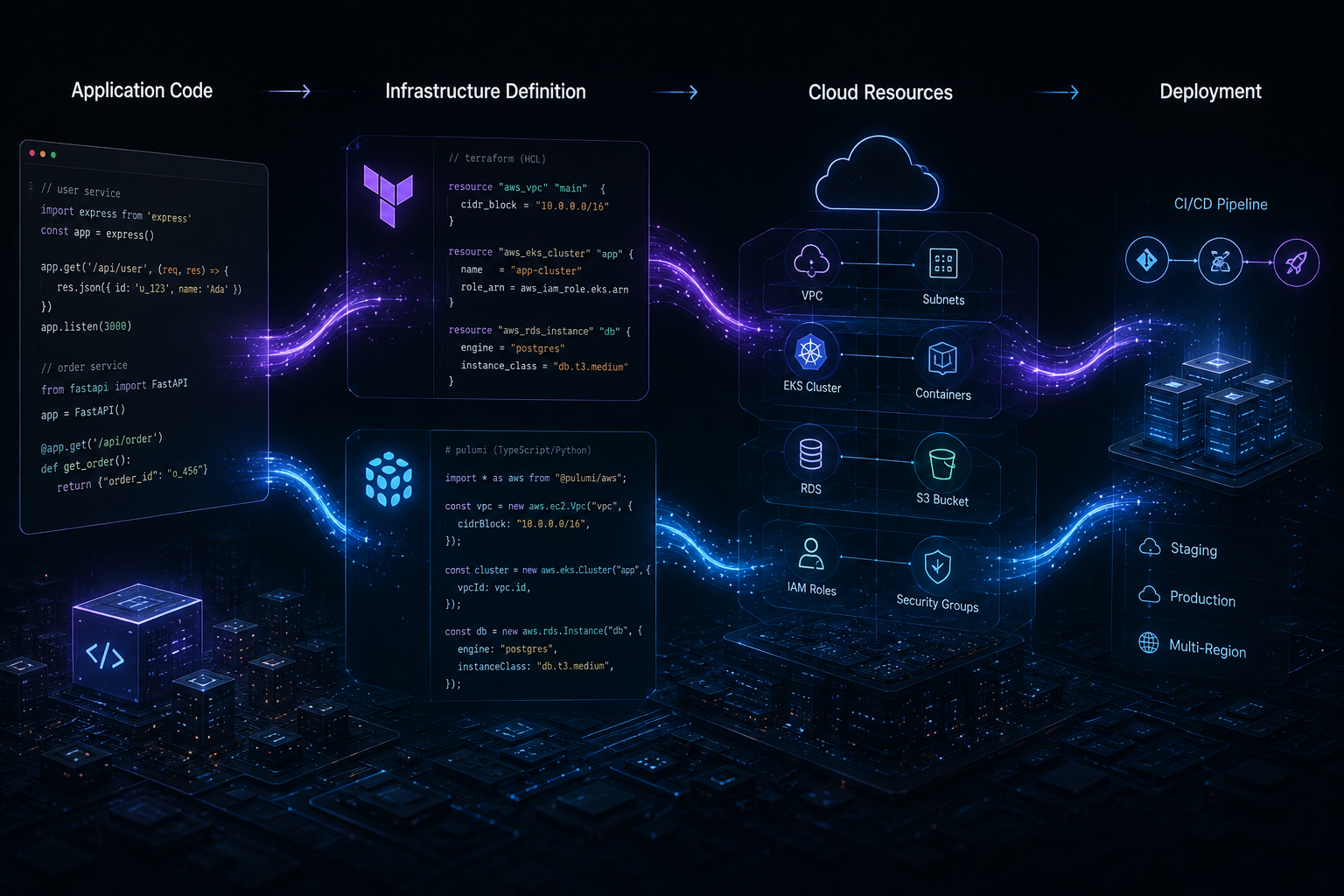
Infrastructure has become part of the software development process. Cloud environments are no longer configured once and left untouched. Applications depend on databases, networks, containers, queues, storage, identity systems, monitoring, secrets, and deployment infrastructure that must evolve alongside the code.
That is why Infrastructure as Code (IaC) has become such an important part of modern DevOps. Instead of manually configuring cloud resources, teams describe infrastructure in files that can be reviewed, versioned, tested, and deployed through automated workflows.
Two prominent choices in this space are Terraform and Pulumi.
They solve the same broad problem, but they encourage developers to think about infrastructure in very different ways. Terraform introduced a declarative infrastructure model built around its own configuration language, while Pulumi lets teams use familiar programming languages such as TypeScript, Python, Go, C#, Java, and YAML.
For a company building cloud applications, SaaS products, APIs, or automated deployment environments, the question is therefore not simply which tool is more powerful.
The more useful question is: which infrastructure model fits the way your engineering team already builds software?
Terraform and Pulumi at a Glance
Area
Terraform
Pulumi
Infrastructure model
Declarative
Infrastructure expressed through general-purpose languages
Primary configuration
HCL
TypeScript, Python, Go, C#, Java, YAML and others
State
Central part of Terraform workflows
Managed through Pulumi's state model
Cloud support
Broad provider ecosystem
Broad provider and package ecosystem
Programming logic
Terraform-specific language constructs
Native language features such as functions, loops and classes
Developer experience
Purpose-built IaC workflow
Feels closer to conventional software development
Best fit
Teams wanting a standardized declarative IaC model
Teams wanting to use familiar programming languages for infrastructure
1. Terraform Starts With a Declarative Mindset
Terraform asks you to describe the infrastructure you want rather than writing a sequence of commands explaining how to create it.
Imagine a production application that requires:
a virtual network
private and public subnets
a managed database
an application cluster
load balancing
object storage
security rules
Instead of manually creating each resource, the desired infrastructure can be represented as Terraform configuration.
Terraform then compares the declared configuration with its understanding of the existing infrastructure and determines which changes are required.
This model is particularly attractive for organizations that want infrastructure changes to follow a predictable and standardized process.
2. Pulumi Brings Infrastructure Closer to Application Code
Pulumi takes a different route. Instead of requiring teams to learn a dedicated configuration language, Pulumi allows infrastructure to be defined using general-purpose programming languages.
A TypeScript development team, for example, can use TypeScript to define cloud infrastructure.
That creates an interesting advantage when infrastructure contains substantial logic.
Consider an environment where every customer receives slightly different infrastructure based on:
subscription tier
geographic region
data requirements
performance requirements
compliance configuration
With Pulumi, developers can use normal programming constructs to represent these conditions and build reusable infrastructure components.
This can make Pulumi particularly appealing to teams whose infrastructure logic is becoming more application-like.
3. HCL vs TypeScript, Python, Go and Other Languages
This is probably the most visible difference between Terraform and Pulumi.
Terraform uses HCL, a language designed specifically for configuration. Pulumi supports several general-purpose programming languages.
Terraform's dedicated syntax can be an advantage because it keeps infrastructure configuration recognizable and focused.
Pulumi's programming-language approach can be an advantage because developers already understand concepts such as:
functions
loops
conditions
classes
modules
package management
unit testing
For a team heavily invested in TypeScript or Python, this can significantly reduce the conceptual distance between application development and infrastructure development.
4. State Is More Important Than It Looks
Infrastructure as Code is not simply about storing cloud configuration in Git.
State is one of the most important concepts behind infrastructure management.
Terraform maintains a state representation that helps it understand the relationship between configuration and real infrastructure. Teams commonly store state remotely when infrastructure is managed collaboratively.
Pulumi also maintains state so it can track resources and determine how infrastructure should change between deployments. Pulumi supports managed state through Pulumi Cloud as well as other state backends.
This matters when multiple engineers work on the same environment.
A production infrastructure repository should not become a collection of competing local assumptions. State management, locking, access control, backups, and review processes need to be part of the architecture.
5. Reusability Looks Different in Each Tool
Large infrastructure projects rarely consist of one configuration file.
Teams typically create reusable patterns for networks, databases, Kubernetes clusters, monitoring, identity, and application environments.
Terraform provides modules for packaging reusable infrastructure configurations.
Pulumi provides packages and component resources that allow teams to create higher-level abstractions around infrastructure.
Consider a company that deploys ten SaaS environments with the same architecture. Rather than duplicating the entire infrastructure definition ten times, the team can create reusable infrastructure components and supply environment-specific configuration.
The architectural principle is the same in both ecosystems:
Reuse the architecture, not the copy-pasted configuration.
6. Terraform's Provider Ecosystem Is a Major Advantage
One of Terraform's strongest characteristics is its extensive provider ecosystem.
Infrastructure frequently crosses service boundaries. A single application may use a major cloud provider alongside Cloudflare, GitHub, Datadog, Kubernetes, a database platform, or another SaaS service.
Providers allow Terraform configurations to interact with resources exposed by these different platforms.
This broad ecosystem has helped Terraform become a familiar standard in many DevOps environments.
For organizations with an existing Terraform codebase, established modules, internal expertise, and CI/CD workflows, moving away from Terraform simply because another IaC tool looks attractive may create unnecessary migration cost.
7. Pulumi's Programming Model Can Simplify Complex Infrastructure
The opposite situation can also happen.
Suppose an organization has built an infrastructure platform where dozens of resources are created dynamically depending on application configuration.
Instead of repeatedly expressing complex configuration patterns, developers may prefer to write reusable functions and components.
Pulumi's use of general-purpose languages makes this approach natural.
For example, a TypeScript function could encapsulate the infrastructure required for a complete application environment and accept parameters for region, database size, domain, scaling requirements, and environment type.
That is a very different developer experience from treating infrastructure primarily as configuration.
8. Testing Infrastructure Changes
Infrastructure can break production just as easily as application code.
A small change to a security rule can block an API. A database configuration change can increase latency. An incorrect network dependency can make an application unreachable.
This is why infrastructure should be reviewed and tested with the same seriousness as application code.
Terraform teams can validate configuration, generate plans for review, and integrate those checks into CI/CD pipelines.
Pulumi's use of general-purpose languages also opens the door to familiar programming-language testing approaches, alongside Pulumi-specific validation and preview workflows.
The exact testing strategy should depend on infrastructure risk rather than simply on the chosen tool.
9. CI/CD Is Where IaC Becomes Operationally Valuable
Infrastructure as Code becomes much more powerful when infrastructure changes are connected to the software delivery lifecycle.
A mature workflow might look like:
Pull Request → Validation → Infrastructure Plan/Preview → Review → Apply → Verification
Imagine a team preparing a new production release. The application requires an additional queue and database index. Instead of manually changing production infrastructure, the required infrastructure changes can be committed alongside the application work.
Reviewers can inspect the infrastructure changes before they are applied.
This creates an important operational advantage: infrastructure becomes visible, reviewable, and repeatable.
10. Multi-Cloud and Hybrid Environments
Organizations rarely stay architecturally simple forever.
A company may start with one cloud provider and later introduce another provider, a managed SaaS platform, Kubernetes, or on-premises infrastructure.
Both Terraform and Pulumi support multi-provider infrastructure approaches.
The more important consideration is how much abstraction the organization actually needs.
If the team already has mature Terraform modules across multiple environments, Terraform may be the lower-risk choice.
If developers are building an internal platform and want infrastructure components to behave more like software libraries, Pulumi may offer a compelling model.
11. Team Skills Should Influence the Decision
Technology choices should consider the people maintaining the system.
A DevOps team experienced in Terraform, HCL, modules, providers, and existing Terraform workflows will probably be productive faster with Terraform.
A software engineering team already working extensively with TypeScript, Python, Go, or C# may find Pulumi more natural.
But there is an important warning:
Using a familiar programming language does not automatically make infrastructure easier.
Cloud architecture still requires knowledge of networking, IAM, security, availability, state, dependencies, cost, observability, and failure recovery.
Pulumi reduces the need to learn a specialized configuration language. It does not eliminate the need to understand infrastructure.
12. What About Security?
Neither Terraform nor Pulumi makes an infrastructure environment secure automatically.
The IaC tool is only one layer of the security model.
Teams should still consider:
secret management
least-privilege IAM
state protection
code review
credential rotation
network isolation
policy enforcement
auditability
Infrastructure repositories should also be treated as sensitive engineering assets because configuration can expose architectural details, permissions, endpoints, and operational assumptions.
13. When Terraform Is the Better Choice
You want a mature, declarative IaC workflow.
Your organization already has Terraform expertise.
You depend heavily on existing Terraform modules and providers.
Your infrastructure is primarily configuration-driven.
You want infrastructure definitions that are intentionally separated from application programming languages.
Your organization already has Terraform-based CI/CD and governance.
14. When Pulumi Is the Better Choice
Your engineering team prefers TypeScript, Python, Go, C#, or another supported programming language.
Infrastructure contains significant conditional or reusable programming logic.
You want infrastructure components to behave more like software libraries.
Your developers will actively maintain infrastructure alongside application code.
You want to use familiar programming-language tooling and package ecosystems.
15. Terraform vs Pulumi for a Growing SaaS Product
Consider a SaaS company starting with one production environment.
Over time it needs:
development, staging, and production environments
regional deployments
automated database provisioning
container infrastructure
monitoring
custom domains
automated DNS
scaling policies
At the beginning, almost any reasonable IaC approach may work.
The architectural pressure appears later. Configuration becomes reusable modules, environments need isolation, state becomes collaborative, deployments need approval, and infrastructure changes become part of release management.
This is the point where the initial IaC decision starts having a long-term impact.
Terraform can provide a highly structured declarative model for these environments. Pulumi can provide a programming-oriented approach that may be particularly useful when infrastructure needs substantial abstraction and logic.
How Code-Ox Thinks About Infrastructure as Code
At Code-Ox, cloud infrastructure is most useful when it supports the application architecture instead of becoming a separate operational island.
When building custom web applications, APIs, SaaS platforms, and automated systems, infrastructure decisions need to account for scalability, deployment frequency, security, integrations, observability, and future maintenance.
That means choosing Terraform or Pulumi should happen alongside decisions about application architecture, CI/CD, cloud services, databases, environments, and operational ownership.
For example, a TypeScript-heavy product team may naturally consider Pulumi because the same engineering ecosystem can extend from application development into infrastructure. Another organization with established DevOps standards and a large Terraform estate may gain more value by improving its existing Terraform architecture rather than introducing another tool.
The objective is not to use the newest infrastructure tool. The objective is to create an infrastructure platform that remains predictable as the product grows.
Final Verdict
Terraform is a strong choice when a team wants a mature declarative infrastructure model, broad provider support, established modules, and a well-understood IaC workflow.
Pulumi is compelling when developers want to express infrastructure using familiar programming languages and when infrastructure requires reusable components and more sophisticated programming logic.
Neither tool automatically produces better infrastructure.
The quality of the result depends on architecture, state management, security, testing, CI/CD, governance, and the engineering practices surrounding the tool.
For a new project, choose the model your team can maintain confidently for years. For an existing project, consider the migration cost before replacing an infrastructure stack that already works.
If your team is designing a new cloud application or rethinking its infrastructure automation strategy, Code-Ox can help connect the application architecture, cloud infrastructure, automation, and deployment workflow into one scalable engineering approach.
Good infrastructure should disappear behind a reliable product experience.
Sep 3, 2026
The E2E Testing Choice That Shapes Your Web App: Cypress or Playwright?
A modern web application can look perfect in development and still fail at the moment a real customer tries to use it. A login redirect can break after deployment, a checkout button can stop responding, a payment flow can behave differently in another browser, or a responsive layout can fail on a specific device.
This is where end-to-end (E2E) testing becomes critical. Instead of checking individual functions in isolation, E2E tests reproduce important user journeys through the application.
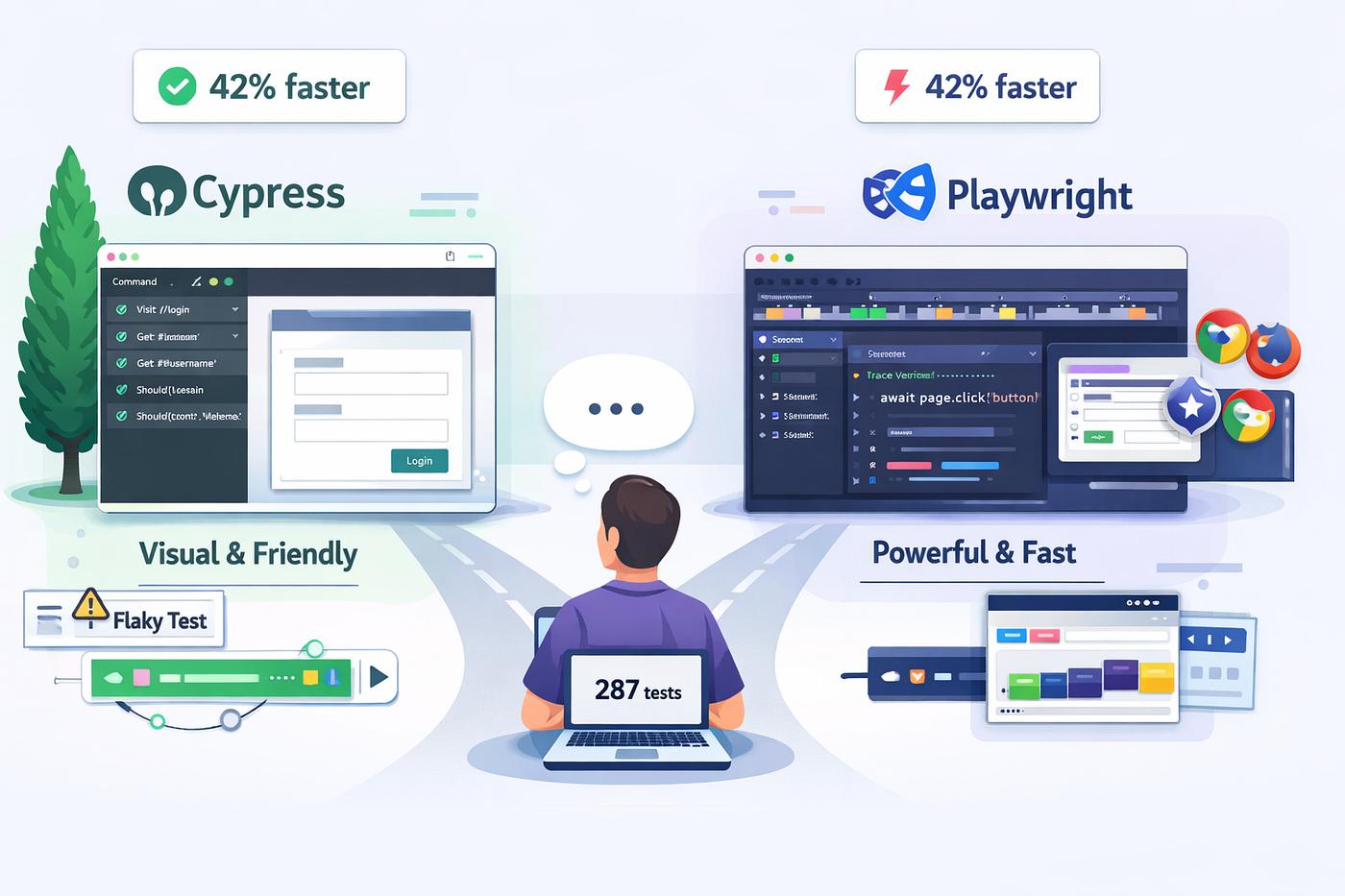
Two of the most widely considered tools for modern browser testing are Cypress and Playwright. Both can automate real browsers and support modern development workflows, but they take noticeably different approaches to test execution, browser control, debugging, and scaling.
For teams building React, Next.js, TypeScript, SaaS platforms, dashboards, customer portals, and other business applications, the decision should not simply be based on which tool is more popular. The better question is:
Which testing architecture fits the application your team is actually building?
Cypress and Playwright: Same Goal, Different Approach
Cypress is designed around an integrated browser-based development and testing experience. Its documentation emphasizes end-to-end testing, component testing, API testing, accessibility testing, automatic waiting, network control, and interactive debugging.
Playwright takes a broader browser-automation approach. Its test runner supports Chromium, Firefox, and WebKit, with built-in capabilities such as auto-waiting, tracing, assertions, parallel execution, and device emulation.
Both tools can provide strong E2E coverage. The important differences appear when a project becomes more complex.
Quick Comparison
Area
Cypress
Playwright
Primary strength
Developer-friendly browser testing and debugging
Broad browser automation and scalable E2E testing
Browser engines
Chrome-family, Firefox, experimental WebKit
Chromium, Firefox, WebKit
Auto-waiting
Yes
Yes
Component testing
Strong built-in experience
Primarily focused on browser automation and E2E workflows
Parallel execution
Available through Cypress Cloud and CI workflows
Built into Playwright Test through worker processes
Debugging experience
Excellent interactive runner and time-travel debugging
Strong traces, UI mode, screenshots and video capabilities
Mobile browser emulation
Supported browser/device testing workflows
Extensive device emulation capabilities
Best fit
Teams prioritizing developer experience and frontend testing
Teams needing broad browser automation and scalable E2E coverage
1. The Architecture Difference Matters
One of the biggest differences between the two tools is how they interact with the browser.
Cypress operates closely with the application and browser environment. This gives Cypress deep access to application behavior and contributes to its distinctive interactive debugging experience.
Imagine a developer testing a checkout page. The payment button fails only after an API response is delayed. Cypress makes it possible to inspect the command history, application state, network activity, and browser behavior directly inside its testing workflow.
Playwright takes a different approach by controlling browsers through its automation architecture. This makes it particularly powerful when the test needs to control multiple browser contexts, pages, tabs, devices, or browser engines.
That distinction becomes increasingly useful in applications where a single test scenario involves multiple users or multiple browser sessions.
2. Browser Coverage Can Change the Decision
Browser compatibility is not just a QA checkbox for many production applications. A customer portal may need to work in Chromium-based browsers, Firefox, and Safari. A B2B application may also have customers using different corporate browser environments.
Playwright officially supports Chromium, Firefox, and WebKit and can also work with branded Chrome and Microsoft Edge channels. It also provides device emulation for tablet and mobile scenarios.
Cypress supports Chrome-family browsers and Firefox, with WebKit currently available experimentally.
If Safari-like WebKit behavior is a core part of your release strategy, Playwright can therefore be the more straightforward choice.
3. Auto-Waiting Reduces Fragile Tests
Modern interfaces are asynchronous. A button may render before it becomes enabled. A modal may appear after an API request. An animation may temporarily cover an element. A dashboard may populate data after several requests complete.
Hard-coded delays such as wait(3000) are a poor long-term solution because they make tests slower without guaranteeing that the application is actually ready.
Both Cypress and Playwright provide automatic waiting mechanisms.
Playwright performs actionability checks before actions such as clicks, including visibility, stability, whether the element receives events, and whether it is enabled.
Cypress similarly emphasizes automatic waiting and synchronization with application activity.
For a Code-Ox-style web application project, this means test design should focus on meaningful application states rather than arbitrary sleep intervals.
4. Debugging: Where Cypress Has a Distinct Advantage
A test framework is only valuable when developers can understand why a test failed.
Cypress has built a reputation around its interactive testing experience. Its command log, snapshots, browser-based runner, network inspection, and time-travel debugging make failures relatively easy to investigate.
Consider a customer-registration test:
Open registration.
Enter customer information.
Submit the form.
Verify the API response.
Confirm the account dashboard appears.
If step four fails, Cypress provides a highly visual environment for inspecting what happened around that step.
Playwright approaches debugging differently. Its tracing capabilities can capture screenshots, actions, network activity, and other execution details, while its UI mode provides an interactive way to inspect tests.
Both are capable, but teams that prioritize a highly visual local debugging workflow may find Cypress particularly comfortable.
5. Playwright Becomes Particularly Interesting at Scale
Imagine a SaaS platform with:
customer login
role-based permissions
subscription management
billing
admin workflows
notifications
file uploads
report generation
The number of important user journeys can grow rapidly.
Running hundreds or thousands of E2E scenarios sequentially can make CI pipelines painfully slow. Playwright Test supports parallel execution through worker processes and allows teams to control worker counts and configure fully parallel execution.
This makes parallel execution an important part of the Playwright architecture when a test suite grows significantly.
Cypress can also scale test execution through its CI and Cypress Cloud capabilities, including parallelization and test orchestration. The important difference is that Cypress's broader scaling experience is closely connected to its Cypress Cloud platform.
6. Component Testing vs Full User Journeys
Not every bug requires a complete E2E test.
Suppose a product team creates a reusable pricing component containing:
monthly and annual billing options
discount calculations
plan selection
feature comparisons
responsive states
Testing this component directly can be much faster than navigating through an entire application every time.
Cypress provides a strong component-testing workflow in which components are mounted and tested directly in a real browser.
Playwright is generally more attractive when the primary requirement is complete browser automation and user-journey testing.
A mature engineering team should not necessarily treat this as an either/or decision. Unit, component, API, and E2E tests can work together.
7. A Realistic Example: Testing an E-Commerce Checkout
Consider an e-commerce application with the following flow:
Customer searches for a product.
Product is added to the cart.
Customer signs in.
Shipping information is entered.
Payment is initiated.
Order is created.
Confirmation page appears.
A useful E2E test should not simply verify that every button can be clicked. It should verify that the business journey actually works.
For example, the test could confirm that the cart total remains correct after authentication, that the payment request is associated with the correct order, and that the customer sees the expected confirmation state.
Cypress can make this kind of workflow highly readable and easy to debug.
Playwright can make the same workflow especially powerful when it needs to be repeated across multiple browser engines, devices, user contexts, or parallel CI workers.
8. Testing Authentication and Multiple User Roles
Enterprise applications often have more than one type of user.
A business platform might have an administrator, sales manager, salesperson, accountant, and customer. Each role sees different screens and has different permissions.
Testing these workflows requires more than checking whether a login form works.
You need to verify that:
the correct dashboard appears
restricted actions are unavailable
authorized actions work
sessions remain isolated
logout behaves correctly
permissions remain correct after navigation
Playwright's browser contexts are particularly useful for scenarios involving isolated sessions and multiple user states.
Cypress also provides session-management capabilities that can reduce repeated authentication work during test execution.
9. CI/CD Changes the Testing Equation
E2E testing should not exist only on a developer's laptop.
A reliable delivery pipeline might look like:
Pull Request → Build → Unit Tests → Integration Tests → E2E Tests → Deployment
Suppose a development team deploys a Next.js application several times each week. A regression introduced on Friday should ideally be detected before production deployment rather than discovered by a customer on Monday morning.
Cypress and Playwright can both operate in CI environments. Playwright runs tests headlessly by default and supports configurable parallel workers. Cypress provides CI-oriented execution and can integrate test results with Cypress Cloud for broader orchestration and reporting.
The important point is not which tool has the better CI checkbox. The real question is how the testing strategy fits the team's deployment pipeline.
10. What About Performance?
It is tempting to ask which framework is simply “faster.”
That question is too broad to be useful.
Test performance depends on factors such as:
number of tests
browser startup strategy
parallel workers
application architecture
test data setup
network dependencies
authentication strategy
CI machine resources
A poorly designed Playwright suite can be slow. A poorly designed Cypress suite can also be slow.
The bigger engineering win usually comes from reducing unnecessary browser work, isolating test data, parallelizing independent scenarios, and avoiding fragile test dependencies.
11. Which One Should Your Team Choose?
Choose Cypress when...
Your frontend team values an extremely approachable testing workflow.
Interactive debugging is a major priority.
Component testing is an important part of your strategy.
You want strong network stubbing and frontend-focused tooling.
Your application primarily targets Chrome-family browsers and Firefox.
Your team wants a highly integrated local test experience.
Choose Playwright when...
You need Chromium, Firefox, and WebKit coverage.
Cross-browser testing is a major release requirement.
You need extensive browser and device automation.
Your E2E suite is expected to grow significantly.
Parallel execution is central to your CI strategy.
You need complex multi-page or multi-context workflows.
12. The Better Question Is Not “Which Tool Wins?”
Cypress and Playwright are both capable testing platforms. The right choice depends on the application, team, browser requirements, CI architecture, and expected scale.
A small product team building a React application may benefit enormously from Cypress's developer-centric workflow. A larger SaaS platform that must validate complex workflows across Chromium, Firefox, and WebKit may find Playwright a more natural fit.
The testing framework should therefore be selected alongside the application's architecture rather than after the application has already been built.
How Code-Ox Approaches Web Application Quality
At Code-Ox, testing is most effective when it is considered as part of the application architecture rather than treated as a final QA activity.
When building custom web applications, the testing strategy should reflect the application's real business flows. A customer portal, for example, may require authentication testing, role-based access validation, API verification, responsive browser testing, and complete user journeys.
For a Next.js or TypeScript application, this can mean combining component-level checks with API tests and carefully selected E2E scenarios. The goal is not to automate every possible click. The goal is to automate the journeys where a failure would have a real business impact.
This approach also helps keep CI pipelines practical as the application grows. Critical flows can be executed on every pull request, while broader browser and regression suites can run as part of scheduled or release-oriented pipelines.
Final Verdict
Cypress stands out when developer experience, interactive debugging, frontend testing, and component testing are central to the team's priorities.
Playwright stands out when broad browser coverage, complex automation, device emulation, parallel execution, and large-scale E2E testing are more important.
Neither tool is universally better.
The strongest testing strategy is the one that matches your application's risk profile and gives your team fast, reliable feedback before users encounter a problem.
If your business is building a new web platform, modernizing an existing application, or dealing with an E2E test suite that has become difficult to maintain, Code-Ox can help design the application and testing architecture around the way your product actually works.
Build with confidence. Test the workflows that matter.
Sep 3, 2026
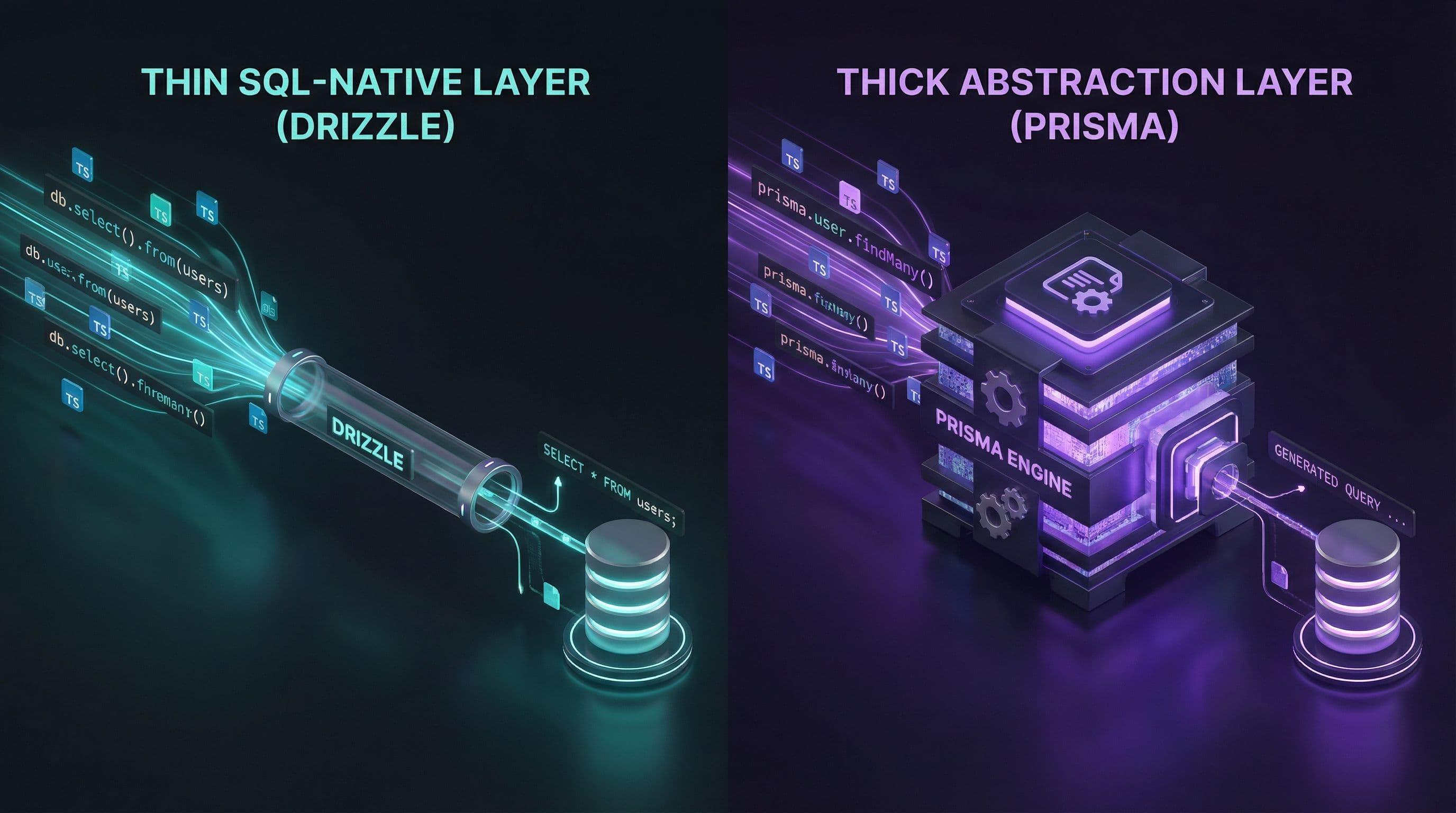
Your Database Layer Matters: Prisma or Drizzle for Modern TypeScript Apps?
Your Database Layer Matters: Prisma or Drizzle for Modern TypeScript Apps?
Choosing an ORM is easy when an application has a handful of database tables. The decision becomes much more
important when the application starts handling real business logic, complex relationships, transactions,
reporting queries, background jobs, and growing traffic.
For teams building modern TypeScript applications, Prisma ORM and
Drizzle ORM have become two prominent choices. Both provide strong TypeScript integration,
database tooling, migrations, and ways to query relational data. However, they take noticeably different
approaches to how developers should work with the database.
Prisma emphasizes a structured, schema-driven developer experience with a generated, type-safe client.
Drizzle takes a more SQL-oriented approach, allowing developers to define schemas in TypeScript and write
queries that remain close to SQL.
That difference matters more than the feature lists suggest.
If you're building a SaaS platform, customer portal, marketplace, ERP-connected application, or another
production system, the better question is not simply "Which ORM is faster?"
It is "Which database abstraction fits the way this application needs to evolve?"
Prisma vs Drizzle at a Glance
Area
Prisma
Drizzle
Core philosophy
Structured ORM with a strong schema-driven developer experience
Lightweight TypeScript data framework with a SQL-like approach
Schema definition
Traditionally centered around Prisma Schema, with newer TypeScript-based options
Defined directly in TypeScript
Query style
High-level typed client API
SQL-like and relational APIs
Type safety
Strong generated typing
Strong TypeScript typing
SQL familiarity
Higher abstraction from SQL
Very close to SQL concepts
Migrations
Integrated migration tooling
Drizzle Kit-based migration tooling
Database control
High, with abstraction over common operations
Very high and SQL-oriented
Learning curve
Straightforward for teams adopting the Prisma model
Natural for developers comfortable with SQL and TypeScript
Best fit
Teams prioritizing structured productivity and a rich ORM experience
Teams prioritizing SQL control, lightweight abstractions, and TypeScript-native schemas
What Prisma ORM Brings to the Table
Prisma is designed around a structured data model and a type-safe application programming experience.
Its ecosystem includes Prisma ORM, Prisma Client, migration tooling, and Prisma Studio.
A traditional Prisma workflow starts with a schema that describes the application's data model.
Prisma then provides a typed client that allows application code to interact with those models without
manually constructing every SQL query.
This can make everyday database operations particularly readable.
For example, a TypeScript application can express a query around users, orders, and related records using
Prisma's generated client rather than manually assembling SQL for every common operation.
Prisma's current evolution is also important. Prisma 8 introduces a TypeScript runtime, a contract-based
data model, a new query API, and a revised migration architecture. Teams evaluating Prisma today should
therefore look at the current Prisma 8 direction rather than relying only on older Prisma tutorials and
comparisons. :contentReference[oaicite:0]{index=0}
Where Prisma Feels Strong
Structured data modeling
Strong type-safe query experience
Generated database client
Developer-friendly autocomplete
Integrated migration workflow
Convenient relational queries
Useful tooling around the database layer
Good fit for teams that want a consistent ORM abstraction
Prisma's documentation highlights type-safe queries, generated types, relational querying, migrations,
and database tooling as central parts of its ecosystem. :contentReference[oaicite:1]{index=1}
Where Drizzle Takes a Different Path
Drizzle is built around a different idea: developers should be able to work with databases without feeling
like the ORM is hiding SQL from them.
Database schemas are defined directly in TypeScript, and queries can use a SQL-like syntax.
This creates a development experience that feels closer to writing SQL while retaining TypeScript's type
checking.
Drizzle describes itself as a headless TypeScript ORM/data framework and emphasizes that it should work with
an application's existing structure rather than forcing the project to revolve around the framework.
Its query APIs support both SQL-like and relational approaches. :contentReference[oaicite:2]{index=2}
Where Drizzle Feels Strong
TypeScript-native schema definitions
SQL-like query syntax
Fine-grained database control
Lightweight abstraction
Strong fit for SQL-oriented developers
Relational query support
Good fit for serverless-oriented architectures
Easy transition between ORM concepts and SQL concepts
Drizzle's own documentation emphasizes its SQL-like approach, TypeScript schema definitions, relational
querying, and lightweight philosophy. :contentReference[oaicite:3]{index=3}
The Real Difference Is Abstraction
The biggest difference between Prisma and Drizzle is not simply syntax.
It is how much abstraction you want between your application code and your database.
Prisma gives you a higher-level interface around your data model. You describe your models and use the
generated client to work with them.
Drizzle stays much closer to database concepts. Tables, columns, joins, conditions, and SQL-style operations
remain visible in the application code.
Neither philosophy is inherently better.
The right level of abstraction depends on the development team and the application.
Prisma: When the ORM Should Do More of the Work
Imagine a Code-Ox team is developing a subscription-based SaaS platform.
The system has customers, subscriptions, invoices, plans, users, permissions, payment records, and
subscription events.
Most database operations are conventional business operations:
retrieve a customer, create a subscription, update a billing status, load related records, or retrieve
invoices for an account.
A higher-level ORM abstraction can make these operations easier for the team to reason about.
Developers can work primarily with application models and typed client operations rather than translating
every operation into SQL.
This is one of the scenarios where Prisma can be particularly attractive.
Drizzle: When SQL Should Stay Visible
Now consider a different application: an analytics-heavy platform where developers frequently work with
joins, aggregations, database-specific features, reporting queries, and carefully optimized SQL.
In this environment, hiding too much of the database can become frustrating.
Drizzle's SQL-like query model allows developers to stay closer to the database while still benefiting
from TypeScript's type system.
For teams where SQL knowledge is already strong, this can produce a very natural development workflow.
Type Safety: Both Take It Seriously
TypeScript developers increasingly expect database operations to participate in compile-time type checking.
Prisma generates types based on the application's data model and provides typed query APIs. Its documentation
specifically describes full type safety for queries, including partial queries and included relations.
:contentReference[oaicite:4]{index=4}
Drizzle takes a TypeScript-first approach, with schemas and query expressions defined directly in TypeScript.
The result is also strongly typed while keeping the query structure close to SQL.
So the comparison is not really "typed versus untyped."
Both can provide strong type safety. The difference is how that type safety is achieved and how much
abstraction sits around it.
Schema Definition: Prisma Schema vs TypeScript
Prisma has historically centered its workflow around the Prisma Schema language.
This gives the team a dedicated place to describe models and relationships.
Prisma's current architecture is evolving, however, and Prisma 8 supports authoring models in Prisma Schema
or directly in TypeScript as part of its new contract-based workflow. :contentReference[oaicite:5]{index=5}
Drizzle defines database schemas directly in TypeScript.
This distinction can matter in projects where developers want the schema to live alongside the rest of their
TypeScript code and use familiar language constructs throughout the data layer.
Querying Relationships
Real applications rarely operate on isolated tables.
A sales platform may need customers and orders.
A project-management platform may need projects, tasks, employees, and time entries.
An e-commerce platform may need products, variants, inventory, orders, and payments.
Prisma provides a high-level relational query model designed around these relationships. Its documentation
highlights nested queries, relation traversal, filtering related records, nested writes, and generated
relation types. :contentReference[oaicite:6]{index=6}
Drizzle provides relational queries as well as SQL-like joins, giving developers more direct control over
how relational operations are expressed. :contentReference[oaicite:7]{index=7}
This is an important distinction for teams that frequently need to reason about the exact SQL shape of a query.
Migrations: An Often-Underestimated Decision
Developers often focus heavily on query syntax and overlook migrations.
That can become a problem once a production database contains years of customer data.
A migration is not simply:
"add a column."
It can involve:
Existing production data
Indexes
Foreign keys
Large tables
Zero-downtime deployment requirements
Backwards compatibility
Data transformation
Rollback planning
Prisma provides integrated migration tooling. Its current Prisma 8 workflow treats migrations as versioned,
reviewable changes between application contracts and database state. :contentReference[oaicite:8]{index=8}
Drizzle uses Drizzle Kit as part of its schema and migration workflow, keeping the database definition close
to TypeScript while providing tooling for generating and applying migrations.
For either ORM, the important engineering question is not simply how easy it is to generate a migration.
It is whether your team has a disciplined process for reviewing, testing, deploying, and monitoring database
changes.
Performance: Don't Choose an ORM by Benchmark Headlines
Performance comparisons between Prisma and Drizzle are often reduced to benchmark numbers.
That can be misleading.
Real-world database performance depends on the database engine, indexes, query shape, connection management,
network latency, caching, transaction boundaries, dataset size, and application architecture.
A poorly indexed SQL query can be slow regardless of which ORM generated it.
Likewise, a well-designed application can perform effectively with either ORM when queries, indexes,
connections, and caching are designed correctly.
The ORM should therefore be evaluated as one component of the complete data-access architecture rather than
as an isolated benchmark winner.
Serverless and Edge-Oriented Applications
Modern TypeScript applications are increasingly deployed using serverless functions and distributed runtimes.
In these environments, database connection behavior becomes especially important.
Developers should evaluate connection pooling, driver compatibility, runtime support, deployment topology,
database location, and the provider's recommended architecture before selecting an ORM.
Drizzle's lightweight approach can be attractive for applications where developers want minimal abstraction
around the database driver.
Prisma also supports modern deployment environments and continues to evolve its runtime architecture, so the
correct decision should be based on the specific database and deployment environment rather than assuming
that one ORM is automatically better for serverless applications.
Complex SQL and Database-Specific Features
Eventually, many serious applications encounter a query that doesn't fit neatly into the application's
normal CRUD patterns.
You may need a complex aggregation, a database-specific operator, a specialized index, a reporting query,
or an optimized SQL statement.
This is where SQL visibility becomes important.
Drizzle's SQL-like design makes this style of database work feel natural.
Prisma also allows developers to use lower-level SQL when the higher-level client abstraction is not the
appropriate tool. Prisma's documentation explicitly supports using raw SQL when required. :contentReference[oaicite:9]{index=9}
Therefore, the comparison should not be framed as "Prisma means no SQL" versus "Drizzle means SQL."
The more useful distinction is how frequently your team wants SQL concepts to appear directly in everyday
application code.
Developer Experience
Prisma's developer experience is particularly appealing to teams that prefer a clear model-driven workflow.
The schema becomes an important source of truth, while the generated client provides autocomplete and typed
access to models.
Drizzle's experience tends to feel more natural to developers who already think in SQL and want TypeScript
to enhance rather than replace that mental model.
A senior backend developer who can immediately read a JOIN may prefer Drizzle's style.
A product-focused TypeScript team that wants database operations to resemble application-level objects may
prefer Prisma.
Prisma vs Drizzle for a Growing SaaS Product
Consider a SaaS product during its first year.
Initially, the application has users, organizations, subscriptions, and invoices.
Six months later, it adds permissions, audit logs, notifications, integrations, reporting, and usage
metering.
At this stage, developer productivity becomes extremely important.
Prisma's structured client and model-oriented workflow can be valuable when many developers are working
across the same application and need a consistent way to access data.
Drizzle can be attractive when the team wants the database structure to remain visible and prefers composing
queries directly in TypeScript.
Neither choice automatically scales better. The team's ability to maintain the data layer matters more than
the ORM's marketing label.
Prisma vs Drizzle for Enterprise Applications
Enterprise systems introduce additional concerns:
Long-lived databases
Complex business relationships
Strict migration procedures
Multiple environments
Auditability
Data governance
Performance monitoring
Legacy database integration
Multiple development teams
In such environments, the ORM decision should be part of a wider architecture review.
A development team might prioritize Prisma because it provides a structured abstraction and consistent
developer workflow.
Another team might choose Drizzle because its SQL-oriented model gives database specialists more direct
control.
The important thing is to establish conventions early. An enterprise database can survive an ORM choice;
inconsistent database practices are much harder to survive.
Where Code-Ox Fits Into the Decision
At Code-Ox, technology selection is approached from the application architecture outward.
When building a custom web platform, SaaS product, business application, or API-driven system, the ORM is
only one part of the stack.
Before selecting Prisma or Drizzle, a Code-Ox development team would consider questions such as:
What database will power the application?
How complex are the relationships?
How SQL-heavy will the application become?
How many developers will maintain the data layer?
Will the application use serverless infrastructure?
How frequently will the schema change?
Are there existing databases that must be integrated?
Does the system require specialized reporting queries?
What are the long-term maintenance requirements?
For a business application with conventional CRUD-heavy workflows, a structured ORM experience can reduce
unnecessary development complexity.
For a data-intensive platform where SQL control is central to the application's performance and reporting
architecture, a SQL-oriented approach can be more appropriate.
This is also why Code-Ox does not treat an ORM as an isolated technology decision. The database layer needs
to work with the application's APIs, authentication, business logic, integrations, deployment model, and
future scaling requirements.
When Prisma Is the Better Fit
Prisma is worth considering when:
Your team prefers a structured ORM abstraction.
You want a model-driven development workflow.
Developer productivity and autocomplete are major priorities.
Your application contains many conventional relational operations.
You want integrated database tooling.
Your team prefers working with application models rather than SQL for most operations.
You want a mature ecosystem around schema, client, migrations, and database tooling.
When Drizzle Is the Better Fit
Drizzle is worth considering when:
Your team is comfortable with SQL.
You want database schemas directly in TypeScript.
You prefer SQL-like queries.
You want a lightweight abstraction.
Your application contains complex joins and reporting queries.
You want database behavior to remain highly visible in application code.
You value close control over how database queries are expressed.
A Better Way to Make the Decision
Instead of asking which ORM is objectively better, score the project against these five areas:
1. Team Preference
Does your team think naturally in ORM models or SQL?
The technology that matches the team's mental model will usually produce fewer unnecessary abstractions.
2. Query Complexity
If most operations are straightforward CRUD and relationship queries, a high-level ORM can be productive.
If complex SQL is a daily requirement, SQL visibility becomes much more important.
3. Database Architecture
Consider PostgreSQL, MySQL, SQLite, MongoDB, extensions, database-specific capabilities, and existing
infrastructure before committing to a data layer.
4. Deployment Model
A traditional Node.js server, serverless functions, containers, and edge-oriented infrastructure can place
different requirements on database connectivity.
5. Long-Term Maintenance
Ask what the database layer will look like after several years—not just on the day the application launches.
Prisma vs Drizzle: The Bottom Line
Prisma and Drizzle are both strong options for modern TypeScript applications, but they solve the developer
experience problem from different directions.
Prisma is compelling when your team wants a structured, model-oriented ORM experience with
strong generated typing and integrated tooling.
Drizzle is compelling when your team wants a lightweight TypeScript-native approach that
keeps SQL concepts close to the surface.
If your application is primarily business-logic driven and your team values abstraction and productivity,
Prisma may be the more comfortable choice.
If your application is data-intensive and your team values SQL control and database transparency, Drizzle
may be the better fit.
But the most important decision is not choosing the ORM with the most impressive feature list.
It is choosing the database layer that your team can understand, operate, optimize, and maintain as the
application grows.
Final Thoughts
An ORM becomes part of an application's architecture long after the initial database setup is finished.
It influences how developers write queries, how schema changes are managed, how relationships are modeled,
and how the application interacts with its most important persistent data.
That is why Prisma vs Drizzle should be treated as an architectural decision rather than a simple library
comparison.
At Code-Ox, we evaluate that decision in the context of the entire system—business
requirements, database design, APIs, integrations, deployment, security, performance, and future growth.
Whether the right choice is Prisma, Drizzle, or another data-access approach, the goal is the same:
build a database layer that remains reliable as the product becomes more complex.
Sep 3, 2026
Auth.js vs Clerk: Which Authentication Solution Should You Choose for Your Next Web App?
Auth.js vs Clerk: Which Authentication Solution Should You Choose for Your Next Web App?
Authentication is one of the first architectural decisions developers face when building a modern web application.
It affects how users sign in, how sessions are managed, how protected routes work, how organizations and roles are handled,
and how much authentication infrastructure the development team must maintain over time.
For developers working with modern JavaScript and Next.js applications, Auth.js and
Clerk are two popular approaches. They solve the same broad problem—authentication and access control—
but they do so with very different philosophies.
Auth.js gives developers a flexible, open-source authentication foundation that can be integrated with their own
application architecture, database, providers, and session strategy. Clerk takes a more managed approach, providing
authentication infrastructure together with prebuilt UI, user management, sessions, organizations, and authorization
capabilities.
The right choice therefore isn't simply about asking which library is "better." The more useful question is:
how much authentication infrastructure do you want your development team to own?
This guide compares Auth.js and Clerk from a practical software-development perspective and explains where each
approach makes sense for startups, SaaS products, enterprise applications, and custom web platforms.
Auth.js vs Clerk at a Glance
Area
Auth.js
Clerk
Core approach
Open-source authentication framework/library
Managed authentication and user-management platform
Developer control
High
High at the application level, with more infrastructure managed for you
Prebuilt authentication UI
Limited / application-controlled
Strong
Session management
Configurable
Managed by Clerk
Database integration
Highly flexible through adapters
Managed user infrastructure with application integration
Organizations
Typically application-designed
Built-in organization capabilities
Roles and permissions
Application-defined
Integrated authorization capabilities
Authentication UI customization
Maximum application ownership
Highly customizable managed components
Infrastructure responsibility
More responsibility for the development team
More responsibility handled by the provider
Best fit
Teams wanting control and architectural flexibility
Teams wanting a complete authentication platform
What Is Auth.js?
Auth.js is an open-source authentication solution designed to provide authentication capabilities without forcing
developers into a completely managed identity platform.
It evolved from the NextAuth.js ecosystem and now supports integrations across several web frameworks. In a Next.js
application, developers can configure authentication providers, create authentication handlers, access sessions,
protect application routes, and connect authentication to their own data layer.
This approach is particularly attractive when authentication is part of a larger custom application architecture.
Instead of handing the entire identity layer to an external platform, a development team can decide how users,
accounts, sessions, databases, and application-specific authorization should fit together.
Auth.js supports configurable providers and allows developers to use adapters to connect authentication to a database,
ORM, backend API, or other data layer.
Why Developers Choose Auth.js
Open-source approach
Strong architectural flexibility
Control over application and authentication data
Configurable authentication providers
JWT and database session strategies
Database and ORM integration through adapters
Ability to build custom authentication experiences
Good fit for teams comfortable owning authentication architecture
A Practical Auth.js Example
Imagine a Code-Ox development team is building a B2B SaaS platform for a company that already has a PostgreSQL
database, a custom customer table, an internal permissions model, and several backend services.
The business does not simply need a login page. It needs authentication to fit an existing architecture.
Customers may belong to accounts, employees may have internal roles, and permissions may be connected to existing
business entities.
In this scenario, Auth.js can be attractive because the authentication layer can be designed around the application's
existing architecture rather than forcing the application to reorganize around a managed identity platform.
What Is Clerk?
Clerk takes a different approach. Instead of providing primarily an authentication foundation that developers
assemble into their application, Clerk provides a managed authentication and user-management platform.
For Next.js applications, Clerk provides SDKs, prebuilt components, React hooks, server-side helpers, route
protection, session management, and organization-related capabilities.
This can significantly reduce the amount of authentication infrastructure a development team needs to design and
maintain itself.
Why Developers Choose Clerk
Fast implementation
Prebuilt sign-in and sign-up experiences
Managed session infrastructure
Built-in user management
Organization and multi-tenant capabilities
Roles and permission support
Strong Next.js integration
Useful server-side and client-side helpers
Less authentication infrastructure to build from scratch
The Fundamental Difference: Control vs Convenience
The most important distinction between Auth.js and Clerk is not the login form.
It is where the responsibility for authentication infrastructure lives.
With Auth.js, more of the architecture remains inside your application. You decide how the authentication system
connects to your database, how users are represented, how sessions are persisted, and how application-specific
authorization is implemented.
With Clerk, much of that infrastructure is provided as a managed service. Your application consumes authentication
capabilities instead of building the complete identity infrastructure itself.
This creates an important engineering trade-off:
Auth.js gives you more ownership of the authentication architecture. Clerk gives you more authentication
infrastructure out of the box.
Auth.js vs Clerk for Next.js
Next.js is an important part of this comparison because both approaches can fit modern Next.js architectures,
but the developer experience is different.
Auth.js with Next.js
Auth.js can be configured directly within a Next.js application. Developers can define providers, authentication
configuration, session behavior, custom pages, and data-layer integration.
This works particularly well for teams that want authentication to remain closely connected to their own backend
architecture.
Clerk with Next.js
Clerk provides a dedicated Next.js SDK with components, hooks, middleware/proxy integration, and server-side
authentication helpers.
A development team can therefore spend less time implementing common authentication flows and more time building
the product itself.
For a startup trying to launch a SaaS MVP quickly, this difference can be meaningful. The team might need
authentication, protected routes, account management, and organization switching without wanting to spend several
development cycles creating those systems from scratch.
Session Management
Sessions are one of the most important technical differences to evaluate.
Auth.js allows developers to configure how sessions are handled. Its documentation supports JWT-based sessions
and database-backed sessions. This gives teams control over how authentication state fits into their application's
architecture.
Clerk takes a managed approach. The application consumes Clerk's authentication state through its SDK and helpers,
reducing the amount of session infrastructure the application team needs to maintain.
For a team with strong backend expertise and specific infrastructure requirements, Auth.js can provide valuable
control. For a product team that wants authentication to behave as an infrastructure service, Clerk can reduce
engineering overhead.
Database Integration
Database architecture is another major decision point.
Auth.js supports adapters that allow it to integrate with different data layers. This is useful when authentication
needs to coexist with an application's existing user, account, session, or authorization data.
For example, a custom enterprise platform might already have:
A PostgreSQL database
An existing users table
Customer accounts
Employee records
Application roles
Audit records
Internal permission rules
In such an environment, architectural ownership may be more important than minimizing implementation effort.
Auth.js can be considered when the authentication model needs to fit deeply into an existing system.
Clerk is more attractive when the business prefers to use a dedicated authentication platform rather than make
identity infrastructure another subsystem the engineering team has to operate.
Organizations and Multi-Tenant SaaS
Multi-tenancy changes the authentication problem considerably.
Consider a SaaS application where one user can belong to multiple companies. The application may need to understand:
Which organization the user is currently accessing
Which organizations the user belongs to
What role the user has in each organization
Which resources belong to that organization
Which actions the user is authorized to perform
Clerk provides organization functionality designed specifically for this type of B2B SaaS architecture, including
organization switching and role-based access checks.
With Auth.js, the application team has greater responsibility for designing this model. That is not necessarily a
disadvantage. In a highly customized SaaS platform, owning the tenant model can actually be an advantage because
the business may have authorization rules that go far beyond standard organization membership.
Authentication UI and User Experience
Authentication is also a user-experience problem.
A production application may require sign-in, sign-up, password recovery, email verification, account management,
social authentication, loading states, errors, session handling, and responsive interfaces.
Building all of these experiences internally takes time.
Clerk's prebuilt components can shorten this implementation path. Developers can use managed authentication
components while still integrating the authentication state into the application's own UI.
Auth.js provides more freedom for teams that want to own the complete experience. This can be especially valuable
when authentication is part of a highly branded product experience where the login journey needs to behave differently
from conventional authentication flows.
Roles and Authorization
Authentication answers one question:
Who are you?
Authorization answers a different question:
What are you allowed to do?
This distinction becomes important when comparing Auth.js and Clerk.
Auth.js can establish authenticated identity, but application-specific roles and permissions are generally part of
the application's own authorization architecture.
Clerk provides authorization-oriented capabilities, including organization roles and permission checks, which can
make common B2B access-control scenarios faster to implement.
However, neither approach removes the need for careful authorization design. A serious application still needs to
enforce permissions on the server and ensure that sensitive business operations cannot be accessed simply because
a user interface hides a button.
Security: Which Is More Secure?
There is no responsible way to say that one platform is automatically "more secure."
Security depends on architecture, configuration, implementation quality, dependency management, session handling,
authorization logic, secrets management, account recovery, monitoring, and operational practices.
Auth.js gives development teams more responsibility over parts of the authentication architecture. That can provide
control, but it also means the team must understand what it is implementing and maintaining.
Clerk reduces some of that infrastructure burden by providing managed authentication services, but the application
still remains responsible for secure authorization, business logic, API protection, data access, secrets, and
application-level security.
For Code-Ox projects, authentication is therefore treated as part of the wider application security architecture
rather than as an isolated login feature.
Customization: Auth.js vs Clerk
Customization Area
Auth.js
Clerk
Authentication flow
Very flexible
Flexible within managed architecture
Database model
Strong control
More provider-managed
Login UI
Application-owned
Prebuilt and customizable
Session architecture
Highly configurable
Managed
Tenant model
Application-defined
Organizations available out of the box
Custom business authorization
Excellent flexibility
Can integrate with application authorization
Developer Experience
Developer experience often determines the practical winner.
Auth.js can be an excellent choice for experienced engineering teams because it provides the building blocks needed
to create an authentication system that fits the application.
The trade-off is that developers need to understand more of the architecture.
Clerk is designed to reduce that implementation burden. A team can integrate the SDK, configure the application,
use authentication components, protect routes, and consume authentication state without building every common
identity-management capability themselves.
If your engineering team has limited authentication expertise, a managed platform can reduce the risk of spending
valuable development time rebuilding common infrastructure.
Performance and Application Architecture
Authentication should not be evaluated only by how quickly a login page appears.
Production performance depends on the complete request path, including middleware or proxy behavior, session
validation, database access, API calls, caching, rendering, and network conditions.
Auth.js can be integrated closely into an application's architecture, which can be useful when developers need
detailed control over data access and request processing.
Clerk can simplify common authentication operations by providing managed infrastructure and SDK abstractions.
In either case, authentication should be designed so that unnecessary user-data queries and authorization checks do
not become a bottleneck on high-traffic routes.
Auth.js vs Clerk for Different Types of Projects
Startup MVP
If the primary objective is to validate a product quickly, Clerk can be a strong option because it reduces the amount
of authentication infrastructure that needs to be built before the product can reach users.
A startup can focus its engineering resources on the actual product rather than spending weeks building account
management and authentication infrastructure.
Custom SaaS Platform
Both options can work well.
Clerk becomes particularly attractive when the SaaS product needs standard multi-tenant organization functionality,
while Auth.js can be attractive when the tenant and authorization architecture is highly specialized.
Enterprise Application
Enterprise applications should evaluate more than implementation speed.
Teams should examine identity requirements, compliance expectations, data ownership, integration requirements,
authorization complexity, auditability, operational responsibility, and long-term architecture.
An enterprise application with a highly customized identity architecture may benefit from greater control.
An organization that wants authentication managed as a specialized service may prefer Clerk.
Customer Portal
For a customer portal where users mainly need registration, login, account management, and access to protected
resources, Clerk can reduce implementation effort significantly.
Internal Business Application
For an internal business system that already has a sophisticated employee database and permissions model,
Auth.js may be worth considering if authentication needs to integrate closely with that existing architecture.
When Auth.js Is the Better Choice
Auth.js may be the better fit when:
You want an open-source authentication foundation.
Your team wants maximum architectural control.
You already have a database and user model.
Your authentication requirements are highly customized.
You want to control the authentication UI completely.
Your engineering team is comfortable owning authentication infrastructure.
You need authentication to fit tightly into a custom backend architecture.
When Clerk Is the Better Choice
Clerk may be the better fit when:
You want to launch authentication quickly.
You prefer managed authentication infrastructure.
You want prebuilt sign-in and sign-up experiences.
Your product needs user management without building it from scratch.
You are building a multi-tenant SaaS application.
You need organization switching and role-based access control.
Your team wants to reduce authentication maintenance.
You are using Next.js and want a tightly integrated authentication SDK.
A Practical Decision Framework
Instead of choosing based on popularity, ask the following questions before selecting your authentication architecture.
How much authentication infrastructure do we want to maintain?
If the answer is "as little as possible," a managed service becomes attractive.
Do we already have a user and identity model?
If yes, architectural flexibility may be more important.
Does the application require multi-tenancy?
If yes, evaluate organization and tenant-management capabilities carefully.
How complex are our authorization rules?
Simple role-based access may be straightforward. Complex resource-level permissions may require a custom
authorization architecture regardless of the authentication provider.
How quickly does the product need to launch?
Faster delivery often favors managed infrastructure.
How much control do we need over authentication data and architecture?
The greater the requirement for application-owned infrastructure, the more carefully a managed platform should
be evaluated.
Auth.js vs Clerk: A Real-World Example
Imagine a company wants to build a B2B platform where customers can create organizations, invite employees,
manage subscriptions, access reports, and connect the platform to an existing ERP.
The frontend is built with Next.js. The backend exposes APIs, while PostgreSQL stores business data.
If the company wants to launch quickly and does not have a dedicated identity-management team, Clerk can provide
a significant head start.
If the same company has strict requirements around where identity data is stored, already operates a mature identity
model, and needs authentication to integrate deeply with internal systems, Auth.js may be worth evaluating.
The important point is that the technology decision should follow the business architecture—not the other way around.
How Code-Ox Approaches Authentication Architecture
At Code-Ox, authentication is considered part of the application's overall architecture rather
than a feature that is selected independently.
When building a custom web application or SaaS platform, the technology choice depends on factors such as the
existing database, frontend framework, API architecture, user model, tenant structure, authorization requirements,
integrations, security expectations, scalability, and long-term maintenance.
For a straightforward SaaS product that needs to reach the market quickly, a managed authentication platform may
remove unnecessary engineering work.
For a highly customized enterprise application, a more application-owned authentication architecture may provide
the control needed to integrate authentication with existing systems and business rules.
Code-Ox's custom web application development approach focuses on selecting technology based on the actual business
problem. The objective is not to add the largest possible technology stack, but to build an architecture that is
secure, scalable, maintainable, and appropriate for the product.
The same principle applies when authentication needs to connect with APIs, ERP systems, CRM platforms, payment
services, analytics systems, or other business applications.
Auth.js vs Clerk: Which One Should You Choose?
There is no universal winner.
Choose Auth.js when architectural ownership, flexibility, open-source foundations, and custom
integration are more important than having a complete managed identity platform.
Choose Clerk when development speed, managed authentication, prebuilt user experiences,
organizations, and reduced infrastructure responsibility are higher priorities.
For a small team building a product quickly, Clerk can reduce the amount of authentication engineering required.
For an experienced engineering team building a deeply customized application, Auth.js can provide greater control
over how identity fits into the broader architecture.
Final Thoughts
Auth.js and Clerk represent two different philosophies for building authentication.
Auth.js gives developers a flexible foundation and greater responsibility for the surrounding architecture.
Clerk provides a managed authentication platform that removes much of that infrastructure burden.
The right choice depends on your application—not simply on which technology is more popular.
Before making the decision, evaluate your user model, authorization requirements, database architecture,
multi-tenancy needs, security expectations, development capacity, and long-term maintenance strategy.
If you are planning a new SaaS product, customer portal, enterprise web application, or custom business platform,
Code-Ox can help you evaluate the architecture and select an authentication approach that fits
the wider system rather than treating authentication as an isolated feature.
Build the right architecture first. Then choose the authentication technology that supports it.
.svg)