.svg)
Scanning Instead of Typing: A Look at Odoo's Barcode App
Reported By
Rinsa Sabir PC
The Short Version
Most warehouse mistakes don't come from people being careless. They come from typing. Wrong product code, wrong quantity, wrong location — a tired employee keying in the same numbers for the two-hundredth time that day is bound to slip up eventually. Odoo's Barcode app removes almost all of that typing. You point a scanner or a phone camera at a label, and Odoo does the rest.
What it replaces: manually finding a product/location in a form and typing quantities by hand
What it uses instead: scanning barcodes with a phone, a handheld scanner, or a Bluetooth ring scanner
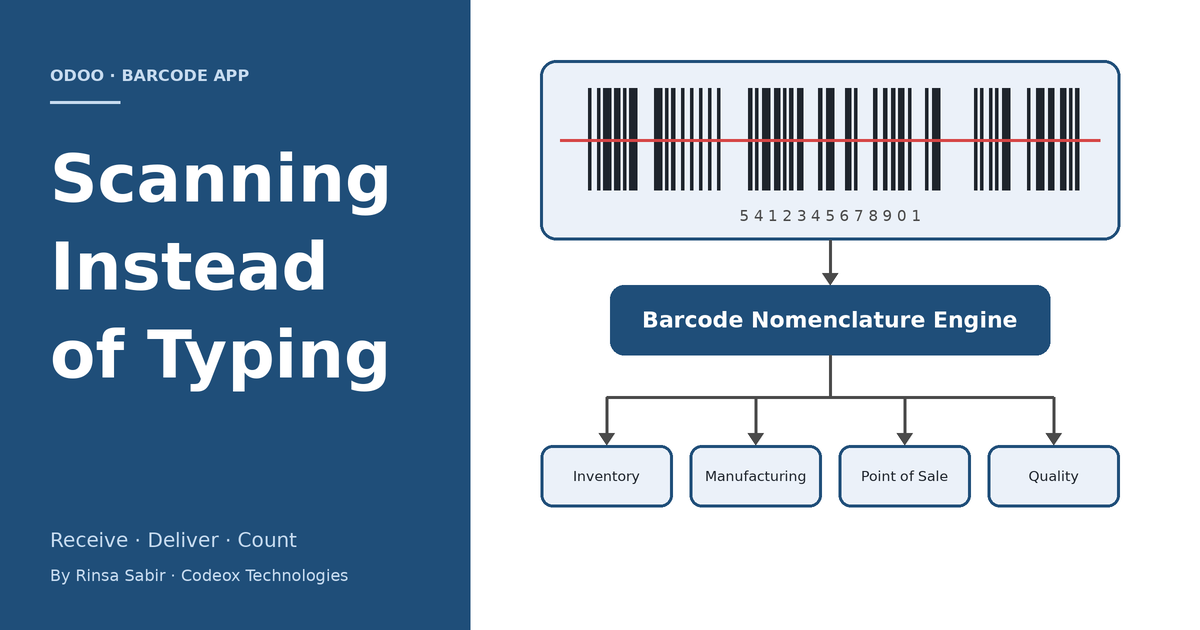
Where it shows up: Inventory, Manufacturing, and Point of Sale all share the same scanning engine
One Engine, Used in Several Places
It's easy to think of Barcode as a feature that belongs to the Inventory app, but that's not really accurate. Odoo built the barcode-reading logic once, as a shared piece of the framework, and then let other apps plug into it. Inventory uses it for receipts, deliveries, and stock counts. Manufacturing uses the exact same engine to consume raw materials and register finished goods on the shop floor. Point of Sale uses it at the register to pull up a product the moment its barcode is scanned. Even Quality checks can be triggered by a scan. Different screens, same underlying logic — which is why, once you understand how scanning works in one app, you already understand most of how it works everywhere else.

The Problem It's Actually Solving
Picture a mid-sized distribution company. A truck shows up with forty different products on it, some in boxes, some in loose pallets, a few of them batch-tracked because they have expiry dates. The old way of receiving this: someone stands at a desktop computer with a paper packing list, opens the matching transfer in Odoo, and types in each product code and quantity by hand while checking it against the paper. It's slow, it pulls a person away from the actual physical unloading, and every typed line is a chance for a mistake to slip into stock records that the whole company then relies on.
With the Barcode app, that same person just opens the app on a phone or a handheld scanner, taps on the waiting receipt (or scans a barcode that opens it directly), and starts scanning products as they come off the truck. Each scan adds that product to the receipt with a quantity of one; scanning it again bumps the quantity up. If a product is batch-tracked, scanning its barcode can also capture the lot number and expiry date in the same motion, provided the label is printed in a format Odoo recognizes. When everything is in, a scan of a printed "Validate" barcode closes out the whole operation. Nobody sits at a desktop. Nobody re-types anything from the paper list. Stock is accurate the moment the last pallet is scanned, not hours later when someone finally gets around to data entry.

How Odoo Actually Reads the Barcode
This is the part that's worth understanding if you're the one configuring it, because it's not magic — it's rules. Every barcode that gets scanned is checked against a Barcode Nomenclature, which is really just an ordered list of patterns Odoo knows how to interpret. A plain EAN-13 code matches straight to a product. A location label matches to a warehouse location. A specially formatted code can even encode a weight or a quantity directly inside the barcode itself, which is how a scale-printed label for a kilo of cheese can tell Odoo both what the product is and how much of it there is, in one scan.

Odoo ships with two ready-made nomenclatures. The default one covers the common cases most companies need out of the box. The other follows the GS1-128 standard, which is the barcode format a lot of manufacturers and retailers already use on their packaging — it can pack a product code, a lot number, a best-before date, and a quantity into a single scan. If a client already prints their own barcodes in a format that doesn't match either of these, new rules can be added to the nomenclature so Odoo learns to recognize their existing labels instead of asking the warehouse to switch label formats.

There's also a set of what Odoo calls command barcodes — printable barcodes for actions like Validate, Discard, Print, or adding a specific quantity. Once these are printed and stuck somewhere near the scanning station, an operator can complete an entire transfer without ever touching a keyboard, mouse, or touchscreen. Everything happens through the scanner.
What's Worth Knowing About It
- No special hardware required to get started. A phone or tablet camera works fine for moderate volume. For a busy warehouse doing this all day, a dedicated handheld or ring scanner paired over Bluetooth is far more comfortable, and Odoo supports both.
- It keeps working when the wifi doesn't. As long as the app was opened at least once while online, it caches what it needs and lets scanning continue through a dead spot in the warehouse. Everything syncs back to the server automatically once the connection returns.
- Batch and wave picking. Instead of processing delivery orders one at a time, an operator can pick several orders together in a single walk through the warehouse, with the app telling them what to grab and where to put it.
- Lot and serial numbers get captured at the source. Rather than someone typing a serial number into a form after the fact, it's scanned in at receiving or at production, which is exactly where it's least likely to be mistyped.
- Manufacturing benefits just as much as the warehouse does. A production operator can scan the components they're consuming and the lot number of the finished product they just made, right there on the shop floor, without walking back to an office computer.
A Realistic Example
Take a company that assembles and ships electronics kits. Their afternoon dispatch run used to work like this: the warehouse team printed the day's delivery orders, walked the floor with clipboards, pulled the right items by memory, and handed everything to someone at a desk who then matched it all back up in Odoo and typed in quantities before validating each delivery. Sales orders arriving through the day meant the office regularly fell behind by an hour or two, which showed up as delayed shipping confirmations to customers.
After switching that team over to the Barcode app, the process flipped around. The warehouse staff open the app, tap into a batch of the day's ready deliveries, and the app walks them through each pick location in order. They scan the location, scan the product, scan the next location, and so on. No clipboard, no separate data-entry pass, no gap between "the product physically left the shelf" and "Odoo knows it left the shelf." The person who used to sit at the desk re-typing everything now spends that time handling exceptions instead — the actual problems that need a human, rather than routine entry that never needed one in the first place.
Why It's Worth Recommending
For clients who move physical stock — which is most of them, in some form — Barcode tends to be one of the more visible wins we can deliver without a heavy development effort. Turning it on is largely a configuration exercise: printing labels, setting up (or adjusting) the nomenclature, and training the floor team on the scan sequence for their operations. There's rarely a need to write custom code unless the client's existing barcode labels don't match a standard nomenclature, in which case adding a few nomenclature rules usually covers it.
- It's a fast, visible improvement clients notice within days, which makes it a good early milestone in an inventory or manufacturing implementation.
- Errors that used to show up as stock discrepancies during month-end counts tend to drop noticeably once typing is removed from the process.
- It scales down as well as up — a five-person warehouse benefits from it almost as much as a hundred-person one, since the problem it solves (manual entry mistakes) doesn't really depend on headcount.
Where It Has Limits
It isn't a fix for a warehouse that hasn't been organized yet. If storage locations aren't labeled, or products don't have barcodes printed anywhere, scanning has nothing to scan. The nomenclature also needs a bit of care during setup — if two different label formats accidentally match the same rule, the app can read the wrong thing from a barcode, which is worse than not scanning at all. It's a tool that rewards a bit of upfront configuration and training; it doesn't replace the need for a warehouse to have its basics (labels, locations, product codes) in order first.
Bottom Line
Barcode doesn't get talked about as often as the bigger apps, probably because it doesn't look like much on its own — it's mostly a phone screen with a big scan button. But it quietly removes one of the most error-prone parts of running a warehouse or a shop floor: typing the same product codes and quantities over and over, all day, every day. For any client doing real physical stock movement, it's worth checking whether they're already using it, and if not, why not.