.svg)
ERP vs CRM: What’s the Difference and Which Does Your Business Need in 2026?
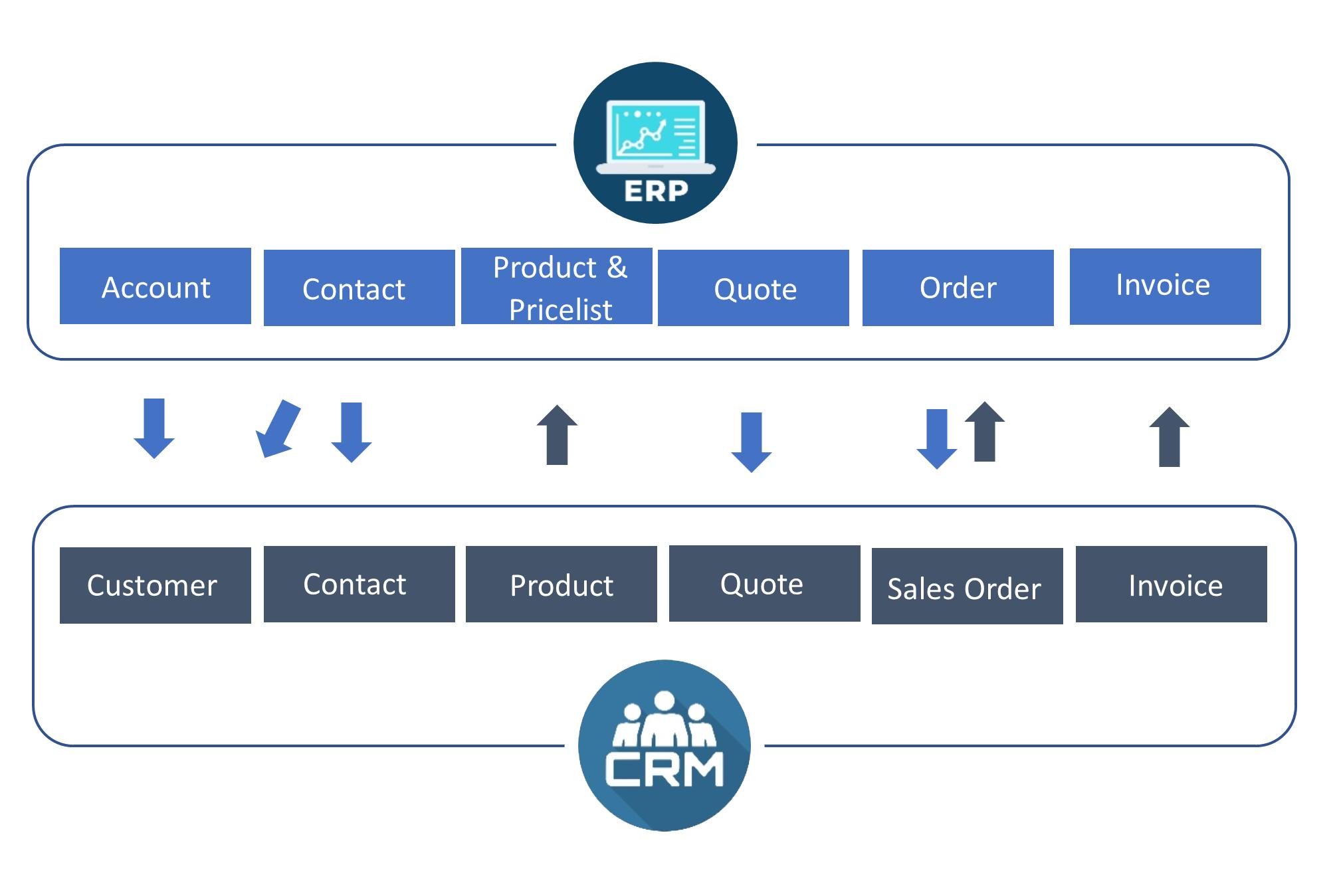
As businesses grow, managing customers, employees, finances, inventory, sales, and daily operations becomes increasingly complex. Using spreadsheets and disconnected software may work initially, but growing organizations often need more connected systems to manage their business effectively.
This is where ERP and CRM software become important.
Although ERP and CRM systems are sometimes confused with each other, they serve different primary purposes. ERP (Enterprise Resource Planning) focuses mainly on managing internal business processes and resources, while CRM (Customer Relationship Management) focuses on managing customer relationships, sales, marketing, and service activities.
Understanding the difference between ERP vs CRM can help businesses choose the right technology strategy—or determine when integrating both systems makes more sense.
What Is an ERP System?
ERP stands for Enterprise Resource Planning. An ERP system integrates core business processes and data into a centralized platform, helping organizations manage their internal operations more efficiently.
ERP software commonly supports areas such as accounting, finance, procurement, inventory, supply chain management, human resources, manufacturing, project management, and other operational processes.
Instead of keeping important business information across separate systems, an ERP can provide a shared source of operational and transactional data.
Common ERP Features
- Accounting and financial management
- Inventory management
- Procurement and purchasing
- Supply chain management
- Human resource management
- Manufacturing and production management
- Project management
- Order and fulfillment management
- Business reporting and analytics
- Workflow automation
What Is a CRM System?
CRM stands for Customer Relationship Management. CRM software helps businesses manage relationships and interactions with current and potential customers.
A CRM can store customer and prospect information, track sales activities, manage leads and opportunities, record customer interactions, support marketing activities, and help customer service teams manage relationships throughout the customer lifecycle.
The main goal of CRM software is to help businesses understand customers better, improve sales processes, strengthen relationships, and deliver better customer experiences.
Common CRM Features
- Contact and customer management
- Lead management
- Sales pipeline management
- Opportunity tracking
- Customer interaction history
- Marketing campaign management
- Customer service management
- Email and communication tracking
- Sales reporting and analytics
- Customer lifecycle management
ERP vs CRM: Quick Comparison
| Category | ERP | CRM |
|---|---|---|
| Primary Focus | Business operations and resources | Customers and relationships |
| Main Area | Back office | Front office |
| Primary Users | Finance, HR, operations, procurement, supply chain | Sales, marketing, customer service |
| Core Data | Financial, operational, inventory, and transaction data | Customer, lead, sales, and interaction data |
| Main Goal | Improve operational efficiency | Improve customer relationships and sales |
| Typical Functions | Finance, accounting, inventory, procurement, HR | Sales, marketing, leads, service |
| Business Perspective | How the business operates | How the business interacts with customers |
In simple terms, ERP manages the business behind the scenes, while CRM manages relationships with customers and prospects.
What Is the Main Difference Between ERP and CRM?
The biggest difference is what each system is designed to optimize.
ERP focuses on internal business operations. It helps organizations manage resources, finances, inventory, procurement, employees, production, and other operational processes.
CRM focuses on customer-facing processes. It helps sales, marketing, and customer service teams manage prospects, customers, opportunities, communications, and relationships.
For example, imagine an online business selling physical products.
A CRM can help the sales team record a new lead, track communications, manage an opportunity, and follow the customer through the sales process.
Once the customer places an order, ERP-related processes may become important for inventory, fulfillment, invoicing, accounting, procurement, and other operational activities.
This is why ERP and CRM are often complementary rather than direct replacements for one another.
ERP vs CRM: Which Departments Use Them?
ERP Users
ERP systems are commonly used by departments involved in internal operations, including:
- Finance and accounting
- Procurement
- Operations
- Human resources
- Inventory management
- Manufacturing
- Supply chain
- Project management
CRM Users
CRM systems are commonly used by customer-facing teams, including:
- Sales
- Marketing
- Customer support
- Customer success
- Business development
- Account management
Modern CRM platforms can also connect information across departments, giving employees a more complete view of customer relationships.
When Does a Business Need an ERP?
An ERP can become valuable when a company's internal processes become difficult to manage using disconnected applications or spreadsheets.
Your business may benefit from ERP software if you need to:
- Centralize financial information.
- Manage inventory across multiple locations.
- Automate purchasing processes.
- Manage suppliers and procurement.
- Improve production planning.
- Connect different departments.
- Reduce repetitive manual work.
- Improve operational reporting.
- Manage financial and transactional data centrally.
- Scale internal processes as the company grows.
ERP systems can help connect business processes and reduce information silos by providing centralized operational data.
When Does a Business Need a CRM?
A CRM becomes particularly valuable when customer management, sales growth, and relationship management become difficult to handle manually.
Your business may benefit from CRM software if you need to:
- Organize customer information.
- Track leads and prospects.
- Manage sales opportunities.
- Monitor the sales pipeline.
- Track customer communications.
- Improve sales follow-ups.
- Manage marketing campaigns.
- Improve customer service.
- Analyze sales performance.
- Build stronger long-term customer relationships.
CRM platforms centralize customer and prospect information and help teams manage interactions throughout the customer lifecycle.
Can an ERP Replace a CRM?
Not always.
Some ERP platforms include CRM capabilities or can integrate with CRM functionality. However, the depth and specialization of customer-facing features can vary.
A dedicated CRM is generally designed specifically around customer relationships, sales activities, marketing, service, and customer engagement.
If customer acquisition, sales pipeline management, and customer service are critical to your business, a specialized CRM may provide deeper functionality than relying only on basic CRM capabilities within an ERP.
Can a CRM Replace an ERP?
Generally, no.
CRM systems are designed primarily around customers, prospects, sales, marketing, and service. ERP systems address a broader range of internal business processes such as finance, accounting, procurement, inventory, HR, and operations.
A CRM can manage the customer relationship effectively, but it is not normally intended to replace the complete operational capabilities of an ERP system.
Why Should Businesses Integrate ERP and CRM?
For many growing organizations, the best approach is not choosing between ERP and CRM, but connecting both systems.
ERP and CRM integration allows relevant customer-facing and operational information to move between systems instead of remaining isolated in separate databases or applications.
For example, a sales representative could use CRM to manage a customer opportunity while accessing relevant information about orders, inventory, invoices, or fulfillment through an integrated ERP environment.
Integration can reduce duplicate data entry, improve visibility, and help different departments work with more consistent information.
Benefits of ERP and CRM Integration
- Better Data Visibility: Teams can access relevant information across business systems.
- Reduced Data Silos: Information does not remain isolated within individual departments.
- Less Manual Data Entry: Automated data synchronization can reduce repetitive tasks.
- Improved Customer Service: Customer-facing teams can access more complete business information.
- Better Sales Operations: Sales teams can connect opportunities with orders and operational information.
- Improved Decision-Making: Management can analyze customer and operational information together.
ERP vs CRM for Small and Medium-Sized Businesses
Small and medium-sized businesses do not necessarily need to implement a large ERP and CRM environment simultaneously.
The right starting point depends on the company's biggest operational challenge.
If the primary problem is managing leads, sales activities, customer relationships, and follow-ups, starting with a CRM may make sense.
If the biggest challenges involve accounting, inventory, purchasing, operations, or supply chain management, an ERP may be a better starting point.
As the business grows, ERP and CRM systems can be integrated to create a more connected technology environment.
ERP vs CRM for E-Commerce Businesses
E-commerce businesses can benefit from both systems because online sales involve both customer-facing and operational processes.
A CRM can manage customer profiles, marketing campaigns, leads, customer communication, and retention activities.
An ERP can manage inventory, purchasing, financial transactions, fulfillment, suppliers, and other back-office processes.
When these systems are connected, businesses can create a smoother flow from customer acquisition to sales, order processing, fulfillment, and financial reporting.
ERP vs CRM: Which One Should You Choose First?
The answer depends on your most important business requirement.
Choose ERP First If You Need to Improve:
- Accounting and finance
- Inventory management
- Procurement
- Manufacturing
- Supply chain operations
- Human resources
- Internal workflows
Choose CRM First If You Need to Improve:
- Lead management
- Sales performance
- Customer relationships
- Marketing operations
- Customer service
- Sales pipeline visibility
- Customer retention
Consider ERP + CRM If You Need:
- Connected sales and operational processes.
- Unified customer and business information.
- Automated data synchronization.
- Better visibility across departments.
- Integrated order-to-cash processes.
- A scalable business management environment.
How to Choose the Right ERP or CRM Software
1. Identify Your Business Problems
Start by identifying the processes that consume the most time or create the most errors. Avoid choosing software based only on the number of features it provides.
2. Understand Department Requirements
Talk to finance, sales, operations, HR, marketing, and customer service teams to understand what information and workflows they actually need.
3. Evaluate Integration Capabilities
Check whether the software can integrate with your existing tools, such as e-commerce platforms, payment systems, accounting applications, marketing platforms, and custom applications.
4. Consider Scalability
Your software should support future growth. Consider users, locations, transactions, integrations, workflows, and reporting requirements.
5. Evaluate Security
Review authentication, authorization, user roles, access controls, data protection, backups, and other security capabilities.
6. Calculate Total Cost
Consider more than the subscription or license price. Implementation, customization, integration, training, maintenance, and ongoing support can also affect the total cost of ownership.
ERP vs CRM in 2026: What Should Businesses Focus On?
In 2026, the ERP vs CRM decision is increasingly about creating connected business processes rather than simply selecting one software category.
Modern businesses generate large amounts of data across sales, customer service, finance, inventory, marketing, and operations. Keeping that information connected can help organizations make faster and more informed decisions.
Modern ERP platforms increasingly act as central business platforms, while CRM systems continue to focus on customer relationships and customer-facing processes. AI-powered capabilities are also becoming more common across business software, particularly for automation, analysis, and personalized customer experiences.
The important question is therefore not simply "ERP or CRM?", but rather "Which business processes need improvement, and how should our systems work together?"
How Code-OX Can Help Your Business
At Code-OX Technologies, we help businesses use technology to simplify operations, improve customer experiences, and build scalable digital solutions.
Whether you need ERP development, CRM development, custom business software, system integration, workflow automation, or cloud-based solutions, the right technology architecture can help your organization reduce manual work and gain better visibility into its operations.
Our approach focuses on understanding your business requirements first and then designing solutions around your actual workflows, users, data, and growth objectives.
Conclusion
ERP and CRM are not simply two competing types of business software—they solve different problems.
ERP primarily focuses on internal business operations such as finance, accounting, inventory, procurement, HR, and supply chain management. CRM focuses on customer-facing activities such as sales, marketing, customer interactions, and service.
If your biggest challenge is operational efficiency, ERP may be the right starting point. If your priority is improving sales and customer relationships, CRM may be more appropriate.
For growing organizations, however, integrating ERP and CRM can provide a more complete view of both the business and its customers.
The best choice depends on your organization's size, industry, workflows, existing technology, growth plans, and business priorities.