.svg)
GitHub Actions vs Jenkins: Two Ways to Build a Modern CI/CD Pipeline
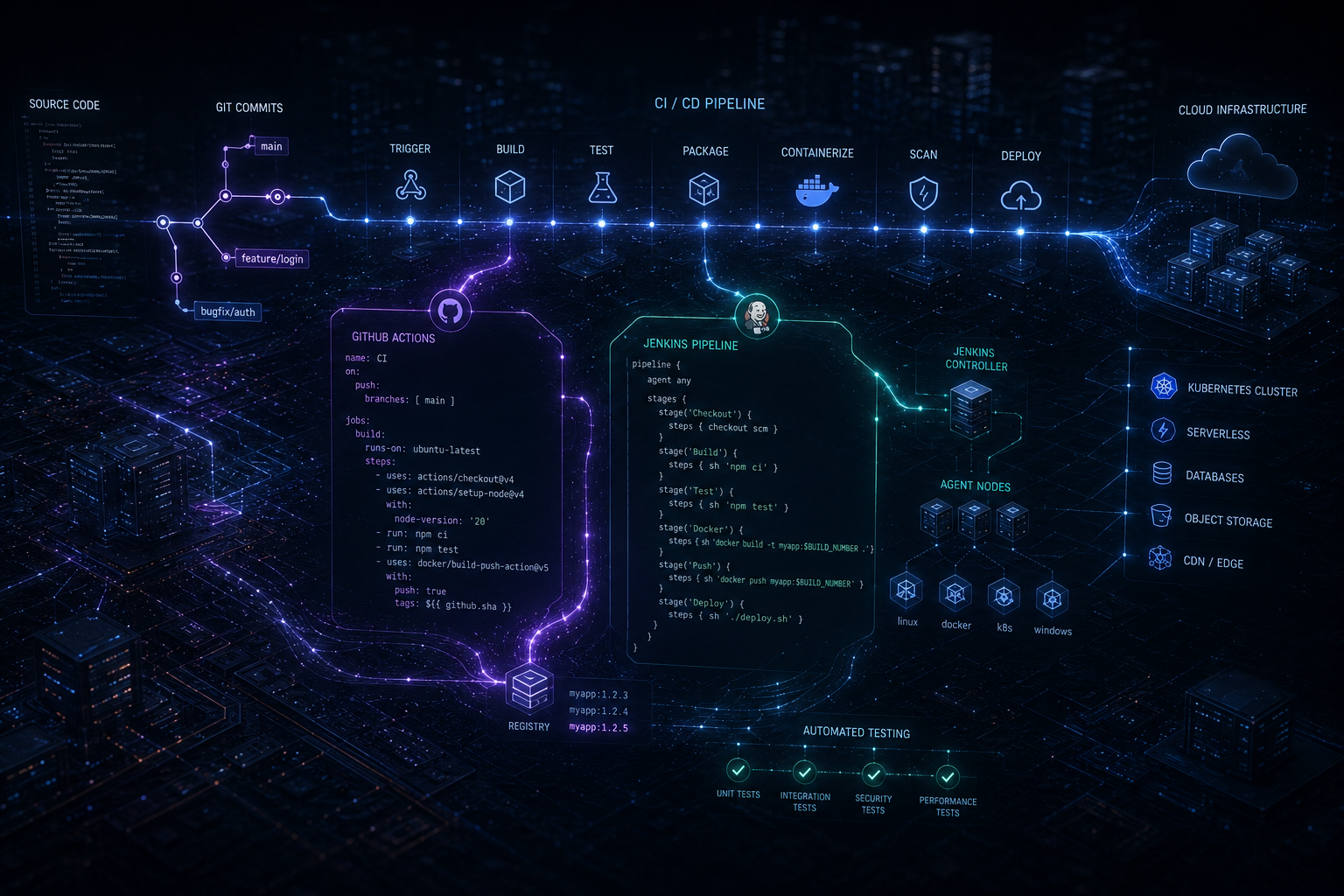
GitHub Actions vs Jenkins: Two Ways to Build a Modern CI/CD Pipeline
A reliable CI/CD pipeline is no longer just a DevOps convenience. For modern software teams, it is part of the application's delivery architecture. Every pull request, test run, container build, security check, and production deployment depends on how effectively that pipeline is designed.
Two names continue to appear in these conversations: GitHub Actions and Jenkins. Both can automate builds, tests, deployments, infrastructure tasks, and release workflows. But they approach the problem differently.
GitHub Actions is deeply integrated with GitHub repositories and represents a repository-native approach to automation. Jenkins takes a more extensible, independently managed approach built around controllers, agents, plugins, pipelines, and shared libraries.
So which one should a development team choose?
The answer depends less on which tool has more features and more on your repository strategy, infrastructure, security requirements, deployment model, engineering skills, and how much operational control your team wants.
What CI/CD Actually Needs to Solve
Before comparing tools, it is useful to define the problem.
Imagine a team building a SaaS platform with a React or Next.js frontend, a Node.js or Python backend, PostgreSQL, Docker containers, and cloud infrastructure.
A developer opens a pull request. The delivery system may need to:
- Install dependencies.
- Run formatting and lint checks.
- Execute unit and integration tests.
- Run security and dependency checks.
- Build a production application.
- Create a Docker image.
- Push the image to a container registry.
- Deploy to a staging environment.
- Run smoke tests.
- Require approval before production.
- Deploy the approved release.
Both GitHub Actions and Jenkins can implement this process. The important difference is how the team builds, manages, secures, and maintains that automation.
GitHub Actions vs Jenkins at a Glance
| Area | GitHub Actions | Jenkins |
|---|---|---|
| Primary model | Repository-integrated workflow automation | Extensible automation server |
| Configuration | YAML workflow files | Jenkinsfile, UI and plugins |
| Execution | GitHub-hosted or self-hosted runners | Controller with agents |
| Source control integration | Excellent GitHub integration | Broad SCM integration through plugins |
| Extensibility | Actions, marketplace and reusable workflows | Large plugin ecosystem and shared libraries |
| Infrastructure control | High with self-hosted runners | Very high |
| Operational overhead | Generally lower when using GitHub-hosted runners | Requires Jenkins infrastructure management |
| Best fit | GitHub-centric modern development teams | Complex, highly customized or existing Jenkins environments |
GitHub Actions: CI/CD Where the Code Already Lives
GitHub Actions takes a repository-first approach. Workflow definitions live alongside application code and can respond directly to repository events such as pushes, pull requests, releases, schedules, and manual triggers.
This creates a straightforward developer experience.
A developer pushes code, opens a pull request, and the workflow automatically starts validation. The results can appear directly alongside the pull request. Once the required checks pass, another workflow can deploy the approved change.
GitHub describes Actions as a CI/CD platform for automating build, test and deployment workflows directly from a repository. It also supports GitHub-hosted and self-hosted runners.
A Typical GitHub Actions Flow
Pull Request
      ↓
Install Dependencies
      ↓
Lint
      ↓
Unit Tests
      ↓
Integration Tests
      ↓
Build
      ↓
Docker Image
      ↓
Staging Deployment
      ↓
Smoke Tests
      ↓
Production Approval
      ↓
Production Deployment
For a team already using GitHub for source control, this integration can eliminate a significant amount of platform management.
Jenkins: A CI/CD Engine You Control
Jenkins approaches CI/CD from a different direction.
Instead of making source control the center of the automation platform, Jenkins provides an automation server that can connect to source control, build systems, testing frameworks, artifact repositories, cloud platforms, containers, and other infrastructure.
Jenkins Pipeline allows teams to define delivery processes as code using a Jenkinsfile. Pipelines can contain stages such as Build, Test and Deploy, and Jenkins can extend those pipelines through plugins and shared libraries.
This architecture is particularly useful when an organization needs a highly customized delivery platform or already has significant Jenkins investment.
A Jenkins Architecture
Source Control
      ↓
Jenkins Controller
      ↓
 ┌───────────────┬───────────────┐
 ↓               ↓               ↓
Agent A         Agent B         Agent C
Build           Testing         Deployment
 ↓               ↓               ↓
Docker          Integration     Cloud
Build           Tests           Deployment
Jenkins is explicitly designed around distributed build environments. Agents can execute workloads while the controller coordinates the environment.
The Biggest Difference: Platform vs Pipeline Engine
The most useful way to understand the difference is not simply "GitHub Actions is newer and Jenkins is older." That misses the architectural distinction.
GitHub Actions is closely connected to a software collaboration platform. Jenkins is an automation platform that can be connected to many different development ecosystems.
If your engineering workflow already revolves around GitHub, Actions can feel like a natural extension of the repository.
If your organization has multiple source-control systems, internal build infrastructure, specialized deployment environments, or deeply customized automation requirements, Jenkins can provide greater independence from any single repository platform.
Workflow Configuration: YAML vs Jenkinsfile
GitHub Actions workflows are generally written in YAML.
name: CI

on:
  pull_request:

jobs:
  test:
    runs-on: ubuntu-latest

    steps:
      - uses: actions/checkout@v4

      - name: Install dependencies
        run: npm ci

      - name: Run tests
        run: npm test
This format makes simple workflows approachable and keeps automation close to the source code.
Jenkins uses Jenkinsfiles, with Declarative and Scripted Pipeline approaches. A simplified Declarative Pipeline can look like:
pipeline {
    agent any

    stages {
        stage('Build') {
            steps {
                sh 'npm ci'
                sh 'npm run build'
            }
        }

        stage('Test') {
            steps {
                sh 'npm test'
            }
        }

        stage('Deploy') {
            steps {
                sh './deploy.sh'
            }
        }
    }
}
Jenkins gives teams considerable control over pipeline behavior, particularly when pipelines become sophisticated and need reusable shared libraries or custom plugins.
Runners vs Jenkins Agents
The execution layer is one of the most important architectural differences.
GitHub Actions jobs run on runners. Teams can use GitHub-hosted runners or self-hosted runners. Self-hosted runners provide control over hardware, operating systems, installed software, and access to internal services.
Jenkins uses a controller-and-agent architecture. Agents execute workloads while the controller schedules and coordinates them.
Consider a company that needs to build software against a private database available only inside its corporate network.
With GitHub Actions, a self-hosted runner can be placed within an appropriate private environment.
With Jenkins, an agent can similarly operate inside the organization's infrastructure and execute the required workload.
The question therefore becomes less about capability and more about which execution model is easier for your team to operate securely.
Extensibility: Actions vs Plugins
Modern CI/CD rarely stops at compiling source code.
Teams integrate cloud providers, Docker, Kubernetes, artifact repositories, security scanners, test platforms, messaging systems, deployment tools and internal services.
GitHub Actions addresses this through individual Actions, marketplace integrations and reusable workflows.
Jenkins has historically built its flexibility around plugins and Pipeline extensions. Shared Libraries also allow organizations to centralize common pipeline logic.
For example, an enterprise with 40 repositories may want every application to perform the same security scan, artifact naming convention and deployment approval process.
With GitHub Actions, reusable workflows can centralize that behavior instead of copying workflow logic into every repository.
With Jenkins, a shared library can provide a similar centralized abstraction.
Both approaches solve the duplication problem. The surrounding ecosystem and operational model are what differ.
Scaling CI/CD Across Multiple Teams
A pipeline that works for one application can become difficult to manage when an organization has dozens or hundreds of services.
Suppose a company has:
- Multiple frontend applications.
- Several backend APIs.
- Mobile applications.
- Background workers.
- Scheduled data-processing jobs.
- Infrastructure repositories.
The organization now needs standards for testing, secrets, artifact storage, deployment approvals, environment protection, logging, rollback and runner management.
GitHub Actions can centralize common automation through reusable workflows. Jenkins can achieve similar standardization through shared libraries and centrally managed pipeline infrastructure.
At this scale, the technology choice matters less than establishing a consistent CI/CD architecture.
Security: The Pipeline Is Part of Your Attack Surface
CI/CD systems have access to some of the most sensitive assets in a software environment.
A production deployment pipeline may have access to cloud credentials, container registries, databases, package repositories, signing keys and deployment environments.
That means CI/CD security cannot be treated as an afterthought.
GitHub Actions Security Considerations
- Limit workflow permissions.
- Protect production environments.
- Use secrets appropriately.
- Review third-party Actions before using them.
- Separate build and deployment privileges.
- Use trusted or controlled runners for sensitive workloads.
Jenkins Security Considerations
- Protect the Jenkins controller.
- Control agent access.
- Limit credentials by project and scope.
- Review installed plugins.
- Protect Jenkinsfiles and shared libraries.
- Secure the underlying infrastructure.
Jenkins documentation specifically recommends restricting credential access to the lowest practical scope and avoiding unnecessary exposure of secrets.
Cost: Look Beyond the CI/CD Tool's Price
CI/CD cost is not simply a subscription question.
The real cost includes compute time, storage, engineering time, maintenance, monitoring, security, upgrades and the infrastructure required to operate the system.
GitHub Actions can use GitHub-hosted runners, while self-hosted runners can avoid GitHub Actions usage charges but shift infrastructure and maintenance responsibility to the organization.
Jenkins itself is open source, but running Jenkins at scale still requires infrastructure, administration, upgrades, backups, plugin management, monitoring and security operations.
A company might therefore spend less on licenses while spending considerably more engineering time maintaining its CI/CD platform.
The correct question is:
What is the total cost of reliably delivering every software change?
Developer Experience: Where GitHub Actions Has an Advantage
For a GitHub-centric team, the developer experience of GitHub Actions can be particularly strong.
A pull request can trigger automated checks without requiring developers to interact with a separate CI platform.
Workflow files live in the same repository as application code. Build results and checks can be connected to the pull request workflow.
This reduces the conceptual distance between writing code and delivering it.
For a startup building a Next.js application, for example, a small workflow can provide linting, testing, build validation and deployment without introducing another platform that developers need to learn.
Where Jenkins Still Makes Strong Sense
Jenkins remains highly relevant when organizations need control and customization that extends beyond a simple repository-centric workflow.
Consider an enterprise with internal systems that cannot be exposed to public cloud infrastructure, multiple source-control platforms, specialized hardware, legacy applications and an existing library of Jenkins pipelines.
Replacing that environment simply because GitHub Actions is newer may create unnecessary migration risk.
Jenkins can continue to provide value when:
- The organization already has mature Jenkins infrastructure.
- Highly customized pipelines are required.
- Build environments are deeply integrated with internal infrastructure.
- Multiple source-control systems need to be coordinated.
- Specialized agents or hardware are required.
- Extensive plugin-based integrations are already in place.
GitHub Actions vs Jenkins for Cloud-Native Applications
For a modern cloud-native application, the pipeline often looks like:
Git Repository
      ↓
CI Validation
      ↓
Container Build
      ↓
Image Registry
      ↓
Infrastructure / Deployment
      ↓
Kubernetes or Cloud Platform
      ↓
Monitoring
      ↓
Feedback
GitHub Actions fits naturally into this architecture when GitHub is already the team's source-control and collaboration platform.
Jenkins can also orchestrate the entire flow and may be especially attractive when the deployment environment requires extensive customization.
Neither tool replaces good architecture. A poorly designed pipeline remains fragile regardless of the platform used to execute it.
A Practical Scenario: Growing SaaS Company
Imagine a SaaS company with 12 developers.
Its stack includes Next.js, Node.js, PostgreSQL and Docker. The team deploys to a cloud platform and keeps all source code in GitHub.
The desired workflow is simple:
- Developer opens a pull request.
- Linting and tests run automatically.
- The application is built.
- A container image is created.
- The image is deployed to staging.
- Automated smoke tests run.
- A production deployment requires approval.
GitHub Actions would be a natural candidate because the source repository, pull-request workflow and CI system are already part of the same ecosystem.
Jenkins could implement the same architecture, but the company would also need to operate the Jenkins environment and its agents.
In this scenario, reducing operational overhead may be more valuable than having maximum CI/CD customization.
Another Scenario: Enterprise Delivery Infrastructure
Now consider a different organization.
It has hundreds of applications, several source-control systems, private networks, dedicated build machines, internal artifact repositories and specialized deployment workflows.
The company already has a large Jenkins estate with shared libraries, specialized agents and carefully designed pipelines.
Moving everything to GitHub Actions would not automatically improve the delivery architecture.
In this case, Jenkins may remain the more practical choice because the existing infrastructure and operational knowledge are already aligned with it.
What About Hybrid Approaches?
Choosing one tool does not always mean eliminating every other automation platform.
An organization might use GitHub Actions for application-level CI while retaining Jenkins for specialized enterprise workflows.
Another organization might gradually migrate selected pipelines from Jenkins to GitHub Actions rather than performing a high-risk migration all at once.
This can be particularly useful when legacy systems and modern cloud applications coexist.
How to Choose Between GitHub Actions and Jenkins
Use GitHub Actions when most of these statements are true:
- Your code is primarily hosted on GitHub.
- You want CI/CD close to pull requests and repositories.
- You prefer lower infrastructure management overhead.
- Your workflows are relatively straightforward.
- You want hosted runners with the option of self-hosted execution.
- You want reusable repository-native automation.
Jenkins may be a better fit when these statements describe your environment:
- You need extensive pipeline customization.
- You operate complex internal infrastructure.
- You require specialized build agents.
- You integrate multiple development ecosystems.
- You already have mature Jenkins infrastructure.
- Your organization needs deep control over the CI/CD platform itself.
The Decision Should Start With Architecture, Not Tool Preference
The most common CI/CD mistake is selecting a tool before understanding the delivery architecture.
Start with questions such as:
- Where does the source code live?
- Where should builds execute?
- Which environments must the pipeline access?
- What secrets are required?
- What must happen before production deployment?
- How many repositories will use the platform?
- How much infrastructure can the DevOps team maintain?
- What needs to be standardized?
- What needs to remain customizable?
- How will failures and rollbacks be handled?
Once these answers are clear, the choice between GitHub Actions and Jenkins becomes considerably easier.
How Code-Ox Approaches CI/CD Architecture
At Code-Ox, CI/CD is treated as part of the software architecture rather than an isolated deployment step.
A modern application may involve a frontend, backend services, databases, APIs, containers, cloud infrastructure, third-party integrations and monitoring. The delivery pipeline has to understand how those components interact.
For a new SaaS platform, that may mean designing automated testing, containerization, staging environments and production deployment together with the application's architecture.
For an existing enterprise application, it may instead mean improving a fragile deployment process without disrupting the systems already in production.
Code-Ox works across custom web applications, integrations, Odoo systems, automation and AI-powered solutions, making CI/CD architecture particularly important when several technologies need to operate as one system.
The goal is not simply to make deployment automatic. The goal is to make software delivery predictable, observable, secure and scalable.
Final Verdict: GitHub Actions or Jenkins?
GitHub Actions and Jenkins are both capable CI/CD platforms, but they optimize for different operating models.
GitHub Actions is particularly compelling for teams that already live inside GitHub and want repository-native automation with less infrastructure management.
Jenkins remains a powerful choice for organizations that need deep customization, extensive infrastructure control, specialized execution environments or already have a mature Jenkins ecosystem.
There is no universal winner.
The better CI/CD platform is the one that fits the way your organization builds, tests, secures and deploys software.
If your development process is becoming difficult to maintain, the problem may not be that you need a different CI/CD tool. You may need a better delivery architecture.
Building a scalable application or modernizing an existing delivery workflow? Code-Ox can help design the application, automation and infrastructure around the way your business actually operates.