.svg)
Server Components vs Client Components in Modern React: What Developers Should Know
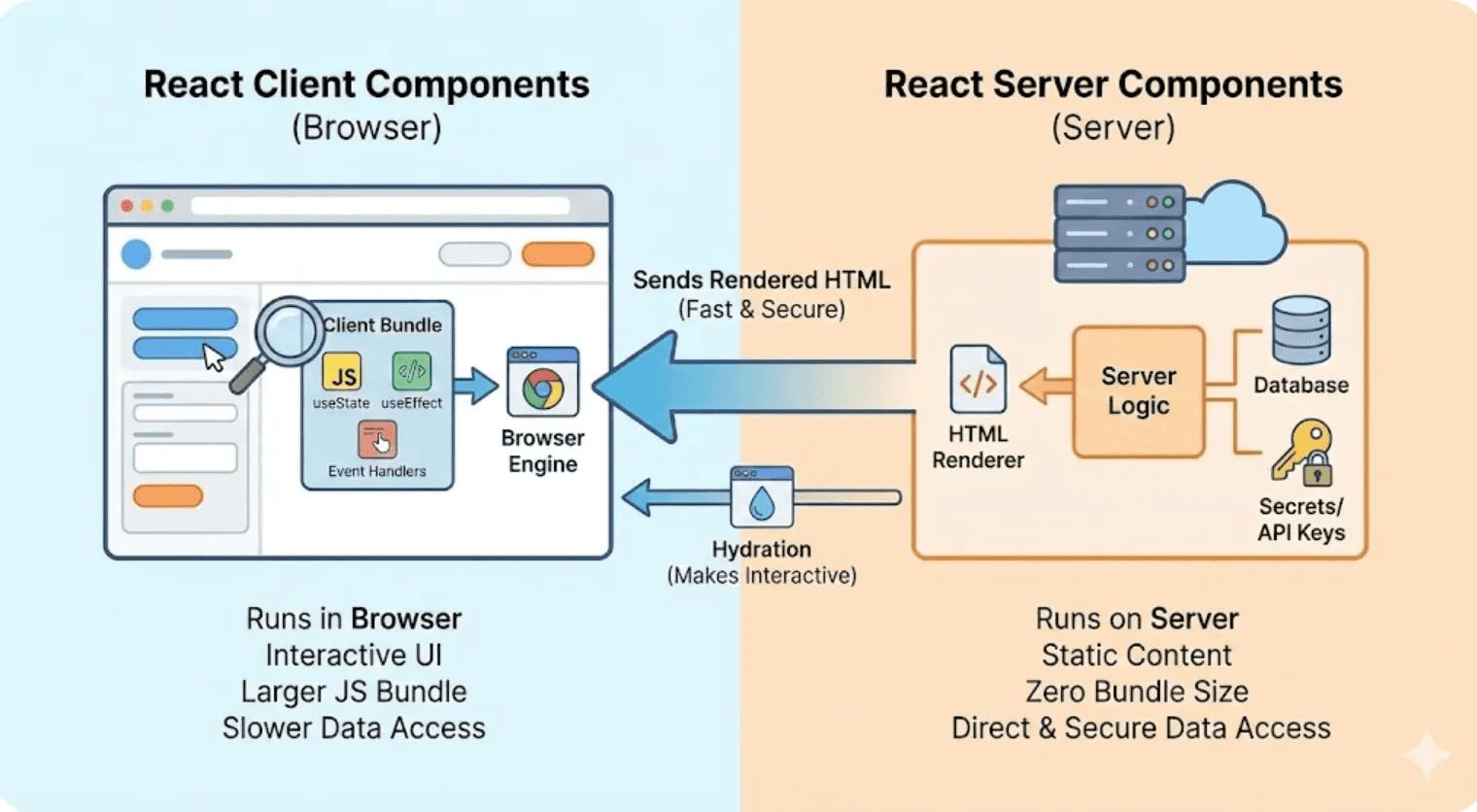
React has evolved significantly with the introduction of Server Components and modern full-stack React architectures. Instead of sending every component and its JavaScript to the browser, developers can now decide which parts of an application should run on the server and which parts need to run in the browser.
This approach is especially important when building modern applications with frameworks such as Next.js. In the Next.js App Router, components are Server Components by default, while developers can opt into Client Components when browser-side interactivity is required.
Understanding the difference between Server Components and Client Components can help developers build applications that are faster, more efficient, easier to maintain, and better suited to modern web performance requirements.
What Are Server Components?
Server Components are React components that render in a server environment rather than running as interactive components in the browser. They can be rendered at build time or on the server when a request is made.
Because Server Components do not need to send their component code to the browser for interaction, they can help reduce the amount of JavaScript that needs to be downloaded and executed by the client.
Server Components are particularly useful for content-heavy pages, data fetching, database access, and UI that does not require browser-side interaction.
Example of a Server Component
export default async function ProductsPage() {
  const products = await getProducts();

  return (
    <div>
      <h1>Products</h1>

      {products.map((product) => (
        <div key={product.id}>
          <h2>{product.name}</h2>
          <p>{product.price}</p>
        </div>
      ))}
    </div>
  );
}
This component can retrieve data on the server and render the resulting UI without requiring the entire component implementation to be shipped to the browser.
What Are Client Components?
Client Components are components that are intended to run in the browser. They are necessary when a component needs browser APIs, local state, event handlers, effects, or other interactive behavior.
In frameworks such as Next.js, a Client Component is typically identified by placing the "use client" directive at the top of the file.
Example of a Client Component
"use client";

import { useState } from "react";

export default function Counter() {
  const [count, setCount] = useState(0);

  return (
    <button onClick={() => setCount(count + 1)}>
      Count: {count}
    </button>
  );
}
The component needs to run in the browser because the counter depends on state and a click event.
Server Components vs Client Components
| Feature | Server Components | Client Components |
|---|---|---|
| Execution | Server or build environment | Browser |
| Default in Next.js App Router | Yes | No |
| useState | No | Yes |
| useEffect | No | Yes |
| Click/event handlers | No | Yes |
| Browser APIs | No | Yes |
| Direct server-side data access | Yes | No |
| Interactive UI | Limited | Yes |
| Client JavaScript | Can avoid shipping component code | Requires client-side JavaScript |
Why Use Server Components?
1. Reduce Client-Side JavaScript
One of the biggest benefits of Server Components is that their implementation does not need to be sent to the browser as normal client-side component code.
This can reduce the JavaScript required by the client and potentially improve loading and runtime performance.
2. Fetch Data on the Server
Server Components are well suited for retrieving data from databases, APIs, files, and other server-side resources.
export default async function Dashboard() {
  const orders = await database.orders.findMany();

  return (
    <section>
      <h1>Recent Orders</h1>

      {orders.map((order) => (
        <p key={order.id}>Order #{order.id}</p>
      ))}
    </section>
  );
}
This keeps server-side data access on the server instead of requiring the browser to make another request simply to render the initial content.
3. Keep Sensitive Logic on the Server
Server-side code can be useful for operations involving databases, private credentials, internal services, and other resources that should not be exposed to the browser.
Developers should still follow proper security practices and avoid accidentally passing sensitive information to Client Components.
4. Better Fit for Content-Heavy Pages
Blogs, product pages, documentation, marketing pages, dashboards with server-fetched data, and other content-oriented interfaces can often benefit from Server Components.
Why Use Client Components?
1. Interactive User Interfaces
Buttons, dropdowns, tabs, modals, interactive filters, carousels, and other UI elements often require Client Components.
2. React State
If a component uses hooks such as useState, it generally needs to be a Client Component in a Server Components architecture.
"use client";

import { useState } from "react";

export default function Menu() {
  const [open, setOpen] = useState(false);

  return (
    <div>
      <button onClick={() => setOpen(!open)}>
        Menu
      </button>

      {open && <nav>Navigation Links</nav>}
    </div>
  );
}
3. Browser APIs
Client Components are appropriate when your code needs browser-only APIs such as localStorage, window, document, media APIs, or other browser capabilities.
4. Event Handlers
Event handlers such as onClick, onChange, and onSubmit require client-side behavior.
How Server and Client Components Work Together
The choice is not Server Components versus Client Components for the entire application. Modern React applications can combine both types in the same component tree.
A common architecture is to keep the page and data-fetching components on the server while moving only interactive sections to the client.
// Server Component

import LikeButton from "./LikeButton";

export default async function Post() {
  const post = await getPost();

  return (
    <article>
      <h1>{post.title}</h1>
      <p>{post.content}</p>

      <LikeButton />
    </article>
  );
}
The page can retrieve and render the post on the server, while the LikeButton can be a Client Component that manages the user's interaction.
The "use client" Directive
The "use client" directive tells a React framework that a module should be treated as part of the client-side component graph.
"use client";

export default function SearchBox() {
  // Client-side interactive component
}
It is important not to add "use client" to every component automatically. A better approach is to place the client boundary around the smallest part of the UI that actually requires browser-side functionality.
What About "use server"?
A common misunderstanding is that "use server" means "this is a Server Component." It does not.
React uses "use server" for Server Functions. Server Components themselves do not require a "use server" directive.
This distinction becomes especially important when working with modern React features such as Server Functions and frameworks that support React Server Components.
Performance Considerations
Server and Client Components have different performance characteristics.
Using Server Components for appropriate parts of an application can reduce the amount of JavaScript that needs to reach the browser. Client Components, however, are essential for interactive experiences.
The goal is therefore not to eliminate Client Components. The goal is to avoid making unnecessarily large sections of the application client-side.
When Should You Use Server Components?
- Fetching data from a database or server-side API
- Rendering static or mostly static content
- Displaying blog articles
- Building documentation pages
- Rendering product information
- Accessing server-only resources
- Performing server-side data processing
- Reducing unnecessary client-side JavaScript
When Should You Use Client Components?
- Interactive forms
- Buttons with state
- Dropdown menus
- Tabs and accordions
- Interactive filters
- Shopping carts
- Client-side animations that depend on interaction
- Browser APIs such as localStorage
- Components using React state or effects
A Practical Example: E-Commerce Product Page
Consider an e-commerce product page.
The product information, description, pricing, images, and inventory information can often be fetched and rendered through Server Components.
However, the following parts may require Client Components:
- Product quantity selector
- Color and size selection
- Add-to-cart interaction
- Wishlist button
- Image carousel controls
- Interactive reviews
This architecture allows developers to keep data-heavy and content-heavy sections on the server while making only the necessary interactive controls client-side.
Common Mistakes Developers Make
Making Everything a Client Component
Adding "use client" to large parent components can cause many child modules to become part of the client-side dependency graph. This can increase the amount of JavaScript sent to the browser.
Using Client Components for Simple Content
A heading, article, product description, or server-fetched list does not automatically need to be interactive.
Fetching Everything in useEffect
In a Server Components architecture, developers do not always need to wait for the browser to load and then fetch the initial page data with useEffect. Server-side data fetching can often provide a more direct rendering path.
Confusing SSR With Server Components
Server-side rendering and Server Components are related but not identical concepts. SSR describes rendering HTML on the server, while Server Components define where React component logic and dependencies are executed within a React Server Components architecture.
Best Practices for Modern React Applications
- Start with Server Components when using a framework that supports them by default.
- Add Client Components only when necessary for interaction or browser-specific functionality.
- Keep client boundaries small whenever practical.
- Fetch server-appropriate data on the server rather than unnecessarily moving initial data fetching to the browser.
- Separate data fetching from interactive UI when the architecture benefits from it.
- Review third-party libraries because some libraries depend on browser APIs or client-side React features.
- Measure real performance instead of assuming that one architecture is automatically faster for every workload.
Server Components vs Client Components: Quick Decision Guide
| Question | Recommended Choice |
|---|---|
| Does the component mainly display server-fetched data? | Server Component |
| Does it need useState? | Client Component |
| Does it need useEffect? | Client Component |
| Does it use browser APIs? | Client Component |
| Does it access a database directly? | Server Component |
| Does it need click or input event handlers? | Client Component |
| Is it primarily static content? | Server Component |
Final Thoughts
Server Components and Client Components are not competing technologies. They are complementary building blocks for modern React applications.
Server Components are a strong choice for data fetching, content rendering, server-side operations, and reducing unnecessary client-side JavaScript. Client Components are essential when users need to interact with the interface through state, events, browser APIs, and other client-side capabilities.
The best architecture usually combines both. Start with Server Components where possible, identify the parts of the interface that genuinely require browser-side behavior, and introduce Client Components at those boundaries.
For developers building modern React applications in 2026, understanding where that server-client boundary belongs is an important part of building fast, scalable, and maintainable web applications.