.svg)
Odoo 20 Inventory Valuation: Four New Accrual Accounts to Explain Your Stock Variation
Reported By
Muhammed Shayar CV
Finally know why your stock variation isn't zero
The Problem This Solves
If you've closed the books in Odoo 18 or 19 under Perpetual (Automated) inventory valuation, you know this pain: goods are received but the vendor bill hasn't landed yet, or a bill is posted before the goods physically arrive. On the sales side, the same gap exists — deliveries go out before invoices are raised, or invoices go out before goods are delivered. Odoo would dump all of this into a single Stock Variation account. The total was accurate, but at month-end you had no way to tell why the number wasn't zero. You'd end up manually creating extra accounts and posting your own journal entries just to find out.
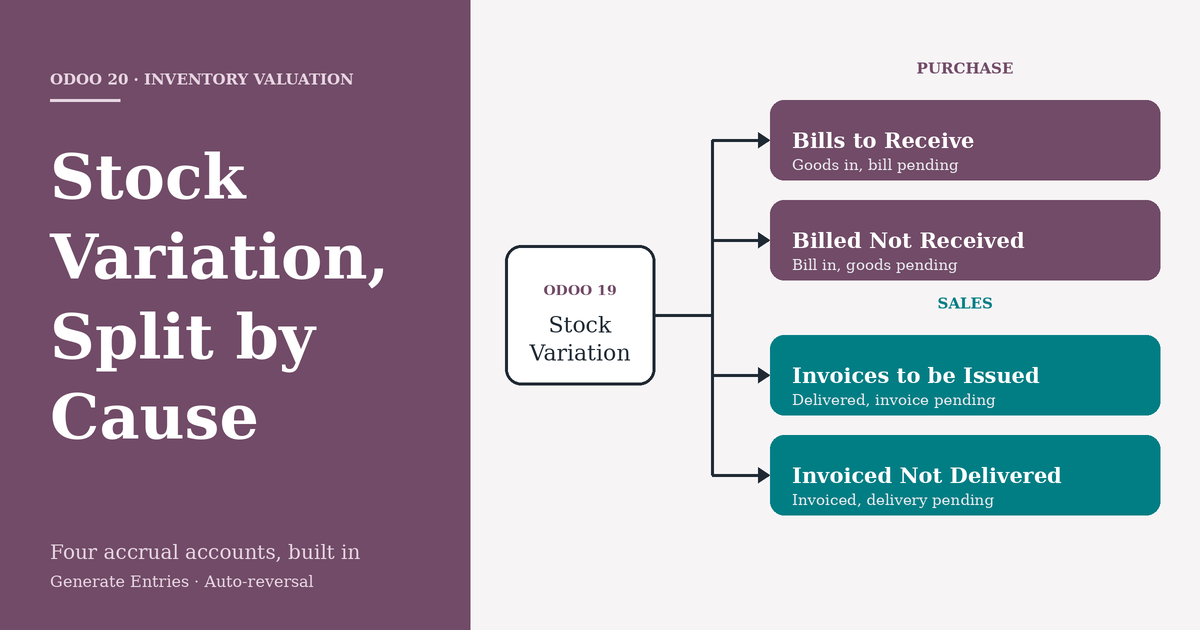
Odoo 20 fixes this natively by splitting that one variance account into four purpose-built accrual accounts and automating the entries around them.
Odoo 19 vs. Odoo 20: What Actually Changed
| Aspect | Odoo 19 | Odoo 20 |
|---|---|---|
| Variance visibility | Single Stock Variation account absorbs every timing gap | Split into 4 dedicated accounts: Invoices to be Issued, Invoiced Not Delivered, Bills to Receive, Billed Not Received |
| Where configured | Product Category only | Product Category and a new central General Settings → Accounting → "Accruals" section, inherited by every category |
| Setup effort | Consultant/user had to manually create these 4 GL accounts and wire up journal entries every month | Standard chart of accounts ships with them pre-built (e.g. 121200, 212000, 211100, 141000) — just map and go |
| Inventory Valuation label | "Perpetual" / "Periodic" | Renamed to "Perpetual (at invoicing)" / "Periodic (at closing)" — states explicitly when valuation posts |
| Accrual + reversal entries | Manual journal entries required to accrue the variance and manually reverse them next period | Generate Entries creates the accrual automatically, and Odoo posts the reversal entry on the next day by itself |
| Month-end diagnosis | Investigate the Stock Variation balance manually to figure out the cause | Inventory Valuation report shows the exact account (and therefore the exact cause) in its own section |
The two screenshots below show this concretely: the General Settings → Accruals screen lets you set Invoices to be Issued (121200), Invoiced Not Delivered (212000), Bills to Receive (211100), and Billed Not Received (141000) once at the company level — every product category (like "Goods" below) then inherits these unless overridden, alongside the renamed Inventory Valuation: Perpetual (at invoicing) setting and the existing Stock Account / Stock Variation fields.


The Four New Accounts
| Account | Type | Side | Triggered When |
|---|---|---|---|
| Bills to Receive | Current Liability | Purchase | Goods received, vendor bill not yet created |
| Billed Not Received | Current Asset | Purchase | Vendor bill created, goods not yet received |
| Invoices to be Issued | Current Asset | Sales | Goods delivered, invoice not yet created |
| Invoiced Not Delivered | Current Liability | Sales | Invoice created, goods not yet delivered |
Setting It Up
- Chart of Accounts: the four accounts ship by default (e.g. 121200, 212000, 211100, 141000) — create your own if you want custom codes.
- General Settings → Accounting → Accruals: set the company-wide defaults for Sale Accruals and Purchase Accruals here — every product category inherits them automatically.
- Product Category → Inventory Valuation: choose the costing method (e.g. Perpetual (at invoicing) / Average Cost), then override any of the four accounts per category if needed. You can also rename the default "Stock Variation" account to something clearer like "Cost of Revenue."
Once mapped, no manual journal entries are needed — Odoo routes timing differences into the correct account by itself.
Purchase Side: Two Scenarios
Goods Received, Bill Pending
A purchase receipt is validated for $100 but no vendor bill exists yet.
- The Inventory Valuation Report shows the $100 under Bills to Receive instead of a generic variance line.
- Generate Entries at month-end creates the accrual: Stock Valuation is debited on receipt; the accrual entry knocks Stock Variation to zero and credits Bills to Receive $100.
- Balance Sheet: Current Assets +100 (inventory), Current Liabilities +100 (Bills to Receive) — a clean accrual, P&L variance nets to zero.
- Odoo automatically reverses this entry the next day, so once the real bill posts, the accrual unwinds cleanly.
Bill Received, Goods Not Yet Delivered by Vendor
A second purchase order (cost $200) has its bill confirmed, but the receipt hasn't happened.
- The report now shows Billed Not Received at $200 alongside the earlier Bills to Receive at $100.
- Generate Entries nets Cost of Goods Sold to zero, debits Billed Not Received, and credits Stock Variation.
- Balance Sheet: Current Assets = $100 (actual inventory) + $200 (Billed Not Received, representing prepayment for goods in transit) = $300; Current Liabilities carry the $100 Bills to Receive.
- Once goods are actually received, this account clears automatically.
Sales Side: Two Scenarios
Delivered, Invoice Still Pending
A sales order is confirmed and delivered, but the customer invoice hasn't been raised — the most common month-end situation.
- The Inventory Valuation Report shows the delivered value under Invoices to be Issued instead of an unexplained variance.
- Generate Entries produces the accrual, in two parts: Entry 1 — Product Sales credited → Invoices to be Issued debited (functionally the same role as Odoo 18's "Stock Interim Delivered" account) → Stock Variation credited → Cost of Goods Sold debited. Entry 2 — Stock Variation debited against Entry 1's credit → nets to zero → Inventory Valuation credited.
- Reversal (automatic, next day): Odoo posts this on its own — no manual reversal required.
- P&L: Cost of Sales and Stock Variation both net to zero; revenue and COGS are matched for the period even before the invoice exists.
- Balance Sheet: Invoices to be Issued sits as a Current Asset — revenue earned but not yet billed.
- When the real invoice is created afterward, it debits Accounts Receivable and credits Income as normal; the auto-reversal ensures nothing is double-counted.
Invoiced, Delivery Still Pending
The reverse gap: the customer invoice is confirmed, but goods haven't physically left the warehouse.
- The report shows the value under Invoiced Not Delivered — flagging that revenue has been booked ahead of the physical delivery.
- This posts as a Current Liability: you've billed the customer but still owe them the goods.
Why the Underlying Logic Matters
This is really Odoo 18 and Odoo 19 merged into one model:
- Like Odoo 18, it uses interim-style accounts to bridge the timing gap between physical stock movement and the financial document.
- Like Odoo 19, those accounts stay visible in the Inventory Valuation report drill-down, so you can trace why a variance exists without leaving the report.
- Unlike either version, Generate Entries automates the full accrual-and-reversal cycle, and the accounts are now standard chart-of-account defaults set centrally, not something you build yourself.
Key Takeaway
For any business running Perpetual (at invoicing) valuation — which covers most Odoo Inventory + Accounting deployments — this is a genuine functional upgrade, not a cosmetic one. It takes the "black box" stock variation account, splits it by cause, exposes company-wide defaults in General Settings, and automates the entire close process around it. That's worth factoring into your Odoo 20 upgrade evaluation.