Oct 8, 2026
How Odoo 20's Timesheet Assistant turns your everyday computer activity into timesheet entries you only have to approve.
The problem every working team knows
Ask anyone who bills clients by the hour, or tracks what a project really costs, and they will tell you the same thing: filling in timesheets is the task everybody forgets. At the end of the day, or worse, the end of the week, people try to rebuild their schedule from memory. Meetings get missed. Quick calls vanish. Hours that were worked never get billed.
Odoo 20, the latest version of the popular business software, tackles this with a new feature called the Timesheet Assistant. You do not need to know Odoo to understand the idea, so this article explains everything from the beginning.
Two quick definitions
Odoo is business management software (often called ERP) that brings sales, accounting, inventory, projects and HR into one system. Companies of all sizes use it.
Timesheet is a record of how much time someone spent on which piece of work. It is used to invoice clients and to see whether projects are staying on budget.
What the Timesheet Assistant does
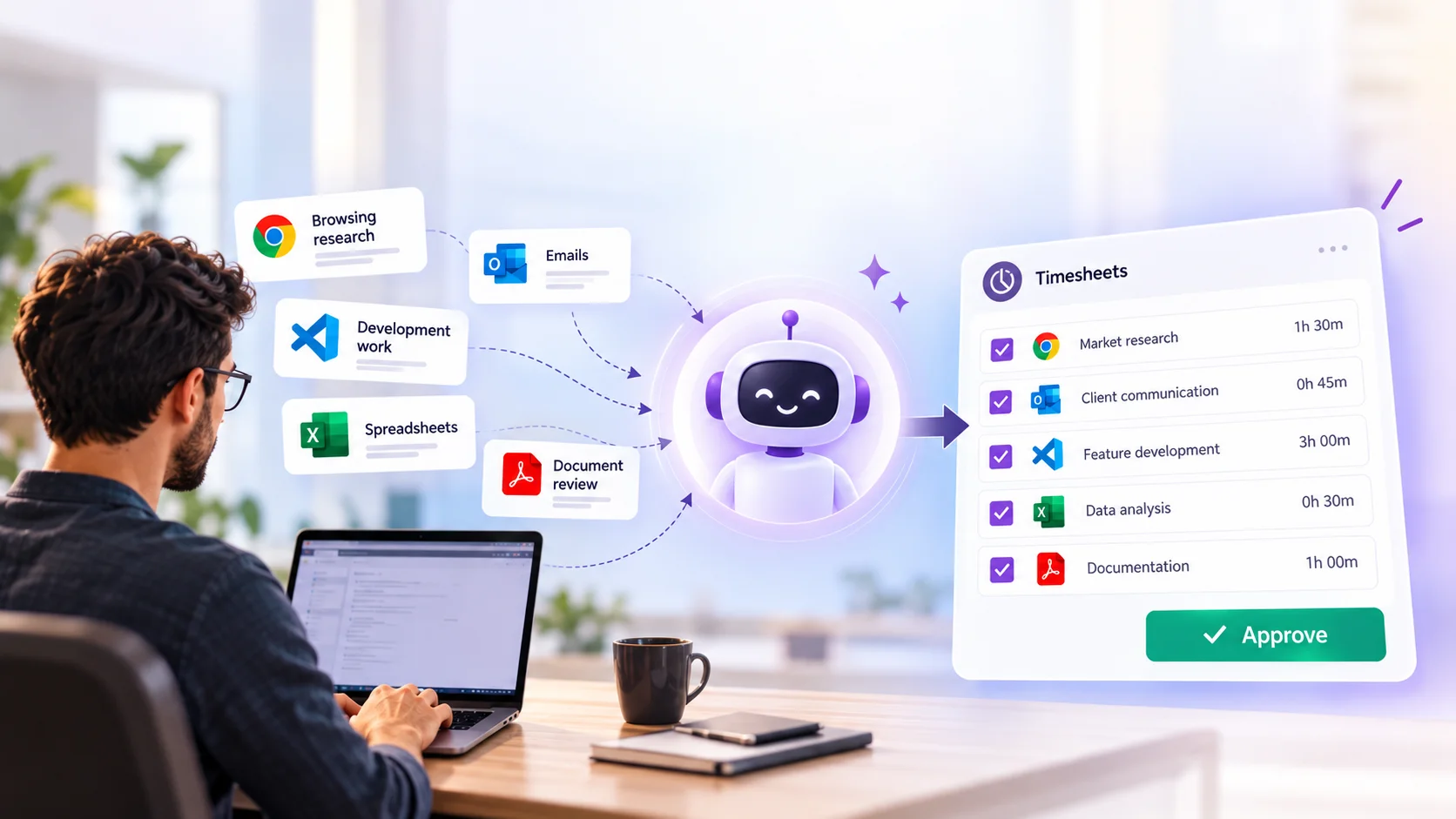
In one sentence: it watches which applications and websites you use during the day, guesses which project each piece of work belongs to, and offers you a ready-made list of timesheet entries. You review the list, fix anything that looks wrong, and click Create.
Nothing is added to your timesheet automatically. The assistant only suggests; you stay in control.
1. TrackApps and websites
2. MatchRules sort the activity
3. SuggestGrouped by project
4. ConfirmYou click Create
The four steps of the Timesheet Assistant. Steps 1–2 happen quietly in the background (together with your Odoo calendar and planning). Steps 3–4 are the only ones you do.
How it works behind the scenes
Tracking. The assistant relies on a free, open-source tool called ActivityWatch, installed on your computer. It notes which application or browser tab is active, and for how long. An optional browser extension (Chrome or Firefox) adds website-level detail.
Matching. Odoo then applies assistant rules. A rule is a small text pattern (technically a “regular expression”) that recognises an activity, such as a Google Meet call or work in a code repository, and labels it. Odoo ships with ready-made rules for Odoo itself, GitHub, Google Docs, Gmail, Google Meet and Discord. Once a rule fires, the activity that follows is attached to it until another rule fires.
Suggesting. Odoo combines these labelled activities with your events in the Odoo calendar and your planning, then assigns each suggestion to a project and task. It also learns from your past choices, so a suggestion that you assigned to a project once is likely to land there again.
Confirming. You open the Assistant screen, select one or more suggestions, adjust the details if needed, and click Create. They become normal timesheet entries.
Where to find it and how to set it up
The assistant lives inside the Timesheets app. Setup takes a few minutes per person.
Switch it on. Go to Timesheets > Configuration > Settings and tick Timesheets Assistant. The timesheets must be recorded in hours and minutes (the “Encoding method” setting), otherwise the option is not available.
Install the tracker. Open Timesheets > Assistant. Odoo walks you through installing ActivityWatch on your computer. Supported systems include Windows 10, macOS 10.15 and Ubuntu 22 or newer. The browser extension is optional.
Connect it to Odoo. Copy your Odoo address into ActivityWatch's settings (this tells it that your Odoo is allowed to read its data), then click Test connection.
Work as usual. Tracking starts automatically each day. Short stretches of less than a minute are ignored, and three minutes without keyboard or mouse activity count as a break.
Review and create. At any point, open Timesheets > Assistant, tick the suggestions you want, edit if necessary, and click Create. Unwanted suggestions can simply be removed.
Rules in plain English: a worked example
Rules are what turn raw activity into something meaningful. Here is how a rule for customer video calls could look. The fields are the ones Odoo asks you to fill in.
FieldExample valueWhat it means
NameCustomer MeetingThe rule's label
Patternmeet - (.*)|https://meet.google.comRecognises a Google Meet window or address
TemplateCustomer Meeting ($1)Names the entry after the meeting title Odoo found
Always activeYesKeeps counting time even if you are not touching the keyboard, which is normal in a meeting
Project and taskLeft emptyEach meeting may belong to a different customer
What about privacy?
This is the first question most people ask, and the answer in Odoo's documentation is reassuring: all activity data is processed locally on your own device and is not shared with anyone, inside or outside your company. Suggestions stay private to you until you choose to turn them into timesheet entries. Only the entries you create become visible to your manager and the rest of the system.
A sensible rule for teams
Explain the feature to staff before switching it on. Because it is opt-in per computer and nothing is recorded in the company timesheet until the employee clicks Create, it works best as a memory aid, not as a monitoring tool.
Odoo 19 versus Odoo 20
Odoo 19 already supported timesheets through manual entries and timers. What changes in Odoo 20 is where the entries come from.
Odoo 19Odoo 20
Logging timeYou type entries or start a timer yourselfThe assistant proposes entries; you confirm them
Source of informationYour memory and what you remember to enterComputer and browser activity, plus Odoo calendar and planning
Project and taskChosen by you every timeMatched by rules and by your previous choices
End-of-day effortRebuild the day from memoryReview a list and click Create
SetupNothing extraTick the setting and install ActivityWatch on each computer
Who benefits, and how
Employees spend less time on admin and stop worrying about forgotten hours.
Managers see more complete timesheets, which makes project reports and planning more reliable.
Finance and billing teams can invoice for time that would previously have gone unrecorded.
Project-based businesses (consultancies, agencies, software teams) get a more accurate picture of what each project really costs.
Things to keep in mind
It needs a one-time installation on each person's computer, so it suits desktop work better than work done mostly away from a computer.
Suggestions are only as good as the rules behind them. Expect to adjust or add rules during the first weeks.
Short, scattered tasks may need manual correction before you create the entry.
It is a helper, not a replacement for judgement: people still decide what goes on the timesheet.
Conclusion
Timesheets have always asked people to remember the past. The Odoo 20 Timesheet Assistant flips that around: the system keeps a private record of your day, and you simply approve what is accurate. For any team that bills by the hour or manages projects, that is a practical improvement, and it does not require anyone to understand the software underneath.
Sources: Odoo 20 documentation (Timesheet assistant, odoo.com/documentation); Odoo 20 release notes; partner write-ups from Octura Solutions and Target Integration.
Oct 6, 2026
Employee Monitoring Without Screenshots: A More Privacy-First Approach to Workforce Management
Employee Monitoring Without Screenshots | TIMO360
Employee monitoring has changed dramatically over the last decade.
Businesses want better visibility into attendance, work patterns,
and productivity, while employees increasingly expect workplace
technology to respect their privacy.
That creates an important question for modern businesses:
how can teams understand whether work is happening without turning
employee monitoring into constant surveillance?
One answer is to move away from collecting everything and instead
focus on the signals that actually help managers understand work.
The problem with invasive employee monitoring
Traditional employee monitoring software often tries to create
visibility by collecting as much information as possible.
Screenshots, keystroke logging, and detailed activity surveillance
can produce large amounts of data.
But more data does not automatically mean better management.
In many cases, excessive monitoring can make employees feel that
they are being watched rather than supported.
01
Privacy concerns
Employees may feel uncomfortable when personal or unnecessarily
detailed information is continuously captured.
02
Too much data
Large volumes of activity data can make it harder to identify
the information managers actually need.
03
Reduced trust
A surveillance-heavy environment can influence how employees
perceive management and workplace technology.
04
Wrong incentives
Visible computer activity is not always the same thing as
meaningful work or useful outcomes.
Why privacy matters in employee monitoring
Employee monitoring should begin with a clear business purpose.
Companies may need information about attendance, schedules,
application activity, and work patterns, but that does not mean
every action on a computer needs to become a permanent record.
A privacy-first approach starts with a simple principle:
collect information because it serves a defined operational purpose,
rather than collecting it simply because the technology makes it
possible.
The goal should be to understand the work that needs to be managed,
not to observe every detail of the person doing it.
A better alternative to screenshots
Businesses still need visibility. Managers need to know whether
employees are working scheduled hours, whether applications are
being used appropriately, and whether teams are staying productive.
Many of these questions can be answered through less invasive
signals.
Business question
Useful signal
Privacy approach
Was the employee working?
Attendance and active/idle time
No screen content required
What applications were used?
Application activity
Focus on application usage rather than screen content
Was scheduled work completed?
Schedules and activity patterns
Measure work patterns instead of capturing everything
Where are productivity issues?
Productivity insights
Use signals to identify patterns and areas for improvement
Traditional monitoring vs privacy-first monitoring
The difference is not whether a company has visibility.
The difference is how that visibility is created.
Traditional surveillance
Privacy-first approach
Screen capture
Continuous or periodic screenshots may capture everything
visible on an employee's display.
Activity signals
Focus on attendance, active/idle time, and application activity.
Keystroke logging
Individual keyboard actions can become part of monitoring.
Work patterns
Understand work activity without recording individual keystrokes.
Maximum data collection
Collect as much information as technically possible.
Purpose-driven collection
Collect information that is actually useful for workforce
management.
Surveillance mindset
Monitoring can feel like constant observation.
Management mindset
Use information to understand attendance, schedules, and
productivity.
What privacy-first employee monitoring looks like
A privacy-first monitoring strategy does not mean removing all
visibility. It means choosing the right level of visibility.
Instead of asking how much employee activity can be captured,
businesses can start by asking what information is necessary to
manage work effectively.
01
Define the question
Identify what managers actually need to understand about work,
attendance, or productivity.
02
Choose useful signals
Use attendance, activity, application usage, and schedules to
answer those questions.
03
Turn signals into insight
Use the resulting information to understand patterns and improve
workforce management.
How TIMO360 approaches employee monitoring
TIMO360
is built around a privacy-first approach to employee monitoring and
workforce management.
Rather than making screenshots or keystroke logging the foundation
of monitoring, TIMO360 focuses on workforce signals that can help
businesses understand how work is happening.
These include attendance, active and idle time, application activity,
schedules, and productivity insights.
Privacy-first approach
The objective is useful workforce visibility without depending on
screenshots or keystroke logging.
Five principles for better employee monitoring
01
Start with the business question
Decide what managers actually need to know before deciding what
data the system should collect.
02
Collect useful signals
Attendance, schedules, activity, and application usage can
provide useful information without recording everything.
03
Make monitoring understandable
Employees should understand what is being measured and why the
information is relevant to their work.
04
Focus on patterns
A single activity signal rarely tells the whole story.
Trends and patterns are generally more useful for management.
05
Use monitoring to improve work
Monitoring should help identify operational problems, improve
workflows, and support better conversations.
What should a privacy-first monitoring system provide?
A useful employee monitoring system should provide enough visibility
to help managers understand work without turning every computer
interaction into surveillance.
✓
Clear attendance information
✓
Active and idle time visibility
✓
Application activity information
✓
Schedule visibility
✓
Useful productivity insights
✓
No dependence on screenshots or keystroke logging
The future of employee monitoring is more purposeful
Employee monitoring does not have to be a choice between having no
visibility and watching everything employees do.
There is a middle ground: collect useful information, understand
work patterns, and avoid unnecessary surveillance.
For businesses, that can mean better operational visibility.
For employees, it can mean workplace technology that respects
reasonable boundaries.
The goal is not to know everything an employee does.
The goal is to know enough to manage work effectively.
Frequently asked questions
Can employee monitoring work without screenshots?
Yes. Businesses can use signals such as attendance,
active and idle time, application activity, schedules, and
productivity insights without making screenshots the foundation
of their monitoring strategy.
Is employee monitoring always invasive?
Not necessarily. The impact depends on what information is
collected, why it is collected, and how that information is used.
A purpose-driven approach can provide workforce visibility with
less invasive data collection.
Why avoid keystroke logging?
Individual keystrokes can contain highly detailed information
without necessarily providing useful management insight.
Broader work signals can often answer the business question
without recording every keyboard action.
What does TIMO360 monitor?
TIMO360 focuses on workforce signals such as attendance,
active and idle time, application activity, schedules, and
productivity insights rather than relying on screenshots or
keystroke logging.
Better visibility doesn't require more surveillance.
Explore a privacy-first approach to employee monitoring with
TIMO360.
Explore TIMO360
Sep 30, 2026
What's New in Odoo's JavaScript Framework
Prepared by Faisal · Codeox Technologies
The Big Picture, in One Line
Odoo rebuilt the entire front-end of the website (the part that powers e-commerce, forms, and page building) almost from scratch, while the core back-office framework stayed mostly stable with a lot of smaller, useful upgrades — especially around speed and offline support.
Odoo's own summary slide: a big refactor on the website side, and a steady stream of improvements on the web client side.
Two Frameworks Living Side by Side
A lot of people assume Odoo only has one JavaScript framework, called Owl. That's not quite right. There are really two different systems working together, and understanding the split helps explain why some things changed a lot this year and others barely changed at all.
The web client (back-office apps like Accounting, CRM, Inventory) is built on Owl. The website (e-commerce, landing pages) now uses a new, lighter system called "Interaction."
Owl is Odoo's component system — think of it as similar in spirit to React. It's used to build the apps we work in every day: Sales, Accounting, Inventory, CRM, and so on. The website works differently: pages are rendered by the server first, and then a lighter layer of JavaScript is "attached" on top to add behavior like pop-ups, sliders, or add-to-cart buttons. Because these two things work so differently, Odoo has always needed two separate approaches — but this year they closed the gap significantly.
Both back-office apps (CRM, Invoicing, Accounting, POS) and website features (e-commerce, Survey) plug into the same underlying framework, just through different doors.
The Website Got a Complete Rebuild
This was the headline change. For years, the website side of Odoo relied on something called "Public Widgets" — an older, clunkier way of attaching JavaScript behavior to web pages. It worked, but it felt disconnected from the rest of Odoo's codebase, which made it harder for developers to move between website work and back-office work. Odoo has now replaced Public Widgets entirely with a new, lightweight system called "Interactions."
The three big website changes: Public Widgets are gone, there's a new HTML editor, and the Website Builder has been rebuilt using Owl.
What are "Interactions"?
Think of Interactions as a stripped-down, simpler cousin of Owl — built specifically for websites. It's not meant to replace a full app interface; it's meant to attach small bits of behavior (like a click handler, a counter, or showing/hiding something) onto pages that are still rendered by the server. The benefit: website code and app code now speak a much more similar language, and in the future Odoo could even offer super-lightweight pages that don't need the whole framework loaded at all.
Interactions are described as a lightweight, "reactive" replacement for Public Widgets that can still tap into Odoo's core services (like notifications) directly.
Here's what the new code actually looks like — a modern JavaScript class with clear rules for what to watch on the page (dynamicContent) and what happens on events like clicks.
A Rebuilt Website Builder
On top of the new Interactions system, Odoo also rebuilt the entire drag-and-drop Website Builder — the tool clients use to design their pages — using Owl. Around 30 developers worked on this. The good news for us: the underlying technology changed, and the options panel has a new syntax for developers, but existing custom snippets (the building blocks clients already use) should keep working without needing to be rebuilt.
The new Website Builder interface, rebuilt in Owl — same drag-and-drop experience for end users, modernized code underneath.
The Back-Office (Web Client): Fewer Big Changes, More Quiet Wins
Unlike the website, the core web client — the part behind Sales, Accounting, Inventory, and every other back-office app — barely changed on the surface. Odoo confirmed that Owl itself had fewer than 20 commits in the entire year. That's good news for us: it means our customizations and modules are unlikely to break because of this layer. Instead, the real effort went into making Odoo faster and more resilient, especially around offline use.
Caching and "Offline Mode"
Odoo has been quietly building a caching system so the app can remember data it already fetched, instead of always waiting on the server. Developers can now mark specific data calls to be cached — either in memory (RAM) or on disk — and choose how often that cache should refresh.
A look at the code: developers can now flag any data request to be cached, choose whether it lives in memory or on disk, and decide how often it should refresh.
Faster-Feeling Screens (Optimistic Rendering)
Because of this caching work, Odoo can now show a screen immediately using the last-known data, fetch the real data in the background, and quietly update the screen only if something actually changed. In practice, this makes the app feel noticeably snappier, even though the underlying request still happens. It's worth noting Odoo was clear that this is not full offline editing yet — you generally can't create or change records with no internet connection today. It's about making things feel fast and staying usable when the connection is slow or briefly drops.
"Optimistic rendering": show what you already have, fetch the latest in the background, and only refresh the screen if the data actually changed.
Small Changes That Are Easy to Love
Alongside the big rebuilds, there were several smaller improvements that are worth flagging because clients and users will notice them directly.
Other framework additions this year: support for add-on-specific translations, custom template directives for advanced developers, and better developer tools.
Middle-click / Ctrl-click now works properly across the interface — for example, opening a task from the Project view in a new browser tab, something that wasn't possible before Odoo 19.
Bottom-sheet pop-ups on mobile: mobile pop-ups now open as a "bottom sheet" (sliding up from the bottom of the screen) by default, which is a much more natural pattern on phones.
jQuery removed from the rebuilt website code. It's technically still bundled for backward compatibility, but any custom code we've written that depends on it will need to be reviewed at some point going forward.
A mini "date language" for filters: filters can be written as plain expressions like "today", "-monday", or "now -5M" instead of complex code — much easier to read and set up.
A new /doc endpoint gives a browsable, always-up-to-date reference of every model and field in a given Odoo instance — handy for scoping integrations or writing technical documentation for clients.
Middle-click and Ctrl-click now reliably open records in a new tab across the interface — a small thing, but a genuinely welcome one for daily use.
On mobile, menus and filters now slide up as a "bottom sheet" instead of a floating pop-up — a much more natural, app-like feel.
jQuery isn't gone entirely, but it's no longer a dependency of the rebuilt website code.
Filters and dates can now be written in plain language instead of complex expressions — a small change that makes life easier for anyone configuring custom views or filters.
The new /doc endpoint gives a live, browsable reference of every model and field — useful for technical scoping and documentation.
Why This Matters for Us
For our day-to-day project work, the practical takeaways are:
Existing website snippets and customizations should keep working, but any custom module that hooks into the old Public Widget system or relies on jQuery in the website layer will eventually need a review when we touch those projects again.
Back-office customizations (the bulk of our work — CRM, Accounting, Inventory, MRP) are on a much more stable foundation this year, since Owl itself changed very little.
Clients running on newer Odoo versions should feel a noticeably snappier, more mobile-friendly interface without us having to do anything extra.
The new /doc endpoint could genuinely save us time during requirement-gathering and technical scoping on new engagements.
The Balancing Act
Odoo's own developers were upfront that this kind of change is never risk-free. Every rewrite risks breaking someone's customization, but standing still isn't an option either — the codebase has to evolve to stay maintainable and to keep adding the features clients ask for.
Odoo's own framing of the trade-off: they have to keep the API reasonably stable, keep adding features, and keep reducing technical debt — all at the same time.
Bottom Line
This year's release is really a story in two halves: a major, ground-up rebuild of the website and page-builder technology (Interactions and the new Website Builder), paired with a quieter, more conservative year for the core back-office framework that focused on speed, caching, and small quality-of-life fixes. For our clients, that should mean a faster, more modern experience with minimal disruption to existing customizations — with the main thing to watch being any older website-layer code that leaned on Public Widgets or jQuery.
Sep 30, 2026
Microservices Architecture: From Monolithic Applications to Scalable, Independently Deployable Systems
From Monolithic Applications to Scalable, Independently Deployable Systems
A practical technical article for developers, architects, and engineering teams
The Big Picture
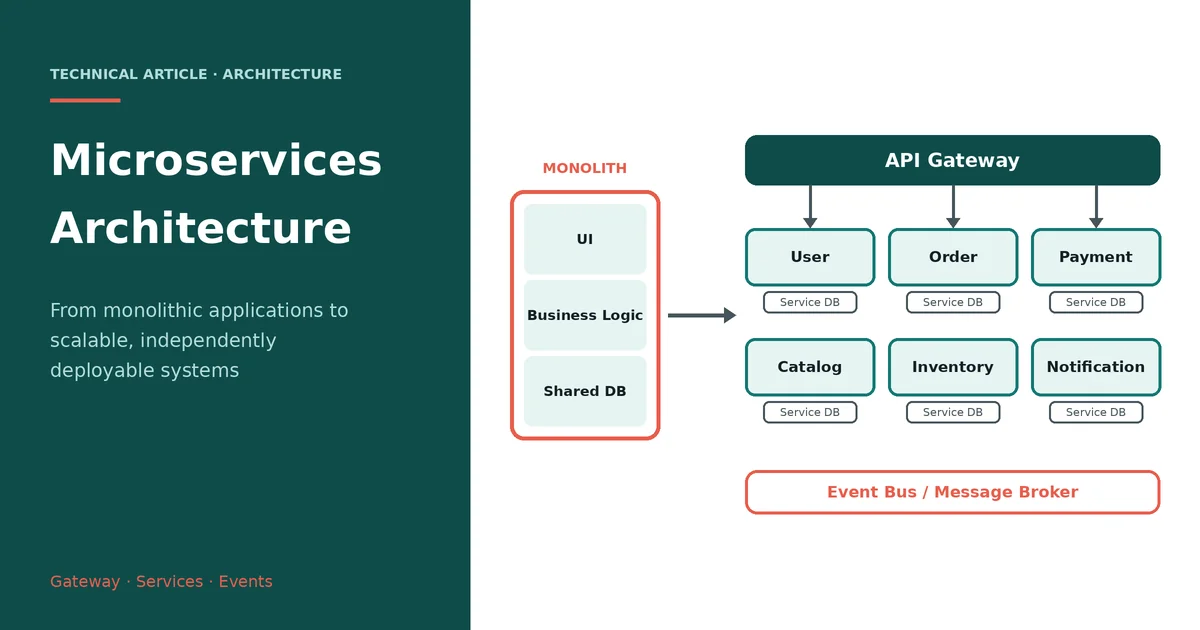
Microservices architecture is a way of designing software as a collection of small, focused, independently deployable services. Instead of placing every business capability inside one large application, the system is divided around meaningful business responsibilities such as users, orders, payments, inventory, search, or notifications. Each service exposes a clear contract and hides its internal implementation from the other parts of the platform.
The important idea is not simply to create many backend applications. The real architectural change is the creation of clear ownership boundaries. A service should own a meaningful capability, its business rules, and normally the data required to support that capability. Services then collaborate through APIs or asynchronous events. Modern architecture guidance similarly emphasizes independent deployment, well-defined APIs, and service-owned state.
Figure 1. A typical microservices platform with an API gateway, independent services, service-owned databases, and an event bus.
Why Microservices Became Important
A monolithic application is often an excellent starting point. It is relatively easy to run, debug, test, and deploy because the application exists as one major unit. Problems appear when the product grows. Different business areas start changing at different speeds, one module requires more computing capacity than another, deployment becomes risky, and a growing development team begins stepping on the same codebase.
Microservices address these pressures by allowing a business capability to evolve separately. A payment service can be deployed without rebuilding the inventory service. A high-traffic catalog service can be scaled without creating the same number of additional payment instances. Teams can also take clearer ownership of individual services. The trade-off is that the application becomes a distributed system, so networking, failures, consistency, monitoring, and deployment must now be designed explicitly.
Monolith and Microservices: The Architectural Shift
The difference becomes easiest to understand visually. In a traditional monolith, user interface code, business logic, and multiple business modules usually belong to one deployable application and commonly interact with a shared database. In a microservices system, those capabilities are separated into independently deployable services. Each service can own a database or another clearly controlled persistence boundary.
Figure 2. The architectural shift from a single deployable monolith to independently deployable services.
This does not mean that every function deserves its own service. Excessive fragmentation creates the opposite problem: too many deployments, too many network calls, and too much coordination. The objective is to find boundaries that represent stable business capabilities and allow meaningful independent change.
How a Microservices System Is Structured
A production system commonly starts at a web application, mobile application, or external client. Requests enter through an edge layer, often an API gateway or load balancer. The gateway provides a stable external entry point while backend services can change internally. It can also participate in authentication enforcement, routing, rate limiting, TLS termination, request transformation, and other cross-cutting concerns. Microsoft describes the API gateway as a centralized entry point for interactions between clients and application services.
Figure 3. The API gateway provides a controlled entry point and routes requests to the appropriate service.
Behind the gateway are the domain services. An e-commerce platform, for example, may contain customer, catalog, cart, order, payment, inventory, delivery, and notification capabilities. The exact boundaries depend on the business domain. The strongest designs avoid exposing internal database structures and instead communicate through stable interfaces.
Service Boundaries Are More Important Than Service Count
The hardest microservices decision is deciding where one service should end and another should begin. A useful boundary keeps related business rules together. If order validation, order state transitions, and order-specific business rules are constantly spread across five services, the system becomes difficult to understand. On the other hand, if orders, payments, inventory, and notifications are all placed in one giant service, the team has simply recreated a monolith under a different name.
Domain-driven design is often useful here because it encourages teams to identify business capabilities and bounded contexts before deciding the technical service structure. The question should be, "Which business capability needs independent ownership?" rather than, "How many APIs can we create?"
How Services Communicate
Microservices communicate mainly through synchronous requests or asynchronous messages. Synchronous HTTP or gRPC communication is appropriate when a caller needs an immediate result. For example, an Order service may synchronously ask an Inventory service whether a product can be reserved.
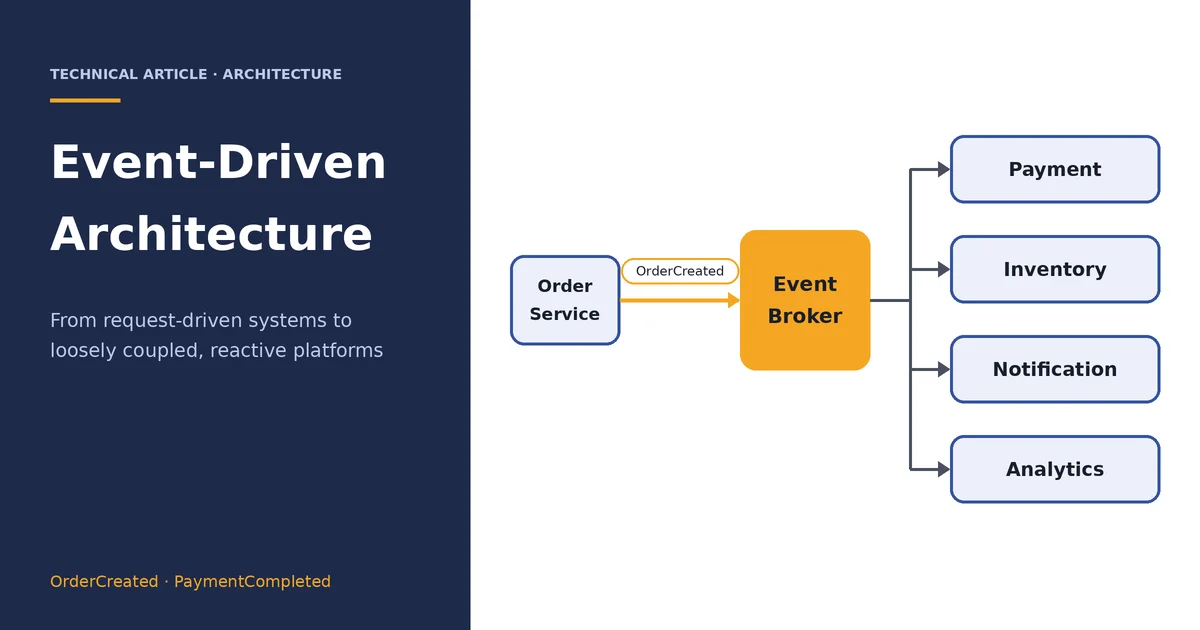
Asynchronous communication is different. Instead of waiting for another service to complete, a service publishes an event to a message broker. Other services consume that event when they are ready. This approach reduces direct coupling and is especially useful for notifications, analytics, integration workflows, and other operations that do not need to block the original request.
Figure 4. An event-driven order workflow in which payment, inventory, and notification services react independently to an order event.
The asynchronous approach introduces eventual consistency. A user may place an order before every downstream service has finished processing it. That is not necessarily a problem, but the product and engineering teams must explicitly define the states an order can occupy and what happens when one of the downstream steps fails.
Data Ownership and the Database-per-Service Idea
One of the most important rules in microservices is data ownership. A service should normally control the data that belongs to its business capability. Other services should access that information through an API or event rather than directly updating another service's tables.
This does not require every service to use a completely different database product. A team may use the same database technology across multiple services while maintaining logical ownership and access boundaries. The key objective is to avoid a situation where every service can freely modify every table. That kind of shared ownership recreates tight coupling and makes independent deployment difficult.
Distributed transactions are also more difficult than transactions inside a single application. For workflows spanning multiple services, patterns such as Saga, transactional outbox, idempotent consumers, retries, and compensating actions can be used to maintain business consistency.
Security in a Microservices Environment
Security must exist at multiple layers. The gateway can validate authentication tokens and apply coarse-grained policies, but individual services must still enforce authorization for the resources they own. A service should never assume that a request is safe merely because it came through the gateway.
Production systems should protect credentials and secrets, validate incoming data, use encrypted communication where appropriate, apply rate limits to public interfaces, and maintain clear service identities. Security becomes more important as the number of network boundaries increases because every additional communication path becomes part of the system's attack surface.
Resilience: Designing for Failure
A function call inside a monolith normally fails in the same process. In microservices, the same operation may cross several networks and independent processes. A service can be healthy while its dependency is unavailable, slow, or returning errors. Therefore, failure is a normal architectural condition rather than an exceptional situation.
Timeouts prevent an unavailable dependency from holding resources indefinitely. Retries can recover from transient failures, but they should be bounded and use backoff so that an unhealthy service is not overwhelmed. Circuit breakers can temporarily stop calls to a failing dependency, while bulkheads isolate resources so that one workload cannot consume everything available to the service.
Idempotency is equally important. If a payment request is retried because the network failed, the system should be able to recognize the repeated operation and avoid charging the customer twice. These small design decisions are what make a distributed system reliable in practice.
Observability Is Not Optional
With many services, a single user action may travel through the gateway, authentication layer, order service, payment service, message broker, inventory service, and notification service. Looking at one service's log file is no longer enough to understand the complete request.
A mature platform therefore combines structured centralized logs, metrics, distributed tracing, health checks, and actionable alerts. Correlation IDs allow engineers to follow a request across services. Metrics reveal latency, traffic, error rates, and resource saturation. Distributed traces show where time is being spent and which dependency is causing a slowdown.
Figure 5. A continuous delivery and observability loop for independently deployed microservices.
Testing a Distributed System
Testing microservices requires more than unit tests. Unit tests remain important for business rules, but services also need integration tests for databases and external dependencies, API tests for public contracts, and contract tests to ensure that producers and consumers agree on the shape and meaning of requests and events.
Critical customer journeys should also be tested end to end. Performance testing is necessary for high-volume services, while resilience testing should simulate timeouts, dependency failures, duplicate messages, and partial outages. The purpose is not to prove that failure never occurs; it is to verify that the system behaves predictably when failure does occur.
CI/CD and Independent Deployment
Independent deployment is one of the major reasons organizations adopt microservices. Each service should have a repeatable pipeline that builds the code, executes automated tests, performs security checks, packages the service, deploys it, verifies health, and supports rollback when necessary.
Containers are frequently used to package services consistently across environments. Orchestration platforms can then handle scheduling, scaling, service discovery, health checks, and rolling deployments. Deployment strategies such as canary and blue-green releases can reduce production risk by limiting the number of users exposed to a new version.
The Hidden Cost of Microservices
Microservices do not remove complexity; they move complexity from code organization into system coordination. Instead of one application process, the team now operates many processes. Instead of a local function call, it may have a network request. Instead of one transaction, it may have a distributed workflow. Instead of one log stream, it needs centralized observability.
This means microservices can be a poor choice for a small product, a small team, or a system whose domain has not yet stabilized. A modular monolith can provide strong separation of responsibilities while remaining operationally simple. Services can later be extracted when there is a clear scaling, deployment, organizational, or reliability reason.
A Practical Order Processing Example
Imagine an online marketplace where a customer places an order. The request first reaches the API gateway and is routed to the Order service. The Order service validates the request and creates an order in its own data store. It then publishes an OrderCreated event.
The Payment service consumes the event and performs the payment workflow. The Inventory service reserves the required items, while the Notification service prepares an email or push notification. These services do not need to execute as one large transaction. They maintain their own state and communicate through well-defined contracts.
If payment fails, the order can move to a payment-failed state. If inventory cannot be reserved after payment succeeds, the system may trigger a compensating payment action or send the order for manual review, depending on the business rules. The architecture therefore makes failure handling an explicit part of the workflow instead of hiding it inside a single large transaction.
When Should You Choose Microservices?
Microservices are a strong fit when a product contains clear business boundaries, multiple development teams, different scaling requirements, frequent independent releases, or workloads that need strong isolation. They are also useful when certain capabilities must evolve at a different pace from the rest of the platform.
They are not automatically the best architecture. If the application is small, the team is small, deployment is simple, and the domain is still changing rapidly, a well-structured modular monolith may be more economical. Architecture should follow the problem rather than the trend.
Final Takeaway
Microservices architecture is ultimately about controlled independence. The goal is to give teams and business capabilities enough separation to change, deploy, scale, and recover without requiring the entire platform to move as one unit. The strongest systems combine clear service boundaries with disciplined APIs, owned data, asynchronous events where appropriate, resilient communication, strong security, automated delivery, and deep observability.
The most successful microservices platform is therefore not the one with the largest number of services. It is the one where each service has a clear reason to exist, a clear owner, a clear contract, and a clear operational story.
Reference Notes
For the architecture discussion, current general architecture guidance was consulted, including Microsoft Azure's microservices and API gateway documentation.
Sep 30, 2026
Event-Driven Architecture: From Request-Driven Systems to Loosely Coupled, Reactive Platforms
From Request-Driven Systems to Loosely Coupled, Reactive Platforms
The Big Picture
Event-driven architecture (EDA) is a way of designing software around events—records that describe something that happened. Instead of forcing every downstream operation to finish inside one synchronous request, a service can publish an event and allow independent consumers to react. The key idea is loose coupling: the producer publishes a business fact without needing to know every consumer.
How It Works
A typical flow is: Producer → Event Broker/Event Bus → Consumers. For example, when an Order service creates an order, it can publish an OrderCreated event. Payment, Inventory, Notification, Analytics, and other services can consume that event independently. The original request does not need to wait for every downstream operation to finish.
Core Components
Events represent facts such as OrderCreated, PaymentCompleted, or AppointmentCancelled. Producers create and publish those events. Consumers subscribe and perform their own responsibilities. The event broker transports and distributes messages, while event schemas define the contract that producers and consumers share. Clear ownership is important: each service should control its own business rules and data rather than directly modifying another service's database.
Why Use Event-Driven Architecture?
EDA is useful when work can happen asynchronously, when multiple services need to react to the same business event, or when workloads need to scale independently. It can reduce direct service-to-service coupling and allow new consumers to be added without changing the original producer. It is especially useful for notifications, analytics, audit processing, integrations, and background workflows.
The Engineering Challenges
Asynchronous systems introduce eventual consistency: different services may temporarily show different states while an event is being processed. Reliable systems therefore need explicit handling for duplicate messages, retries, timeouts, ordering, and failed consumers. Idempotent consumers prevent repeated events from producing repeated business effects. Dead-letter handling provides a controlled destination for messages that repeatedly fail.
Transactional Outbox
A common reliability problem occurs when a service updates its database successfully but crashes before publishing the corresponding event. The transactional outbox pattern solves this by storing the business change and an event record in the same database transaction. A separate publisher then sends the stored event to the broker, making recovery possible if publication fails.
EDA vs Microservices
Event-driven architecture and microservices are related but not identical. Microservices define independently owned business capabilities and deployment boundaries; EDA defines a communication style based on events. A microservices platform may use synchronous HTTP/gRPC for some operations and asynchronous events for others. Event-driven communication can also exist without microservices.
Final Takeaway
The goal of event-driven architecture is not simply to introduce Kafka, RabbitMQ, or another broker. The real goal is to create clear ownership and allow components to react independently to business facts. Strong EDA combines well-defined event contracts, reliable delivery, idempotency, explicit consistency rules, failure handling, security, testing, and observability. As with microservices, the architecture should follow the problem rather than the trend.
Sep 30, 2026
Scanning Instead of Typing: A Look at Odoo's Barcode App
The Short Version
Most warehouse mistakes don't come from people being careless. They come from typing. Wrong product code, wrong quantity, wrong location — a tired employee keying in the same numbers for the two-hundredth time that day is bound to slip up eventually. Odoo's Barcode app removes almost all of that typing. You point a scanner or a phone camera at a label, and Odoo does the rest.
What it replaces: manually finding a product/location in a form and typing quantities by hand
What it uses instead: scanning barcodes with a phone, a handheld scanner, or a Bluetooth ring scanner
Where it shows up: Inventory, Manufacturing, and Point of Sale all share the same scanning engine
One Engine, Used in Several Places
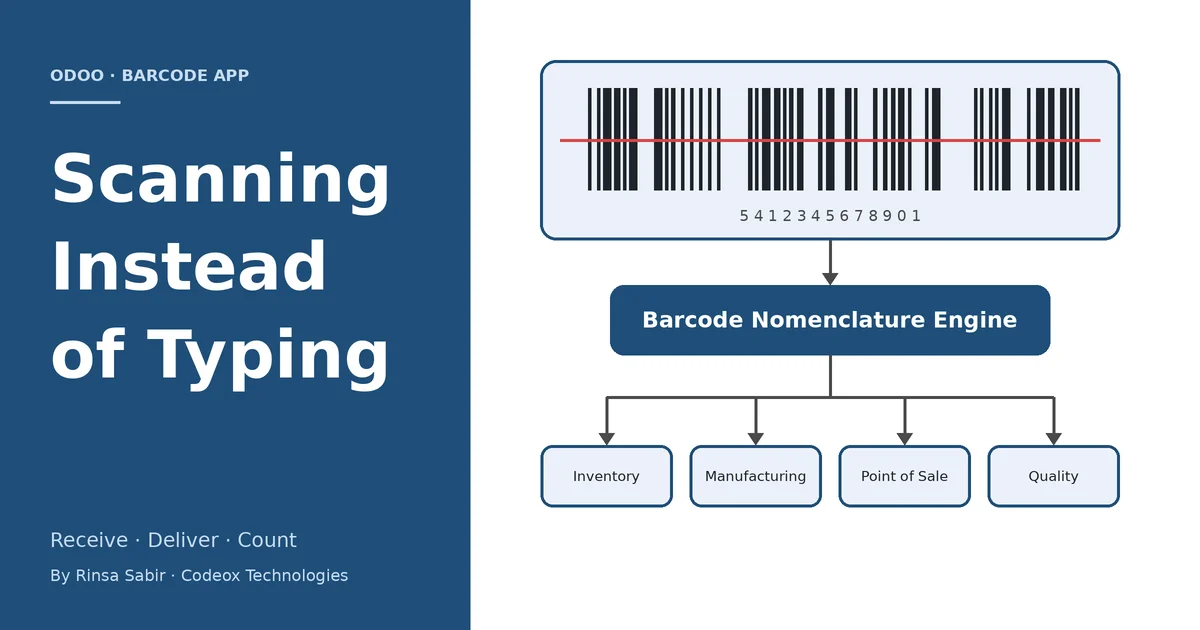
It's easy to think of Barcode as a feature that belongs to the Inventory app, but that's not really accurate. Odoo built the barcode-reading logic once, as a shared piece of the framework, and then let other apps plug into it. Inventory uses it for receipts, deliveries, and stock counts. Manufacturing uses the exact same engine to consume raw materials and register finished goods on the shop floor. Point of Sale uses it at the register to pull up a product the moment its barcode is scanned. Even Quality checks can be triggered by a scan. Different screens, same underlying logic — which is why, once you understand how scanning works in one app, you already understand most of how it works everywhere else.
Inventory, Manufacturing, Point of Sale, and Quality all read barcodes through the same nomenclature engine — configure the rules once, and every app benefits.
The Problem It's Actually Solving
Picture a mid-sized distribution company. A truck shows up with forty different products on it, some in boxes, some in loose pallets, a few of them batch-tracked because they have expiry dates. The old way of receiving this: someone stands at a desktop computer with a paper packing list, opens the matching transfer in Odoo, and types in each product code and quantity by hand while checking it against the paper. It's slow, it pulls a person away from the actual physical unloading, and every typed line is a chance for a mistake to slip into stock records that the whole company then relies on.
With the Barcode app, that same person just opens the app on a phone or a handheld scanner, taps on the waiting receipt (or scans a barcode that opens it directly), and starts scanning products as they come off the truck. Each scan adds that product to the receipt with a quantity of one; scanning it again bumps the quantity up. If a product is batch-tracked, scanning its barcode can also capture the lot number and expiry date in the same motion, provided the label is printed in a format Odoo recognizes. When everything is in, a scan of a printed "Validate" barcode closes out the whole operation. Nobody sits at a desktop. Nobody re-types anything from the paper list. Stock is accurate the moment the last pallet is scanned, not hours later when someone finally gets around to data entry.
Receiving the same delivery the old way versus scanning it in directly — stock is accurate the moment the last pallet is scanned.
How Odoo Actually Reads the Barcode
This is the part that's worth understanding if you're the one configuring it, because it's not magic — it's rules. Every barcode that gets scanned is checked against a Barcode Nomenclature, which is really just an ordered list of patterns Odoo knows how to interpret. A plain EAN-13 code matches straight to a product. A location label matches to a warehouse location. A specially formatted code can even encode a weight or a quantity directly inside the barcode itself, which is how a scale-printed label for a kilo of cheese can tell Odoo both what the product is and how much of it there is, in one scan.
Every scan is compared against the nomenclature's rules until Odoo finds a match — a product, a location, a lot number, or a command like Validate.
Odoo ships with two ready-made nomenclatures. The default one covers the common cases most companies need out of the box. The other follows the GS1-128 standard, which is the barcode format a lot of manufacturers and retailers already use on their packaging — it can pack a product code, a lot number, a best-before date, and a quantity into a single scan. If a client already prints their own barcodes in a format that doesn't match either of these, new rules can be added to the nomenclature so Odoo learns to recognize their existing labels instead of asking the warehouse to switch label formats.
A single GS1-128 label can carry the product code, lot number, expiry date, and quantity all in one scan — no separate lookup needed.
There's also a set of what Odoo calls command barcodes — printable barcodes for actions like Validate, Discard, Print, or adding a specific quantity. Once these are printed and stuck somewhere near the scanning station, an operator can complete an entire transfer without ever touching a keyboard, mouse, or touchscreen. Everything happens through the scanner.
What's Worth Knowing About It
No special hardware required to get started. A phone or tablet camera works fine for moderate volume. For a busy warehouse doing this all day, a dedicated handheld or ring scanner paired over Bluetooth is far more comfortable, and Odoo supports both.
It keeps working when the wifi doesn't. As long as the app was opened at least once while online, it caches what it needs and lets scanning continue through a dead spot in the warehouse. Everything syncs back to the server automatically once the connection returns.
Batch and wave picking. Instead of processing delivery orders one at a time, an operator can pick several orders together in a single walk through the warehouse, with the app telling them what to grab and where to put it.
Lot and serial numbers get captured at the source. Rather than someone typing a serial number into a form after the fact, it's scanned in at receiving or at production, which is exactly where it's least likely to be mistyped.
Manufacturing benefits just as much as the warehouse does. A production operator can scan the components they're consuming and the lot number of the finished product they just made, right there on the shop floor, without walking back to an office computer.
A Realistic Example
Take a company that assembles and ships electronics kits. Their afternoon dispatch run used to work like this: the warehouse team printed the day's delivery orders, walked the floor with clipboards, pulled the right items by memory, and handed everything to someone at a desk who then matched it all back up in Odoo and typed in quantities before validating each delivery. Sales orders arriving through the day meant the office regularly fell behind by an hour or two, which showed up as delayed shipping confirmations to customers.
After switching that team over to the Barcode app, the process flipped around. The warehouse staff open the app, tap into a batch of the day's ready deliveries, and the app walks them through each pick location in order. They scan the location, scan the product, scan the next location, and so on. No clipboard, no separate data-entry pass, no gap between "the product physically left the shelf" and "Odoo knows it left the shelf." The person who used to sit at the desk re-typing everything now spends that time handling exceptions instead — the actual problems that need a human, rather than routine entry that never needed one in the first place.
Why It's Worth Recommending
For clients who move physical stock — which is most of them, in some form — Barcode tends to be one of the more visible wins we can deliver without a heavy development effort. Turning it on is largely a configuration exercise: printing labels, setting up (or adjusting) the nomenclature, and training the floor team on the scan sequence for their operations. There's rarely a need to write custom code unless the client's existing barcode labels don't match a standard nomenclature, in which case adding a few nomenclature rules usually covers it.
It's a fast, visible improvement clients notice within days, which makes it a good early milestone in an inventory or manufacturing implementation.
Errors that used to show up as stock discrepancies during month-end counts tend to drop noticeably once typing is removed from the process.
It scales down as well as up — a five-person warehouse benefits from it almost as much as a hundred-person one, since the problem it solves (manual entry mistakes) doesn't really depend on headcount.
Where It Has Limits
It isn't a fix for a warehouse that hasn't been organized yet. If storage locations aren't labeled, or products don't have barcodes printed anywhere, scanning has nothing to scan. The nomenclature also needs a bit of care during setup — if two different label formats accidentally match the same rule, the app can read the wrong thing from a barcode, which is worse than not scanning at all. It's a tool that rewards a bit of upfront configuration and training; it doesn't replace the need for a warehouse to have its basics (labels, locations, product codes) in order first.
Bottom Line
Barcode doesn't get talked about as often as the bigger apps, probably because it doesn't look like much on its own — it's mostly a phone screen with a big scan button. But it quietly removes one of the most error-prone parts of running a warehouse or a shop floor: typing the same product codes and quantities over and over, all day, every day. For any client doing real physical stock movement, it's worth checking whether they're already using it, and if not, why not.
Sep 30, 2026
Odoo 20 Inventory Valuation: Four New Accrual Accounts to Explain Your Stock Variation
Finally know why your stock variation isn't zero
The Problem This Solves
If you've closed the books in Odoo 18 or 19 under Perpetual (Automated) inventory valuation, you know this pain: goods are received but the vendor bill hasn't landed yet, or a bill is posted before the goods physically arrive. On the sales side, the same gap exists — deliveries go out before invoices are raised, or invoices go out before goods are delivered. Odoo would dump all of this into a single Stock Variation account. The total was accurate, but at month-end you had no way to tell why the number wasn't zero. You'd end up manually creating extra accounts and posting your own journal entries just to find out.
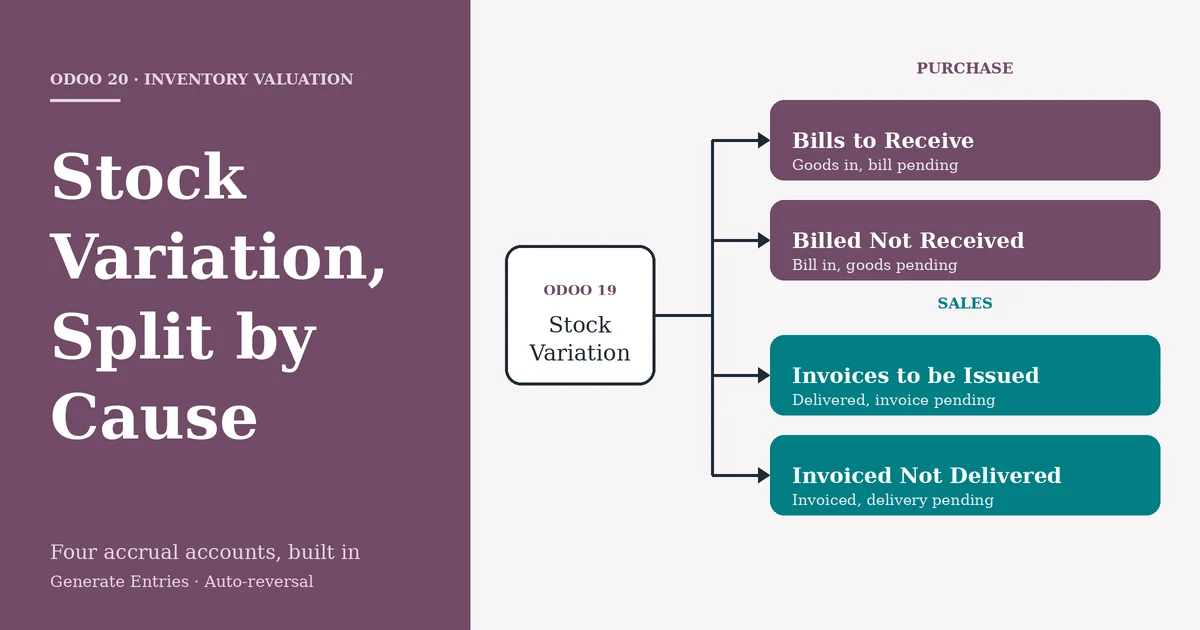
Odoo 20 fixes this natively by splitting that one variance account into four purpose-built accrual accounts and automating the entries around them.
Odoo 19 vs. Odoo 20: What Actually Changed
Aspect
Odoo 19
Odoo 20
Variance visibility
Single Stock Variation account absorbs every timing gap
Split into 4 dedicated accounts: Invoices to be Issued, Invoiced Not Delivered, Bills to Receive, Billed Not Received
Where configured
Product Category only
Product Category and a new central General Settings → Accounting → "Accruals" section, inherited by every category
Setup effort
Consultant/user had to manually create these 4 GL accounts and wire up journal entries every month
Standard chart of accounts ships with them pre-built (e.g. 121200, 212000, 211100, 141000) — just map and go
Inventory Valuation label
"Perpetual" / "Periodic"
Renamed to "Perpetual (at invoicing)" / "Periodic (at closing)" — states explicitly when valuation posts
Accrual + reversal entries
Manual journal entries required to accrue the variance and manually reverse them next period
Generate Entries creates the accrual automatically, and Odoo posts the reversal entry on the next day by itself
Month-end diagnosis
Investigate the Stock Variation balance manually to figure out the cause
Inventory Valuation report shows the exact account (and therefore the exact cause) in its own section
The two screenshots below show this concretely: the General Settings → Accruals screen lets you set Invoices to be Issued (121200), Invoiced Not Delivered (212000), Bills to Receive (211100), and Billed Not Received (141000) once at the company level — every product category (like "Goods" below) then inherits these unless overridden, alongside the renamed Inventory Valuation: Perpetual (at invoicing) setting and the existing Stock Account / Stock Variation fields.
Figure 1 — General Settings → Accounting → Accruals: company-wide default accounts for Sale and Purchase accruals.
Figure 2 — Product Category ("Goods") inheriting the four accrual accounts, plus the renamed "Perpetual (at invoicing)" valuation method.
The Four New Accounts
Account
Type
Side
Triggered When
Bills to Receive
Current Liability
Purchase
Goods received, vendor bill not yet created
Billed Not Received
Current Asset
Purchase
Vendor bill created, goods not yet received
Invoices to be Issued
Current Asset
Sales
Goods delivered, invoice not yet created
Invoiced Not Delivered
Current Liability
Sales
Invoice created, goods not yet delivered
Setting It Up
Chart of Accounts: the four accounts ship by default (e.g. 121200, 212000, 211100, 141000) — create your own if you want custom codes.
General Settings → Accounting → Accruals: set the company-wide defaults for Sale Accruals and Purchase Accruals here — every product category inherits them automatically.
Product Category → Inventory Valuation: choose the costing method (e.g. Perpetual (at invoicing) / Average Cost), then override any of the four accounts per category if needed. You can also rename the default "Stock Variation" account to something clearer like "Cost of Revenue."
Once mapped, no manual journal entries are needed — Odoo routes timing differences into the correct account by itself.
Purchase Side: Two Scenarios
Goods Received, Bill Pending
A purchase receipt is validated for $100 but no vendor bill exists yet.
The Inventory Valuation Report shows the $100 under Bills to Receive instead of a generic variance line.
Generate Entries at month-end creates the accrual: Stock Valuation is debited on receipt; the accrual entry knocks Stock Variation to zero and credits Bills to Receive $100.
Balance Sheet: Current Assets +100 (inventory), Current Liabilities +100 (Bills to Receive) — a clean accrual, P&L variance nets to zero.
Odoo automatically reverses this entry the next day, so once the real bill posts, the accrual unwinds cleanly.
Bill Received, Goods Not Yet Delivered by Vendor
A second purchase order (cost $200) has its bill confirmed, but the receipt hasn't happened.
The report now shows Billed Not Received at $200 alongside the earlier Bills to Receive at $100.
Generate Entries nets Cost of Goods Sold to zero, debits Billed Not Received, and credits Stock Variation.
Balance Sheet: Current Assets = $100 (actual inventory) + $200 (Billed Not Received, representing prepayment for goods in transit) = $300; Current Liabilities carry the $100 Bills to Receive.
Once goods are actually received, this account clears automatically.
Sales Side: Two Scenarios
Delivered, Invoice Still Pending
A sales order is confirmed and delivered, but the customer invoice hasn't been raised — the most common month-end situation.
The Inventory Valuation Report shows the delivered value under Invoices to be Issued instead of an unexplained variance.
Generate Entries produces the accrual, in two parts: Entry 1 — Product Sales credited → Invoices to be Issued debited (functionally the same role as Odoo 18's "Stock Interim Delivered" account) → Stock Variation credited → Cost of Goods Sold debited. Entry 2 — Stock Variation debited against Entry 1's credit → nets to zero → Inventory Valuation credited.
Reversal (automatic, next day): Odoo posts this on its own — no manual reversal required.
P&L: Cost of Sales and Stock Variation both net to zero; revenue and COGS are matched for the period even before the invoice exists.
Balance Sheet: Invoices to be Issued sits as a Current Asset — revenue earned but not yet billed.
When the real invoice is created afterward, it debits Accounts Receivable and credits Income as normal; the auto-reversal ensures nothing is double-counted.
Invoiced, Delivery Still Pending
The reverse gap: the customer invoice is confirmed, but goods haven't physically left the warehouse.
The report shows the value under Invoiced Not Delivered — flagging that revenue has been booked ahead of the physical delivery.
This posts as a Current Liability: you've billed the customer but still owe them the goods.
Why the Underlying Logic Matters
This is really Odoo 18 and Odoo 19 merged into one model:
Like Odoo 18, it uses interim-style accounts to bridge the timing gap between physical stock movement and the financial document.
Like Odoo 19, those accounts stay visible in the Inventory Valuation report drill-down, so you can trace why a variance exists without leaving the report.
Unlike either version, Generate Entries automates the full accrual-and-reversal cycle, and the accounts are now standard chart-of-account defaults set centrally, not something you build yourself.
Key Takeaway
For any business running Perpetual (at invoicing) valuation — which covers most Odoo Inventory + Accounting deployments — this is a genuine functional upgrade, not a cosmetic one. It takes the "black box" stock variation account, splits it by cause, exposes company-wide defaults in General Settings, and automates the entire close process around it. That's worth factoring into your Odoo 20 upgrade evaluation.
Sep 30, 2026
ODOO APPOINTMENTS Booking Straight From Google How Odoo Appointments and Google Reserve turn a search into a confirmed booking
How Odoo Appointments and Google Reserve turn a search into a confirmed booking
For many local businesses, the customer's journey no longer begins at the company website. It begins with a search. A prospective patient, diner or client types a service and a location into Google, scans the listings that appear, and decides within moments whom to contact. The businesses that make it easiest to act on that decision are the ones that win the booking.
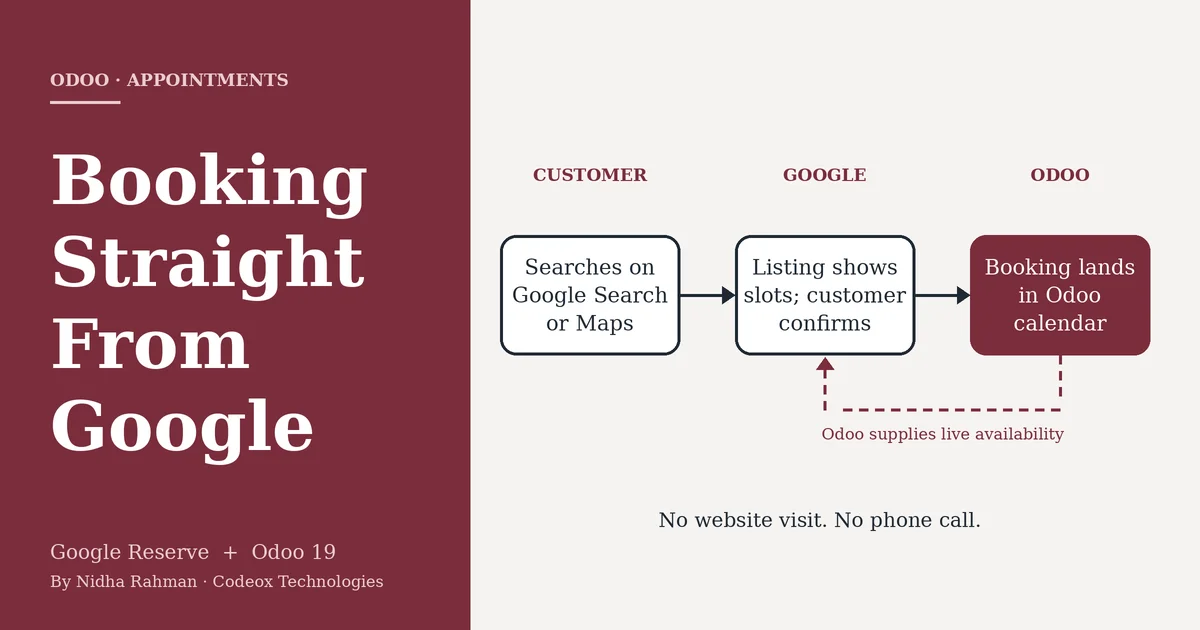
Odoo's Appointments app can now meet customers at that moment. Through its Google Reserve integration, customers book directly from Google Search, Google Maps and the Google Assistant, and the booking is created in Odoo without the customer having to visit the company's website. This article explains how the integration works, what else Odoo 19 adds to Appointments, and what to verify before recommending it to a client.
Key Points
Customers can book from Google Search, Google Maps and the Google Assistant, and the booking is created directly in Odoo.
Setup is configuration rather than development: one module, one merchant record and one synchronization.
Eligibility is set by Google, and the business address must match its Google Maps listing exactly.
Why the Booking Channel Matters
A conventional online booking asks a lot of the customer. They find the listing, open the website, locate the booking page, choose a time and complete a form. Every step is a chance to lose them. Behind the scenes, each channel that accepts bookings, whether a phone line, a web form or a walk-in, also creates work for staff, who must reconcile the results in a single system.
Consider an illustrative case: a physiotherapy clinic that closes at six. A prospective patient finds it on Google Maps at 9:40 in the evening. Without an online option, the best likely outcome is that the patient remembers to call the next day. With Google Reserve connected to Odoo, the patient can choose from the availability Odoo supplies and confirm a slot on the spot. The patient's details are written to Odoo Contacts, and the appointment is already in the therapist's calendar the next morning. Nobody has to answer a call, and nobody has to re-enter anything.
Figure 1. How a booking travels from a Google search to an Odoo calendar.
How the Integration Works
Configuration takes place entirely inside Odoo. According to Odoo's documentation, the process has four steps:
Install the module. Install Appointment Google Reserve from the Apps menu. The default Apps filter must be removed before searching for "Google".
Open an appointment type. In the Appointments app, open an existing appointment type or create a new one, then go to its Google Bookings tab.
Add the merchant. Select or create a Google Reserve Merchant and complete the business details. The business address must match the Google Maps listing exactly.
Synchronize. Select Synchronize with Google Reserve. The first synchronization can take up to 24 hours to propagate to Google's systems.
Figure 2. The setup flow, including the address check flagged in Odoo's documentation.
Odoo also exposes the settings Google expects from a booking partner. These include availability based on resources such as staff members or tables, automatic assignment, a scheduling window of up to 31 days, minimum lead times for booking and cancelling, and email reminders. Once the connection is live, the details a customer enters on Google are written to Odoo Contacts, and the booking appears in Odoo alongside those made through any other channel.
Restaurants follow a variation of the same model. Tables defined on the Point of Sale floor plan, each with a maximum number of guests, act as the bookable resources, and reservations made through Google appear in the floor plan and the booking pipeline.
Other Appointments Improvements in Odoo 19
The Google integration sits alongside several other additions to Appointments listed in Odoo 19's release notes. Group sessions allow a capacity limit and multiple bookings in a single slot, which suits classes and workshops. An appointment type can move from a weekly recurring schedule to a flexible one, with durations shown on the booking page. Booking calendars can be embedded on external websites using an iframe, which is useful for clients whose sites are not built on Odoo. Reusable default questions keep intake forms consistent and make the answers easier to report on. And when a confirmed appointment creates a Field Service task, the appointment details are carried into that task automatically.
Practical Considerations
Eligibility is determined by Google rather than Odoo. Google's documentation requires a business with a physical location whose address can be matched to its Maps database, and eligibility may further depend on business type and country. It should be confirmed for each client before the feature is proposed.
Address matching deserves particular care. Odoo's documentation warns that mismatches in formatting or unit numbers can cause synchronization to fail or prevent the listing from appearing, and because the first synchronization can take up to a day, testing should be planned accordingly.
The integration is an Enterprise feature; Odoo has described synchronization with Google Bookings as available from Odoo Enterprise 18 onward. Finally, customers see the availability that Odoo supplies, so the integration is only as reliable as the calendars behind it. Out-of-date staff availability will lead to bookings the business cannot honour.
Conclusion
Google Reserve addresses a simple problem: customers who are ready to book at a moment when the business is unreachable. For clients whose revenue depends on appointments or reservations, and who already use or are considering Odoo Appointments, the integration adds a channel customers already rely on, at the cost of a modest amount of configuration. The real work lies in verifying eligibility and aligning the business's details with its Google listing, and doing that before the feature is promised is what keeps the rollout smooth.
Sources and Further Reading
Google reserve integration. Odoo 19.0 documentation, Appointments. odoo.com/documentation/19.0/applications/productivity/appointments/google_reserve.html
Odoo 19 Release Notes. Appointments section. odoo.com/odoo-19-release-notes
POS Restaurant: Reservations with Google Bookings. Odoo blog. odoo.com/blog/business-hacks-1/pos-restaurant-reservations-with-google-bookings-2211
Skip the line, book online with Google table reservation integrated with Odoo. Odoo Experience 2025 session summary. oduist.com/blog/odoo-experience-2025-ai-summaries-2/261-skip-the-line-book-online-with-google-table-reservation-integrated-with-odoo-263
Reservations: Overview and Eligibility. Google Actions Center documentation. developers.google.com/actions-center/verticals/reservations/bl/overview
.svg)