.svg)
ODOO APPOINTMENTS Booking Straight From Google How Odoo Appointments and Google Reserve turn a search into a confirmed booking
Reported By
Nidha Rahman
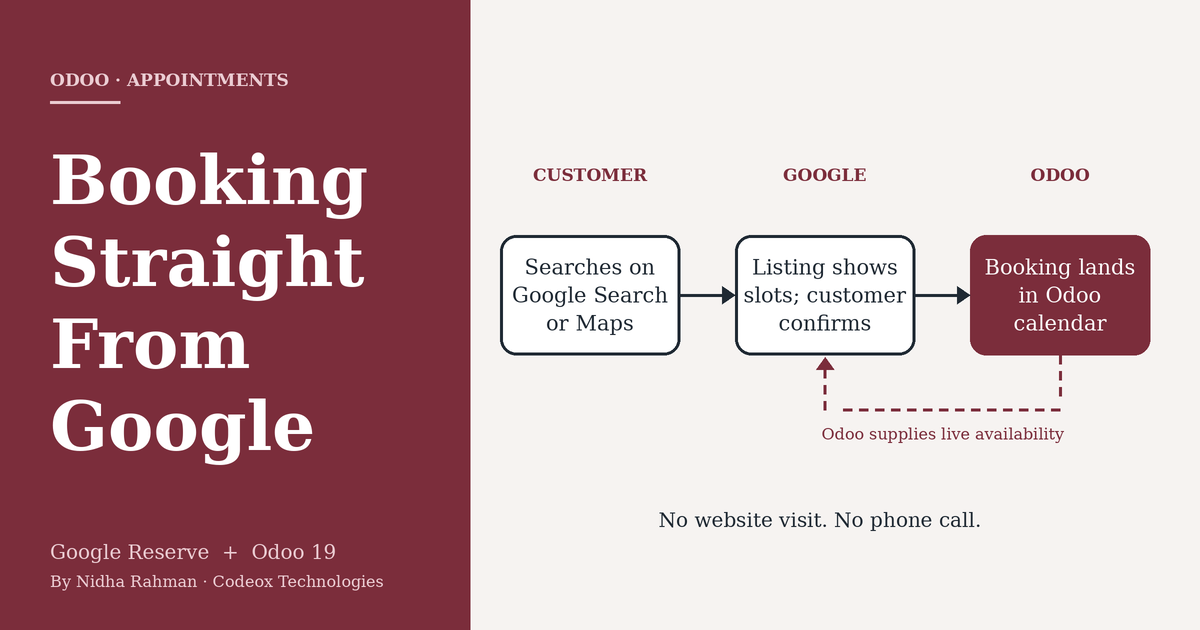
How Odoo Appointments and Google Reserve turn a search into a confirmed booking
For many local businesses, the customer's journey no longer begins at the company website. It begins with a search. A prospective patient, diner or client types a service and a location into Google, scans the listings that appear, and decides within moments whom to contact. The businesses that make it easiest to act on that decision are the ones that win the booking.
Odoo's Appointments app can now meet customers at that moment. Through its Google Reserve integration, customers book directly from Google Search, Google Maps and the Google Assistant, and the booking is created in Odoo without the customer having to visit the company's website. This article explains how the integration works, what else Odoo 19 adds to Appointments, and what to verify before recommending it to a client.
Key Points
- Customers can book from Google Search, Google Maps and the Google Assistant, and the booking is created directly in Odoo.
- Setup is configuration rather than development: one module, one merchant record and one synchronization.
- Eligibility is set by Google, and the business address must match its Google Maps listing exactly.
Why the Booking Channel Matters
A conventional online booking asks a lot of the customer. They find the listing, open the website, locate the booking page, choose a time and complete a form. Every step is a chance to lose them. Behind the scenes, each channel that accepts bookings, whether a phone line, a web form or a walk-in, also creates work for staff, who must reconcile the results in a single system.
Consider an illustrative case: a physiotherapy clinic that closes at six. A prospective patient finds it on Google Maps at 9:40 in the evening. Without an online option, the best likely outcome is that the patient remembers to call the next day. With Google Reserve connected to Odoo, the patient can choose from the availability Odoo supplies and confirm a slot on the spot. The patient's details are written to Odoo Contacts, and the appointment is already in the therapist's calendar the next morning. Nobody has to answer a call, and nobody has to re-enter anything.

How the Integration Works
Configuration takes place entirely inside Odoo. According to Odoo's documentation, the process has four steps:
- Install the module. Install Appointment Google Reserve from the Apps menu. The default Apps filter must be removed before searching for "Google".
- Open an appointment type. In the Appointments app, open an existing appointment type or create a new one, then go to its Google Bookings tab.
- Add the merchant. Select or create a Google Reserve Merchant and complete the business details. The business address must match the Google Maps listing exactly.
- Synchronize. Select Synchronize with Google Reserve. The first synchronization can take up to 24 hours to propagate to Google's systems.

Odoo also exposes the settings Google expects from a booking partner. These include availability based on resources such as staff members or tables, automatic assignment, a scheduling window of up to 31 days, minimum lead times for booking and cancelling, and email reminders. Once the connection is live, the details a customer enters on Google are written to Odoo Contacts, and the booking appears in Odoo alongside those made through any other channel.
Restaurants follow a variation of the same model. Tables defined on the Point of Sale floor plan, each with a maximum number of guests, act as the bookable resources, and reservations made through Google appear in the floor plan and the booking pipeline.
Other Appointments Improvements in Odoo 19
The Google integration sits alongside several other additions to Appointments listed in Odoo 19's release notes. Group sessions allow a capacity limit and multiple bookings in a single slot, which suits classes and workshops. An appointment type can move from a weekly recurring schedule to a flexible one, with durations shown on the booking page. Booking calendars can be embedded on external websites using an iframe, which is useful for clients whose sites are not built on Odoo. Reusable default questions keep intake forms consistent and make the answers easier to report on. And when a confirmed appointment creates a Field Service task, the appointment details are carried into that task automatically.
Practical Considerations
Eligibility is determined by Google rather than Odoo. Google's documentation requires a business with a physical location whose address can be matched to its Maps database, and eligibility may further depend on business type and country. It should be confirmed for each client before the feature is proposed.
Address matching deserves particular care. Odoo's documentation warns that mismatches in formatting or unit numbers can cause synchronization to fail or prevent the listing from appearing, and because the first synchronization can take up to a day, testing should be planned accordingly.
The integration is an Enterprise feature; Odoo has described synchronization with Google Bookings as available from Odoo Enterprise 18 onward. Finally, customers see the availability that Odoo supplies, so the integration is only as reliable as the calendars behind it. Out-of-date staff availability will lead to bookings the business cannot honour.
Conclusion
Google Reserve addresses a simple problem: customers who are ready to book at a moment when the business is unreachable. For clients whose revenue depends on appointments or reservations, and who already use or are considering Odoo Appointments, the integration adds a channel customers already rely on, at the cost of a modest amount of configuration. The real work lies in verifying eligibility and aligning the business's details with its Google listing, and doing that before the feature is promised is what keeps the rollout smooth.
Sources and Further Reading
- Google reserve integration. Odoo 19.0 documentation, Appointments. odoo.com/documentation/19.0/applications/productivity/appointments/google_reserve.html
- Odoo 19 Release Notes. Appointments section. odoo.com/odoo-19-release-notes
- POS Restaurant: Reservations with Google Bookings. Odoo blog. odoo.com/blog/business-hacks-1/pos-restaurant-reservations-with-google-bookings-2211
- Skip the line, book online with Google table reservation integrated with Odoo. Odoo Experience 2025 session summary. oduist.com/blog/odoo-experience-2025-ai-summaries-2/261-skip-the-line-book-online-with-google-table-reservation-integrated-with-odoo-263
- Reservations: Overview and Eligibility. Google Actions Center documentation. developers.google.com/actions-center/verticals/reservations/bl/overview