.svg)
Passkeys vs Passwords: The Future of Authentication
Passwords have been the standard method of online authentication for decades. However, password reuse, phishing, credential theft, brute-force attacks, and forgotten passwords continue to create security and usability challenges.
As organizations look for stronger and simpler authentication methods, Passkeys are becoming an important alternative to traditional passwords.
Passkeys use public-key cryptography and can allow users to sign in using device-based authentication such as biometrics, a device PIN, or another supported authenticator. Unlike passwords, the website does not need to receive or store a shared password secret.
So, are passkeys going to replace passwords completely? In this article, we compare Passkeys vs Passwords and explore what authentication could look like in 2026.
What Is a Password?
A password is a secret string of characters that a user provides to prove their identity when signing into a website or application.
A typical password authentication process looks like this:
- The user creates a password.
- The website stores a protected representation of the password.
- The user enters the password during login.
- The server verifies the submitted password.
- If verification succeeds, the user is authenticated.
Although passwords are simple and widely supported, their security depends heavily on user behavior and how the authentication system is implemented.
Why Are Passwords a Security Problem?
Passwords can be exposed through several common attack methods.
Phishing
Attackers can create fake login pages designed to trick users into entering their passwords.
Password Reuse
Users sometimes reuse the same password across multiple websites. If one service suffers a breach, attackers may attempt to use the stolen credentials on other services.
Credential Theft
Passwords can be stolen through malware, phishing, compromised websites, insecure storage, or other attacks.
Brute-Force and Guessing Attacks
Weak or predictable passwords can be targeted through automated guessing and password-cracking techniques.
Password Recovery
Forgotten passwords create additional recovery workflows involving email links, verification codes, or support processes.
What Are Passkeys?
Passkeys are credentials based on public-key cryptography that allow users to authenticate without entering a traditional password.
When a passkey is created, an authenticator generates a cryptographic key pair:
- Public key: stored by the website or service.
- Private key: protected by the user's authenticator.
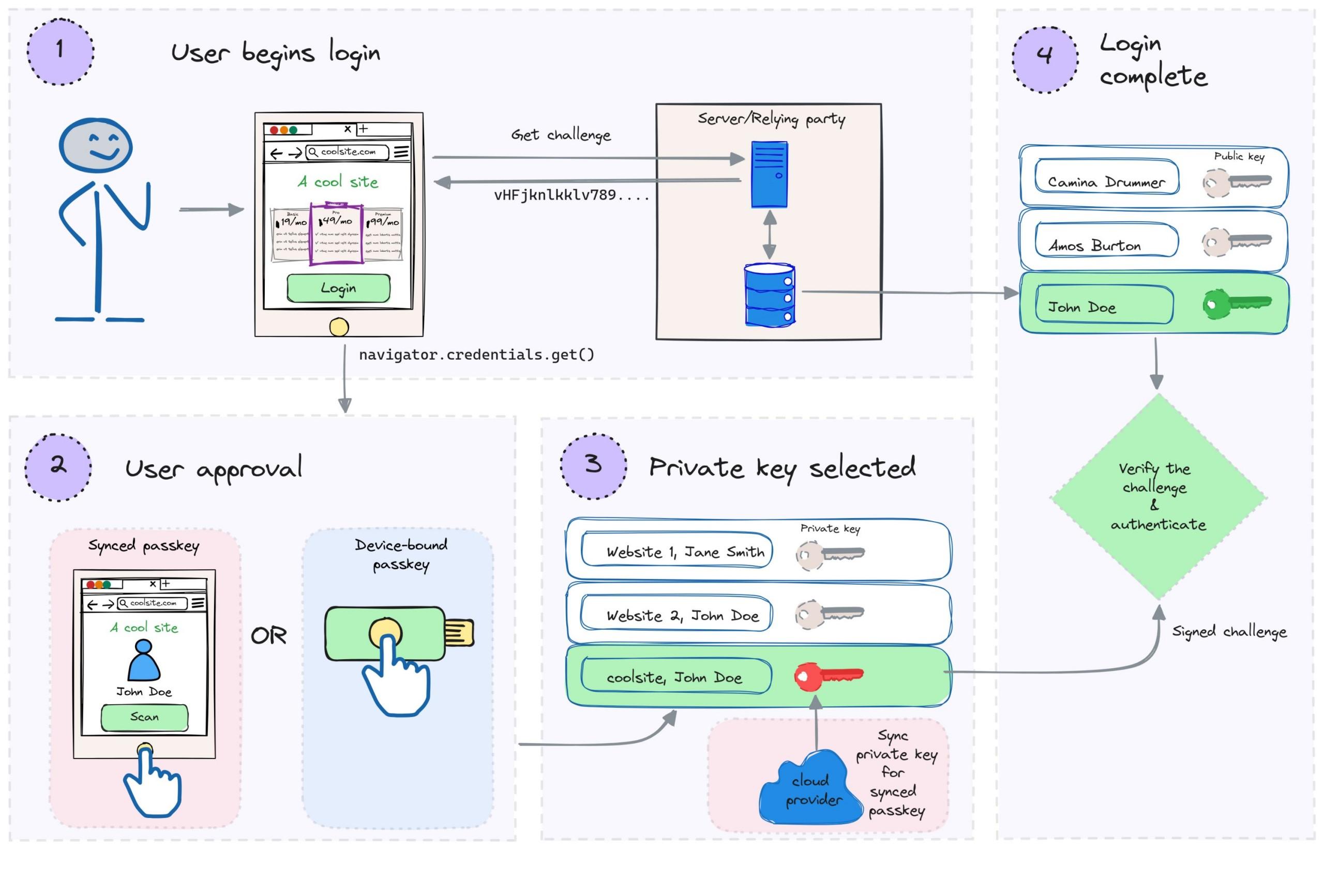
The private key is not sent to the website during normal authentication. Instead, the authenticator uses it to sign a challenge from the server, and the server verifies the signature using the corresponding public key.
This changes the fundamental authentication model from sharing a secret to proving possession of a cryptographic credential.
How Does a Passkey Login Work?
A simplified passkey authentication process looks like this:
- The user chooses to sign in with a passkey.
- The website generates a unique authentication challenge.
- The browser communicates with the user's authenticator.
- The user approves authentication using biometrics, a device PIN, or another supported method.
- The authenticator signs the challenge with the private key.
- The website verifies the signature using the stored public key.
- The user is authenticated.
WebAuthn provides the web APIs used for passkey authentication.
Passkeys vs Passwords: Key Differences
| Feature | Passwords | Passkeys |
|---|---|---|
| Authentication method | Shared secret | Public-key cryptography |
| User needs to remember a secret | Yes | No traditional password required |
| Phishing resistance | Limited | Strong protection against phishing |
| Password reuse risk | Possible | Passkeys are tied to specific services |
| Server stores | Password verifier | Public key |
| Login experience | Enter username and password | Device-based authentication |
| Credential generation | Often user-created | Generated by an authenticator |
| Recovery considerations | Password reset process | Passkey/device/account recovery |
Why Are Passkeys More Resistant to Phishing?
One of the biggest advantages of passkeys is their resistance to traditional phishing attacks.
With a password, a user can accidentally type their credentials into a fake website.
With WebAuthn-based authentication, the credential is associated with the website's origin. The authenticator signs authentication data for the legitimate relying party rather than simply revealing a password that can be copied and reused.
This makes traditional credential-harvesting phishing significantly harder.
Are Passkeys More Secure Than Passwords?
Passkeys can address several major weaknesses associated with passwords.
They are not based on user-created secrets, are designed to be unique to a service, and use asymmetric cryptography rather than sending a password to the server for verification.
However, passkeys do not make every security problem disappear.
Organizations still need to protect user accounts, sessions, recovery mechanisms, devices, application logic, and backend infrastructure.
What Happens if a Server Is Breached?
With traditional password systems, a compromised password database can become a serious security risk, particularly when users have reused passwords elsewhere.
With passkeys, the service stores the public key used to verify authentication. The corresponding private key is protected by the authenticator rather than being sent to the server as part of normal authentication.
This means stealing a site's stored public keys does not directly provide attackers with the private keys required to authenticate.
Passkeys and Biometrics
Passkeys are often associated with fingerprint or facial recognition, but biometrics themselves are not the passkey.
Biometric authentication can be used by the device to unlock or authorize use of the credential.
For example, a user may approve a passkey using:
- Fingerprint recognition
- Face recognition
- Device PIN
- Device passcode
- Security keys
- Other supported authenticators
The exact authentication experience depends on the operating system, browser, device, and authenticator.
Are Passkeys Easy to Use?
One of the main advantages of passkeys is the simplified login experience.
Instead of remembering a password, a user can authenticate using an authenticator already available on their device.
Modern WebAuthn implementations can also support passkey autofill experiences, allowing compatible credentials to appear as login options alongside saved passwords.
What Are the Challenges of Passkeys?
Passkeys are not completely free of implementation and user-experience challenges.
Account Recovery
Organizations need a reliable recovery strategy for users who lose access to a device or credential.
Device Management
Users may have multiple devices and multiple passkeys associated with the same account.
Migration
Existing applications with large password-based user populations need a carefully designed migration strategy.
Legacy Systems
Some older systems may not support modern passkey authentication and may require passwords or alternative authentication methods.
User Education
Users may initially be unfamiliar with passkeys, especially when transitioning from traditional passwords.
Can Businesses Remove Passwords Completely?
Some applications can move toward passwordless authentication, but completely removing passwords requires careful planning.
Organizations need to consider:
- Passkey enrollment
- Account recovery
- Device replacement
- Lost-device scenarios
- Authentication fallback
- Existing user migration
- Customer support
- Security policies
A gradual transition can allow users to register passkeys while maintaining existing authentication methods during the migration period.
Passkeys vs Passwords: Which Should Businesses Choose?
| Business Requirement | Recommended Approach |
|---|---|
| Simple legacy authentication | Passwords may still be supported |
| Strong phishing resistance | Passkeys are a strong option |
| Passwordless user experience | Passkeys |
| Existing password-based application | Gradual passkey adoption |
| High-security application | Passkeys with appropriate security controls |
| Large existing user base | Hybrid migration strategy |
The Future of Authentication in 2026
Authentication is moving toward systems that reduce dependence on shared secrets.
Passkeys are an important part of this shift because they combine public-key cryptography with familiar device-based authentication experiences.
WebAuthn is already widely available across modern browsers and devices, although specific capabilities can vary by platform and authenticator.
For businesses building new applications, authentication architecture is increasingly becoming a strategic security decision rather than simply a login-page feature.
Final Thoughts
Passwords are familiar and widely supported, but they come with significant security and usability challenges.
Passkeys provide a different approach: instead of asking users to remember and submit a shared secret, they use cryptographic credentials protected by an authenticator.
For organizations looking to improve authentication security and reduce password-related friction, passkeys are an important technology to consider in 2026.
The future may not be about suddenly eliminating every password. Instead, businesses can gradually introduce passkeys, improve recovery processes, and move toward authentication systems that are both more secure and easier for users.