.svg)
Trunk-Based Development vs Git Flow: Which Git Workflow Is Better in 2026?
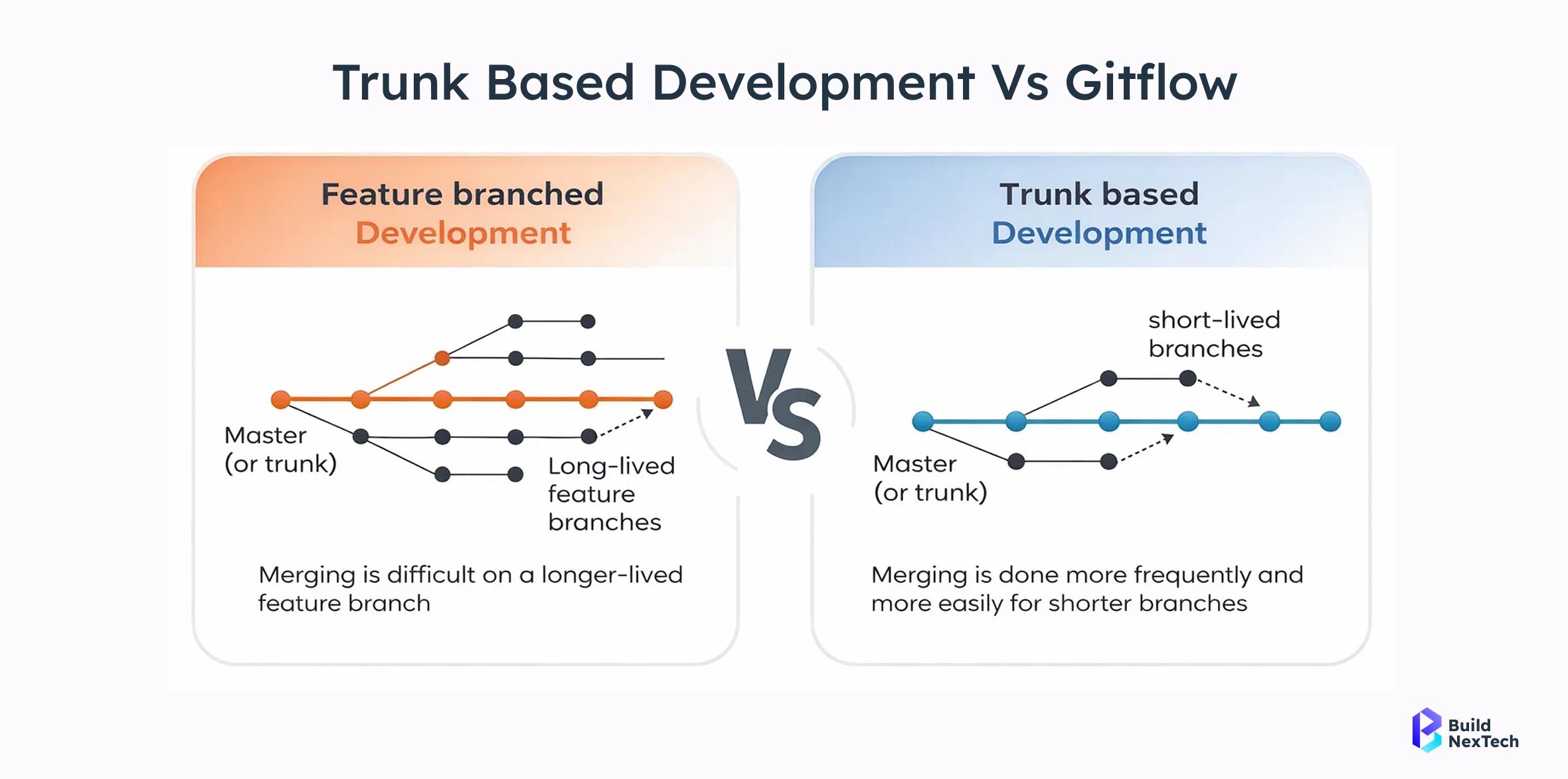
Choosing the right Git workflow can have a major impact on how efficiently a development team builds, tests, reviews, and releases software. Two well-known approaches are Trunk-Based Development and Git Flow.
Both workflows help developers organize source code and collaborate effectively, but they take very different approaches to branching and releases. Trunk-Based Development focuses on keeping changes small and integrating them into a shared main branch frequently, while Git Flow uses multiple long-lived branches to organize feature development, releases, and hotfixes.
As modern software teams increasingly adopt CI/CD, DevOps, cloud-native development, and frequent releases, understanding the differences between these two approaches can help businesses choose a development workflow that matches their goals.
What Is Trunk-Based Development?
Trunk-Based Development (TBD) is a Git branching strategy where developers continuously integrate small changes into a central branch, commonly called main or trunk.
Developers may use short-lived branches for individual tasks, but those branches are merged back into the main branch quickly rather than remaining separate for weeks or months.
The primary goal is to keep the main codebase continuously integrated and close to a deployable state. This approach works particularly well with automated testing and CI/CD pipelines.
Trunk-Based Development is strongly associated with Continuous Integration because developers integrate their changes frequently instead of allowing large amounts of work to accumulate on isolated branches.
What Is Git Flow?
Git Flow is a structured Git branching model originally introduced by Vincent Driessen. It organizes development around several branch types, including main, develop, feature, release, and hotfix.
In a traditional Git Flow workflow, developers create feature branches from develop. Completed features are merged back into develop, while release branches are used to prepare production releases. Hotfix branches can be created from main when urgent production fixes are required.
This structured approach can be useful for teams with formal release cycles, but it introduces more branches and merge points than Trunk-Based Development.
Trunk-Based Development vs Git Flow: Quick Comparison
| Feature | Trunk-Based Development | Git Flow |
|---|---|---|
| Primary development branch | Main / Trunk | Develop |
| Feature branches | Short-lived | Often longer-lived |
| Integration frequency | Frequent | Usually less frequent |
| Release model | Continuous or frequent | Release-oriented |
| Branch complexity | Low | Higher |
| CI/CD compatibility | Excellent | Requires additional coordination |
| Merge conflict risk | Generally lower with frequent integration | Can increase with long-lived branches |
| Best suited for | Continuous delivery and modern DevOps teams | Structured and scheduled release environments |
Key Difference: How Teams Manage Branches
The biggest difference between Trunk-Based Development and Git Flow is the role of branches.
With Trunk-Based Development, the main branch is the center of development. Developers integrate changes frequently, keeping branches short-lived when they are needed.
With Git Flow, different branches have specific responsibilities. The develop branch integrates upcoming features, feature branches isolate individual tasks, release branches prepare production versions, and hotfix branches address urgent production problems.
This makes Git Flow more structured, but also creates more branch management and synchronization requirements.
Trunk-Based Development and CI/CD
Modern CI/CD pipelines benefit from frequent code integration. When developers continuously merge small changes into the main branch, automated builds and tests can validate those changes quickly.
This makes it easier for teams to identify problems early instead of discovering integration issues after several weeks of independent development.
Trunk-Based Development therefore fits naturally into environments where teams want to build, test, deploy, and release software frequently.
For effective implementation, teams should combine trunk-based workflows with automated testing, code review, branch protection, deployment automation, and monitoring.
How Git Flow Handles Releases
Git Flow was designed around a more structured release process. A typical workflow may look like:
- Create feature branches from
develop. - Develop and test individual features.
- Merge completed features into
develop. - Create a release branch when preparing a production version.
- Test and stabilize the release.
- Merge the release into
mainanddevelop. - Create a production tag.
- Create a hotfix branch from
mainwhen an urgent production fix is required.
This structure can provide clear separation between ongoing development and production releases. However, the additional branches can increase workflow complexity.
Advantages of Trunk-Based Development
1. Faster Integration
Small and frequent integrations reduce the amount of code that must be merged at one time. Developers can detect integration problems earlier and resolve them before they become complicated.
2. Better CI/CD Alignment
Trunk-Based Development works naturally with automated build, testing, and deployment pipelines. A healthy main branch can continuously move through the delivery pipeline.
3. Reduced Branch Complexity
Teams do not need to maintain numerous long-lived branches for development, releases, and hotfixes. This simplifies repository management.
4. Faster Feedback
When changes are integrated frequently, automated tests and code reviews provide feedback closer to the time the code was written.
5. Supports Frequent Releases
Because changes are integrated continuously, teams can release smaller increments more frequently instead of waiting for a large release cycle.
Advantages of Git Flow
1. Clear Branch Responsibilities
Git Flow clearly defines the purpose of different branches. This can make the workflow easy to understand for teams operating around formal release processes.
2. Structured Release Management
Dedicated release branches provide a controlled area for final testing, stabilization, and release preparation.
3. Dedicated Hotfix Process
Hotfix branches provide a defined workflow for making urgent changes to production without disrupting ongoing feature development.
4. Useful for Scheduled Releases
Organizations that release software according to planned versions or fixed release cycles may find Git Flow's structure useful.
Which Workflow Is Better for CI/CD?
For teams practicing modern Continuous Integration and Continuous Delivery, Trunk-Based Development is generally a more natural fit.
The reason is simple: CI depends on integrating changes frequently. Long-lived branches can allow codebases to drift apart, increasing the amount of work required when changes are eventually merged.
Trunk-Based Development minimizes this separation by encouraging small changes and frequent integration into the shared main branch.
However, adopting trunk-based development does not automatically create a successful CI/CD environment. Teams still need reliable automated tests, fast builds, code quality checks, deployment automation, monitoring, and appropriate branch protection.
What About Feature Branches?
Trunk-Based Development does not necessarily mean that developers must commit every change directly to main.
A team can use short-lived feature branches and pull requests while still following trunk-based principles. The important difference is that these branches should be integrated quickly rather than remaining active for long periods.
For larger or complex features, techniques such as feature flags and branch by abstraction can allow incomplete functionality to be integrated without necessarily exposing it to users.
Trunk-Based Development vs Git Flow for Large Teams
Team size alone does not determine which workflow should be used. Engineering maturity, release frequency, architecture, testing practices, and deployment requirements are equally important.
Large teams that operate modern CI/CD pipelines can use Trunk-Based Development successfully when they have strong automated testing, code review practices, and engineering standards.
Git Flow may still make sense when an organization has strict release procedures, multiple supported versions, or a strong need to separate release preparation from ongoing development.
When Should You Choose Trunk-Based Development?
Trunk-Based Development may be a strong choice if your organization:
- Uses CI/CD extensively.
- Wants to deploy frequently.
- Works with small, incremental changes.
- Has strong automated testing.
- Wants to reduce long-lived branches.
- Builds cloud-native or continuously delivered applications.
- Needs rapid feedback from development and testing.
- Has an engineering culture focused on continuous integration.
When Should You Choose Git Flow?
Git Flow can be considered when your project:
- Uses scheduled and versioned releases.
- Requires a formal release preparation phase.
- Needs dedicated release branches.
- Maintains multiple production versions.
- Has a workflow built around traditional release management.
- Benefits from clearly separated development and release branches.
Common Challenges When Moving to Trunk-Based Development
Switching from a branch-heavy workflow to Trunk-Based Development requires more than simply deleting branches.
Teams should first improve the engineering practices that make frequent integration safe.
- Automated testing: Critical functionality should have reliable automated tests.
- Fast CI pipelines: Builds and tests should provide feedback quickly.
- Small pull requests: Smaller changes are easier to review and integrate.
- Feature flags: Incomplete functionality can remain disabled while code is integrated.
- Code ownership: Teams should establish clear review and ownership practices.
- Branch protection: Rules can prevent untested or unauthorized changes from reaching the main branch.
Trunk-Based Development vs Git Flow: Which One Should Your Business Choose?
There is no universal Git workflow that works perfectly for every organization. The right choice depends on your product, engineering team, release strategy, and operational requirements.
If your goal is continuous integration, rapid development, frequent deployments, and modern DevOps practices, Trunk-Based Development is often the stronger option.
If your organization depends on structured release cycles, dedicated release branches, or formal version management, Git Flow may still provide useful organization.
The key is not to choose a workflow simply because it is popular. Your branching strategy should support the way your team actually builds, tests, releases, and maintains software.
How Code-OX Can Help Your Development Team
At Code-OX Technologies, we understand that an effective software development process requires more than writing code. The right architecture, Git workflow, CI/CD strategy, testing practices, and deployment infrastructure all contribute to reliable software delivery.
Whether your project needs a modern Trunk-Based Development workflow, a structured Git strategy, cloud infrastructure, CI/CD automation, or custom software development, choosing the right engineering approach can help your team deliver software more efficiently.
Conclusion
Trunk-Based Development and Git Flow are fundamentally different approaches to managing software development.
Git Flow emphasizes structured branches and release management, while Trunk-Based Development emphasizes frequent integration, smaller changes, and continuous delivery.
For modern teams focused on CI/CD, DevOps, cloud applications, and frequent releases, Trunk-Based Development can provide a simpler and faster development model. Git Flow, however, can remain useful for projects where controlled and scheduled releases are a major requirement.
The best Git workflow is ultimately the one that fits your team's engineering practices and business goals.