.svg)
When a Project Looks Fine Until You Check the Details: Making Project Work Visible with Odoo
تقرير من قبل
code
When a Project Looks Fine Until You Check the Details: Making Project Work Visible with Odoo
A project can be marked as “on track” while something is already going wrong.
A deadline is approaching, but several tasks are still open.
Employees are spending more hours than expected.
A client is waiting for a document that someone sent three days ago by email.
The project manager knows something is slipping, but finding out exactly where requires checking spreadsheets, messages, timesheets, and individual task updates.
The problem is not necessarily a lack of project management.
It is a lack of connected project information.
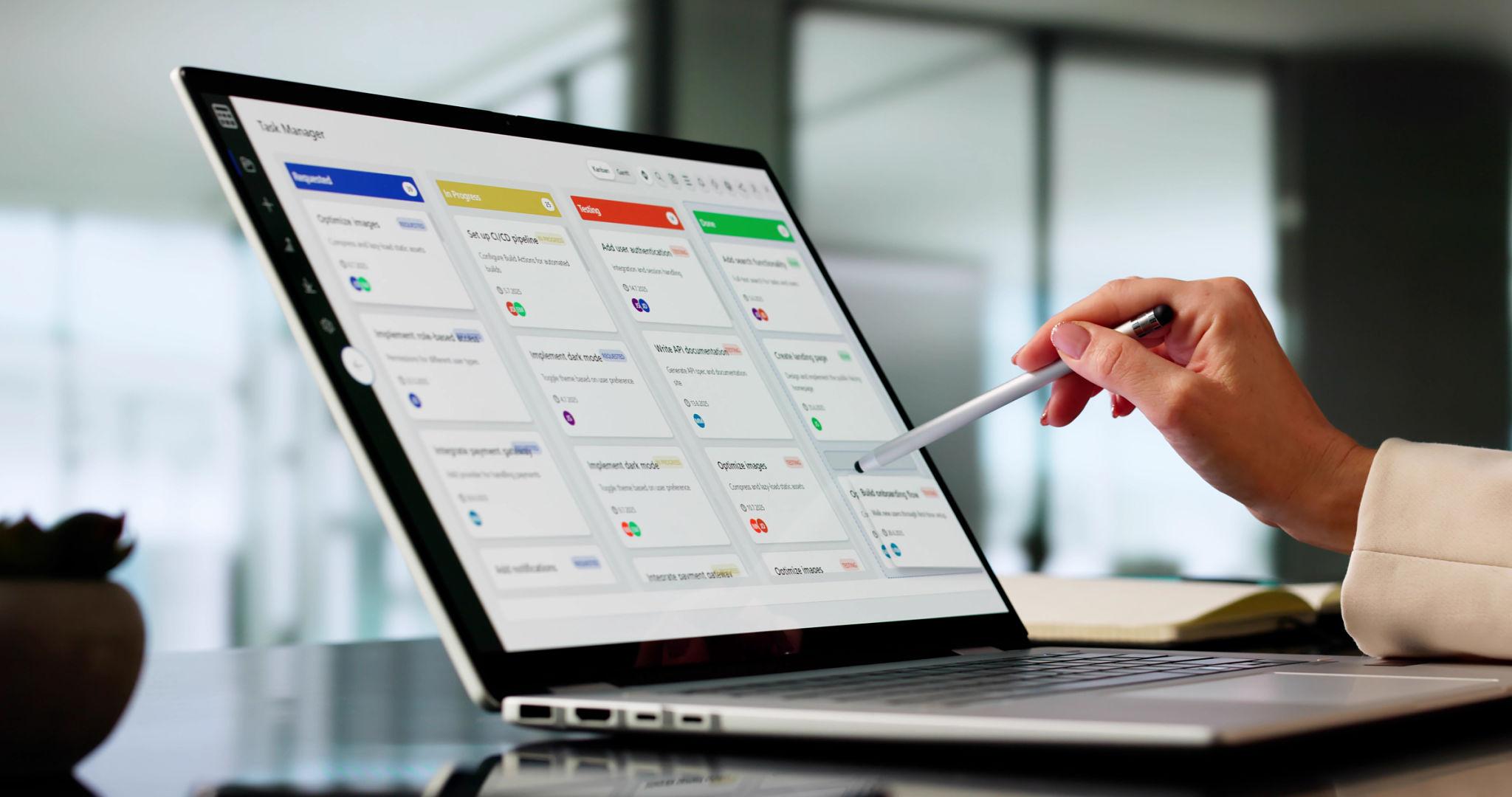
Odoo Projects brings tasks, timelines, time tracking, and customer-facing information into the same environment. Code-Ox implements and customizes the Projects application around the way each organization actually manages its work. The Code-Ox Projects offering includes Kanban, Gantt and List views, task-level time tracking, and a customer portal for project status and documents.
A Project Is Not a Checklist
Imagine a software development project scheduled for 12 weeks.
The project contains 80 tasks across design, development, testing, deployment, and client review.
On paper, the project manager can see that 65 tasks are complete.
That sounds healthy.
But the remaining 15 tasks include the final integration, security testing, customer approval, and deployment preparation.
The percentage complete does not tell the whole story.
Show the Work Behind the Percentage
Project management becomes more useful when individual tasks reveal what is actually happening.
Which tasks are complete?
Which are waiting?
Who owns them?
How much time has been spent?
Which dependencies are holding up the next stage?
The Odoo Projects app provides multiple views for understanding project work, including Kanban, Gantt, and List views.
Each view answers a different management question.
Kanban makes workflow stages visible.
Gantt makes timing and dependencies easier to understand.
List view provides a more detailed operational record.
Kanban Is Useful When the Question Is “What Needs Attention?”
Consider a marketing project with 35 deliverables.
Five are waiting for client approval.
Four are being revised.
Three have not started.
The remaining items are completed.
A Kanban view makes those states immediately visible instead of forcing the project manager to read through a long task list.
Move Work Through Real Stages
Tasks can move through defined stages such as:
- New
- Planned
- In Progress
- Waiting for Client
- Review
- Completed
The exact stages should reflect the organization's actual workflow.
That is where implementation matters.
Code-Ox can customize Odoo workflows so project stages represent the way the team actually moves work from one state to another rather than forcing employees into an unrelated process.
Gantt Answers a Different Question: “Are We Still Going to Finish on Time?”
Suppose a construction design project has a final delivery date of September 30.
Architectural drawings need to be approved before engineering work can begin.
Engineering needs to finish before documentation can be finalized.
The documentation team needs three days to prepare the final package.
If the architectural approval is delayed by five days, the problem is bigger than one late task.
The final delivery date may also move.
Deadlines Are Connected
A timeline view makes it easier to understand how individual tasks fit into the larger project schedule.
Instead of seeing tasks as isolated records, project managers can examine them as parts of a timeline.
Odoo Projects provides Gantt views specifically for tracking project progress and timing.
This is especially valuable for projects where one team's completion is another team's starting point.
The Most Expensive Question in a Project Can Be “Where Did the Hours Go?”
Imagine a consulting project estimated at 240 hours.
After six weeks, the team has already logged 210 hours.
But only about 60 percent of the deliverables are complete.
The project manager now has a financial problem, not just a scheduling problem.
Track Time Against the Work
Time tracking becomes useful when hours are recorded against specific project tasks rather than simply recorded as an employee's total working time.
Odoo Projects allows users to log hours directly on tasks, providing visibility into how much time is being consumed by project work.
This creates a relationship between:
Task → Employee → Hours → Project Cost → Project Profitability
That relationship is much more useful than knowing only that an employee worked eight hours today.
Profitability Can Start With a Single Task
Consider a website project containing:
- UX research
- Wireframes
- UI design
- Frontend development
- Backend development
- Testing
- Deployment
The original estimate allocates 30 hours to UI design.
After several revisions, the team has spent 48 hours.
If the hours are attached to the project tasks, the project manager can see where the additional effort is occurring.
Without that connection, the overrun may only become obvious when the project is almost finished.
A Client Should Not Have to Ask “What Is the Status?” Every Week
Project teams often spend more time than expected answering status requests.
A client sends an email:
“Can you send me the latest project update?”
The project manager checks the task list, asks two team members for updates, finds the latest document, prepares a summary, and sends it back.
Then another client asks the same question.
The project team is now spending time reporting on work instead of doing the work.
Give Clients Controlled Visibility
Odoo Projects includes a customer portal where clients can access project status and documents securely.
The objective is not to expose every internal task or conversation.
It is to give customers access to the information they actually need.
That might include project progress, shared documents, milestones, or other approved information.
The Customer Portal Should Not Become an Open Door to Internal Work
A project may contain internal comments, employee discussions, cost information, draft documents, and other material that should remain private.
Client visibility therefore needs boundaries.
Separate Internal Work From Customer-Facing Information
A properly configured portal allows the business to decide what information customers can see while keeping internal project operations private.
This distinction becomes increasingly important when a company manages dozens of customers and hundreds of active tasks.
Code-Ox can configure and customize the Odoo environment so customer-facing workflows fit the organization's communication and access requirements.
Documents Are Often Where Project Communication Breaks
A project can have multiple versions of the same document:
- proposal-final.pdf
- proposal-final-v2.pdf
- proposal-final-approved.pdf
- proposal-final-approved-new.pdf
Someone eventually asks:
“Which one is the latest version?”
The problem is not the number of files.
It is the absence of a shared project context around them.
Keep Documents Close to the Work
When documents are associated with the project workflow, the team has a clearer understanding of which files belong to which project activity.
Customer-facing documents can then be shared through the appropriate portal workflow rather than repeatedly attached to individual emails.
A Project Manager Needs Exceptions, Not Another Spreadsheet
A spreadsheet can tell you that a task is due on Friday.
What it may not tell you is why the task is late, what it is blocking, or how many hours have already been spent.
A project system becomes valuable when it exposes exceptions early.
Look for the Tasks That Are Deviating
The useful questions are:
- Which tasks are overdue?
- Which tasks are consuming more hours than expected?
- Which projects have work waiting on customers?
- Which employees are carrying the largest active workload?
- Which deadlines are approaching?
- Which projects are at risk of exceeding their planned effort?
These questions turn project management from record keeping into operational control.
Project Management Changes When Every Hour Has Context
There is a major difference between:
“Sarah worked 32 hours this week.”
and:
“Sarah spent 18 hours on Project A, 10 hours on Project B, and 4 hours on internal work.”
The second statement gives management something to act on.
When those hours are attached to individual tasks, the picture becomes even more useful.
From Task Completion to Project Profitability
Project businesses often sell time, expertise, deliverables, or combinations of all three.
That means the cost of delivering the project matters.
A project that finishes on time can still be financially unsuccessful if the team spends significantly more hours than planned.
Time Data Creates a Financial Signal
Task-level time tracking gives the organization a way to compare effort against expectations.
Odoo's Projects application specifically supports logging hours directly on tasks to monitor project profitability.
This is particularly valuable for agencies, consultants, software companies, engineering firms, contractors, and other businesses where employee time is one of the main project costs.
Not Every Project Should Be Managed the Same Way
A software development company may organize work into sprints.
An engineering firm may organize work around phases and deliverables.
A marketing agency may manage campaigns and approval cycles.
A construction company may work through site activities and milestones.
A consulting firm may track billable hours against client engagements.
They are all “projects.”
The workflows are completely different.
The System Should Adapt to the Project Model
Project management software should provide a common foundation while allowing the organization to define its own stages, task structures, access rules, reporting requirements, and integrations.
Code-Ox's broader Odoo offering includes implementation and customization, with workflows, modules, Studio configurations, reports, integrations, and migration available as part of its services.
That makes the implementation more than simply turning on the Projects application.
It means shaping the application around the way the business delivers work.
One Project Can Connect Several Business Processes
Projects rarely exist by themselves.
A client project may begin with a sales opportunity.
The confirmed work may generate tasks.
Employees record time.
Documents are shared with the customer.
Invoices are generated.
Management reviews profitability.
If each step lives in a different system, employees spend time moving information between them.
The Project Can Become the Operational Thread
When project information is connected to the wider Odoo environment, the project can provide a common reference point for the work.
Instead of asking which spreadsheet contains the latest project status, employees can work from the project record itself.
Code-Ox specializes in connecting Odoo modules and third-party systems through integrations, APIs, webhooks, IoT, and EDI where required.
Consider a 10-Week Client Project
Here is what a connected project workflow might look like.
- Project is created: The project structure and major deliverables are defined.
- Tasks are planned: Work is broken into actionable tasks and assigned to team members.
- Timeline is established: Deadlines and dependencies are visible through the project schedule.
- Work begins: Employees move tasks through the defined workflow stages.
- Hours are logged: Time is recorded against the relevant tasks.
- Client information is shared: Approved status updates and documents are made available through the portal.
- Problems become visible: Delayed tasks and excessive time consumption can be identified earlier.
- Project is completed: Final tasks and deliverables are closed.
- Performance is reviewed: Actual effort can be compared with the project's expectations.
Each stage creates information that can be useful at the next stage.
What Code-Ox Adds Beyond the Standard Project Screen
The Odoo Projects application provides the core project-management capabilities.
The difficult part is often everything around it.
How should your projects be structured?
Which stages should tasks use?
Who should see customer information?
Which reports does management actually need?
Should time tracking feed another process?
Does the project need to connect with sales, accounting, documents, CRM, or another external application?
Code-Ox helps businesses answer those questions during implementation and customization rather than simply handing over an application and leaving the organization to design the process itself.
The company provides full-cycle Odoo implementation, customization, migration, training, integrations, and support.
Migration Is Also a Project Problem
Some organizations already have years of project data in spreadsheets or legacy systems.
Moving to Odoo creates another question:
What happens to the old project information?
Historical tasks, customers, employees, documents, and time records may all have different structures.
Move the Data Without Losing the Meaning
Migration is not simply copying columns from one database to another.
The old data has to be mapped to the new project's structure.
Code-Ox provides Odoo migration services focused on moving data from legacy systems or older Odoo versions while minimizing downtime and protecting data integrity.
Reporting Should Answer Business Questions
A project dashboard should not exist just because dashboards look impressive.
The useful reports are the ones that answer questions management actually asks.
For example:
- Which projects are consuming more hours than planned?
- Which projects have overdue tasks?
- Which customers have the most active work?
- Where is the team spending its time?
- Which project phases create the most delays?
- Which projects are approaching their deadlines?
Code-Ox also provides dashboards and analytics solutions designed to turn operational data into actionable insight and KPI reporting.
Automation Should Remove the Follow-Up Work
Project teams often spend surprising amounts of time chasing information.
“Can you update the task?”
“Have you uploaded the document?”
“Did the client approve this?”
“How many hours did you spend on this?”
“Is this task finished?”
Not every follow-up can be automated, but repetitive administrative transitions often can.
Let the System Handle Repetitive Signals
Code-Ox's AI and automation services are designed to connect gaps between systems, people, and data and reduce repetitive manual work.
For project teams, the opportunity is not to automate project decisions.
It is to automate the repetitive work surrounding those decisions so project managers can spend more time managing exceptions and less time collecting status information.
The Client Portal Changes the Relationship
When customers can securely see approved project information, communication becomes more transparent.
The project manager no longer has to manually answer every “what is the status?” request.
The customer gets a clearer view.
The team gets fewer interruptions.
And both sides are working from the same project context.
Odoo Projects includes customer portal functionality for sharing project status and documents securely.
A Good Project System Should Make Problems Visible Early
The best time to discover a project is five hours over budget is not when the final invoice is being prepared.
The best time to discover a critical task is late is not on the delivery date.
The best time to discover that a customer is waiting for a document is not after they complain.
Project management becomes powerful when those signals appear while there is still time to act.
From “Where Are We?” to “What Needs Attention Next?”
That is the real shift from basic project tracking to operational project management.
Instead of asking:
“What is the status of this project?”
the team can ask:
“Which task is putting the deadline at risk?”
“Where are we spending more hours than planned?”
“What is waiting for the client?”
“Which deliverable needs attention today?”
Those are much more actionable questions.
Make Project Information Work as Hard as the Project Team
Odoo Projects provides the foundation for visual task management, time tracking, and customer collaboration.
But the value comes from how those capabilities are connected to the organization's actual way of working.
That is where Code-Ox's implementation and customization approach becomes important.
Instead of treating project management as an isolated application, Code-Ox can help connect project work with the wider Odoo environment, tailor workflows to the business, migrate existing information, integrate external systems, and provide training and ongoing support.
Ready to See Your Projects Differently?
If your project managers are still relying on spreadsheets for schedules, separate tools for time tracking, email for document sharing, and manual follow-ups for client updates, the problem may not be the people managing the projects.
The problem may be that the information they need is scattered across too many places.
Odoo Projects can bring tasks, timelines, time tracking, and customer-facing information into one environment, while Code-Ox can adapt that environment to your organization's actual workflow.
Talk to Code-Ox about implementing and customizing Odoo Projects around your teams, clients, deadlines, documents, and profitability goals.