.svg)
npm vs Yarn vs pnpm: Which Package Manager Should You Choose?
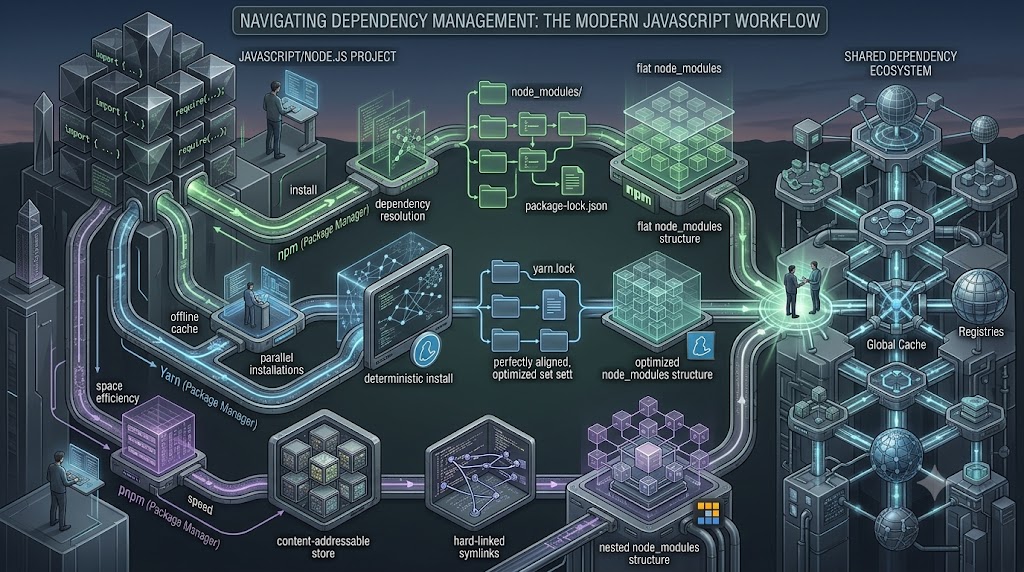
npm vs Yarn vs pnpm: Which Package Manager Should You Choose?
Every modern JavaScript or Node.js project depends on a package manager. Whether you're installing React, adding a database driver, managing TypeScript tooling, or maintaining a large monorepo, the package manager sits underneath your development workflow.
For many teams, the choice comes down to npm, Yarn, or pnpm.
At first glance, they seem interchangeable. All three can install packages from the npm ecosystem, manage dependency versions, execute project scripts, generate lockfiles, and support workspaces. The important differences appear in how dependencies are stored, resolved, linked, validated, and managed across larger projects.
That makes the decision less about finding the universally "best" package manager and more about choosing the one that matches your project's architecture, team workflow, CI/CD environment, and dependency requirements.
npm vs Yarn vs pnpm at a Glance
| Area | npm | Yarn | pnpm |
|---|---|---|---|
| Primary strength | Compatibility and simplicity | Advanced project workflows | Efficient dependency management |
| Lockfile | package-lock.json |
yarn.lock |
pnpm-lock.yaml |
| Workspaces | Yes | Yes | Yes |
| Dependency layout | Traditional node_modules installation |
PnP by default in modern Yarn, with other linkers available | Symlink-based layout backed by a shared content-addressable store |
| Strict dependency isolation | More permissive traditional layout | Strong with PnP | Strong by default |
| Monorepo support | Good | Strong | Strong |
| Best fit | General-purpose applications and teams wanting minimal setup | Teams wanting advanced workspace and dependency controls | Large projects and monorepos focused on efficient installs |
What Does a JavaScript Package Manager Actually Do?
A package manager does considerably more than download a library.
When you run an install command, it needs to determine which versions of your direct and transitive dependencies should be used, retrieve those packages, construct the project's dependency environment, and record the resulting dependency graph so future installations can be reproduced.
For example, a project may directly depend on next, while Next.js depends on dozens of other packages. Those packages may have dependencies of their own. The package manager resolves this graph and creates the environment your application actually runs against.
This becomes increasingly important as the project grows.
A small landing page may have a relatively simple dependency tree. A large SaaS platform can have hundreds of packages, multiple applications, shared internal libraries, testing tools, build systems, and several developers installing dependencies on different machines.
At that point, package management becomes part of engineering infrastructure rather than a simple installation command.
npm: The Straightforward Default
npm is the package manager most developers encounter first in the Node.js ecosystem. Its biggest advantage is straightforward: it is familiar, widely supported, and requires very little decision-making to get started.
A typical project can begin with:
npm init -y
npm install express
npm install -D typescript
npm records resolved dependency information in package-lock.json, helping installations reproduce the dependency tree across environments. npm also has built-in workspace functionality for managing multiple packages from a root project.
Where npm Works Well
- New developers need a familiar workflow.
- A project uses a conventional
node_modulesenvironment. - Maximum ecosystem compatibility is important.
- The application is a single package rather than a complex monorepo.
- The team wants to minimize package-manager-specific configuration.
Where npm Can Become Less Attractive
As dependency trees and repositories become larger, teams may start looking more closely at installation efficiency, dependency isolation, workspace tooling, and disk usage.
That does not make npm unsuitable for large applications. It simply means that other package managers can provide different trade-offs that may be more attractive for particular architectures.
Yarn: More Than an Alternative CLI
Modern Yarn is substantially different from the Yarn Classic workflow many developers remember.
Current Yarn supports several installation strategies. Its default Plug'n'Play approach can avoid creating a traditional node_modules directory by generating a loader file that maps dependencies to their stored packages. Yarn also supports traditional node_modules installations and a pnpm-style linker.
This makes Yarn particularly interesting when a team wants more control over dependency resolution and repository workflows.
Yarn Plug'n'Play
With Plug'n'Play, Yarn can detect dependencies that a package tries to access without declaring them properly. These are often called ghost dependencies.
Instead of allowing an undeclared dependency to work accidentally because it happens to exist somewhere in node_modules, Yarn can report the dependency problem explicitly.
That can expose issues earlier in development and make dependency relationships more explicit. Yarn's documentation also describes Zero-Install workflows where cached packages and the PnP loader can be committed so that switching branches or cloning a repository can require little or no traditional installation step.
Where Yarn Works Well
- Teams want advanced workspace management.
- A monorepo contains many interconnected packages.
- Dependency correctness and explicit dependency boundaries matter.
- The team is comfortable adopting Yarn's project-level configuration.
- Zero-Install or Plug'n'Play workflows provide genuine value.
The Yarn Compatibility Question
Yarn PnP is powerful, but it changes assumptions that some tools make about node_modules. Yarn itself provides a traditional node_modules linker when compatibility is more important than PnP-specific advantages.
For that reason, a team should test its complete toolchain before adopting PnP—especially when working with older tooling, native dependencies, or frameworks and plugins with filesystem-specific assumptions.
pnpm: Efficient Dependency Storage and Strictness
pnpm takes a different approach to dependency storage.
Instead of treating every project's dependency files as isolated copies, pnpm maintains a content-addressable store and uses links to construct each project's dependency environment. This allows packages shared across projects to be reused rather than repeatedly stored as independent copies. pnpm also intentionally keeps dependency access stricter, so a package generally cannot import dependencies that it has not declared.
For a developer working on multiple JavaScript projects, this difference can become noticeable.
Imagine maintaining ten applications that all depend on the same version of TypeScript, ESLint, or a common utility package. A shared package store can reduce redundant storage and make repeated installations more efficient.
Why pnpm Is Popular for Monorepos
pnpm provides workspace support and filtering capabilities that are particularly useful when a repository contains multiple applications and packages.
Consider a company with a repository structured like this:
apps/
  web/
  admin/
  mobile-api/

packages/
  ui/
  config/
  database/
Instead of treating every application as a completely isolated project, a workspace-aware package manager can coordinate dependencies between these packages.
pnpm's workspace model and filtering commands make it possible to target specific packages without necessarily operating on the entire repository. Its shared workspace lockfile can also keep dependency resolution centralized for a monorepo.
Dependency Storage Is the Real Difference
One of the most useful ways to understand these tools is to stop thinking about their commands and look at what happens to dependencies after installation.
npm
npm traditionally builds a conventional node_modules hierarchy with hoisting behavior that makes many dependencies directly accessible from the project environment.
Yarn PnP
Yarn PnP can eliminate the traditional node_modules directory altogether. A generated loader maps package requests to the correct dependency locations.
pnpm
pnpm uses a central content-addressable store and a symlink-based project structure. Dependencies are linked into the project while package contents can be reused across projects.
These architectural choices affect installation behavior, disk usage, dependency isolation, debugging, and compatibility.
Lockfiles: Why They Matter
All three package managers use lockfiles, although the formats are different.
| Package Manager | Lockfile |
|---|---|
| npm | package-lock.json |
| Yarn | yarn.lock |
| pnpm | pnpm-lock.yaml |
A lockfile records the resolved dependency graph so that different environments can install consistent versions rather than resolving the dependency ranges from scratch each time.
For example, if package.json allows a dependency such as ^5.2.0, the lockfile records the specific resolution selected for the project.
This becomes especially important in CI/CD.
A developer's laptop and the production build server should not silently resolve different dependency versions because a new package release appeared between two installations.
The lockfile therefore becomes part of the application's source-controlled build definition.
npm vs Yarn vs pnpm for Monorepos
Monorepos change the package-management problem.
Instead of managing one application, the repository may contain frontend applications, backend services, shared component libraries, configuration packages, database packages, and internal utilities.
All three tools support workspaces, but their approaches differ.
npm provides built-in workspace functionality that allows multiple local packages to be managed from a root project.
Yarn provides advanced workspace functionality and commands for operating across selected workspaces. Modern Yarn also supports features such as focused workspace installations.
pnpm places strong emphasis on workspace workflows and provides filtering capabilities that are particularly useful when a monorepo becomes large.
For example, a development team might want to rebuild only the packages affected by a shared UI change rather than treating the entire repository as one package-management operation.
The important point is that workspace support exists in all three. The deciding factor is usually how much workspace-specific tooling and dependency isolation your repository actually needs.
Installation Speed: Don't Choose From a Single Benchmark
Installation speed is one of the most common reasons developers compare npm, Yarn, and pnpm. But benchmark results should be treated carefully.
Installation performance depends on factors such as:
- Dependency count
- Cold versus warm cache
- Network speed
- Operating system
- Disk performance
- Lockfile state
- Native dependencies
- CI environment
- Repository structure
pnpm's shared store can reduce redundant package storage and work, while Yarn PnP can reduce filesystem linking overhead by using its loader-based model. npm continues to offer a conventional and broadly compatible installation model.
Rather than choosing a package manager because an isolated benchmark says it is "the fastest," teams should measure installation and CI performance using their own dependency tree.
Dependency Isolation and Phantom Dependencies
One subtle problem in JavaScript projects is accidentally relying on a package that your application never declared.
For example, imagine your application directly declares:
{
  "dependencies": {
    "framework-a": "^2.0.0"
  }
}
Framework A happens to depend on utility-b. Your code starts importing utility-b directly even though your own package.json never declares it.
That can appear to work under a permissive dependency layout.
Later, Framework A changes its dependency tree and no longer exposes Utility B in the same way. Your application breaks even though you never intentionally changed your own code.
Strict dependency environments are designed to make this kind of problem easier to detect.
pnpm's dependency layout intentionally restricts access to undeclared dependencies, while Yarn PnP explicitly checks dependency declarations and reports these kinds of access problems.
CI/CD Considerations
The package manager also affects your deployment pipeline.
Consider a Next.js application deployed through CI:
git push
   ↓
CI runner
   ↓
Install dependencies
   ↓
Run tests
   ↓
Build application
   ↓
Deploy
The dependency installation stage can consume a meaningful part of build time, particularly for large repositories.
A good CI setup should therefore:
- Pin the package manager version.
- Commit the appropriate lockfile.
- Use deterministic installation behavior.
- Cache dependencies where appropriate.
- Fail when dependency definitions and lockfiles unexpectedly diverge.
Modern Yarn, for example, provides --immutable to prevent the lockfile from being modified during installation.
npm, Yarn, and pnpm can all be used successfully in CI/CD. The important thing is consistency between local development and production environments.
Which Package Manager Is Best for a New Project?
Choose npm When...
- You want the simplest conventional setup.
- Your project uses standard
node_modulesbehavior. - Your team values broad compatibility over specialized package-management features.
- You are building a straightforward application or API.
- You don't have a strong reason to introduce another package manager.
Choose Yarn When...
- You want advanced workspace and dependency-management capabilities.
- Your team is comfortable with modern Yarn configuration.
- Plug'n'Play can solve real dependency-management problems for your project.
- Zero-Install workflows are valuable to your development process.
- Your monorepo benefits from Yarn's workspace tooling.
Choose pnpm When...
- You maintain multiple JavaScript projects on the same machines or CI infrastructure.
- Disk efficiency matters.
- You are building a monorepo.
- You want stricter dependency boundaries.
- You want workspace filtering and efficient package reuse.
A Practical Example: Choosing for a SaaS Platform
Imagine a SaaS company building:
- A Next.js customer application
- An internal admin dashboard
- A Node.js API
- A shared UI package
- A shared TypeScript configuration package
- A database package
Putting all of these applications into a monorepo introduces a different set of requirements from a single Next.js project.
The team may want centralized dependency management, shared packages, targeted workspace commands, predictable CI installations, and reduced duplication across projects.
In this situation, pnpm or modern Yarn may be more attractive than simply using the default npm workflow.
But if the company has a single application with a small team and a conventional deployment pipeline, npm may be the better engineering decision precisely because it introduces less additional complexity.
The right choice is therefore driven by the repository's actual requirements—not by which package manager is currently popular.
Can You Switch From One to Another?
Yes, but switching should be treated as an engineering change rather than simply replacing one command with another.
A migration may involve:
- Replacing the existing lockfile.
- Generating the new package manager's lockfile.
- Updating CI/CD installation commands.
- Pinning the package manager version.
- Reviewing workspace configuration.
- Testing native dependencies.
- Checking scripts that assume a specific
node_moduleslayout. - Validating development and production builds.
Yarn PnP deserves particular attention because moving from a traditional node_modules environment changes how dependencies are resolved. Yarn provides a node-modules linker when a project needs traditional compatibility.
A stable production application does not need to be migrated simply because another package manager looks better on paper.
npm vs Yarn vs pnpm: Decision Table
| Project Requirement | Recommended Starting Point |
|---|---|
| Simple Node.js application | npm |
| Maximum conventional compatibility | npm |
| Large monorepo | pnpm or Yarn |
| Strong dependency isolation | pnpm or Yarn PnP |
| Shared dependency storage across projects | pnpm |
| Zero-Install workflow | Yarn |
| Minimal package-manager configuration | npm |
| Workspace-heavy development | pnpm or Yarn |
How Code-Ox Approaches the Decision
At Code-Ox, package-manager selection is best treated as part of the application's overall engineering architecture.
For a straightforward custom web application, npm may provide everything the project needs without introducing unnecessary tooling decisions.
For a large TypeScript monorepo containing shared frontend components, backend packages, internal libraries, and multiple deployable applications, pnpm or Yarn may provide more useful workspace and dependency-management capabilities.
The decision should also consider the team's existing development environment, CI/CD platform, deployment target, third-party packages, native dependencies, and long-term maintenance requirements.
Code-Ox develops custom web applications and business software with an emphasis on maintainable architecture rather than choosing technologies simply because they are trending. The package manager is one small but important part of that architecture.
Final Verdict
There is no universal winner between npm, Yarn, and pnpm.
npm is an excellent default when simplicity, conventional node_modules behavior, and broad compatibility are the priorities.
Yarn is compelling when a team wants advanced dependency management, workspace capabilities, and options such as Plug'n'Play or Zero-Install workflows.
pnpm is particularly attractive for teams managing large projects or monorepos where dependency reuse, disk efficiency, strictness, and workspace workflows matter.
The best package manager is ultimately the one that makes your project's dependency graph easier to understand, reproduce, maintain, and deploy.
If you're starting a new application, don't ask only "Which package manager is fastest?" Ask a better question: "Which dependency-management model fits the way this application will actually be developed and deployed?"