.svg)
From Table to Kitchen to Delivery: Connecting the Moving Parts of a Modern Restaurant
Reported By
code
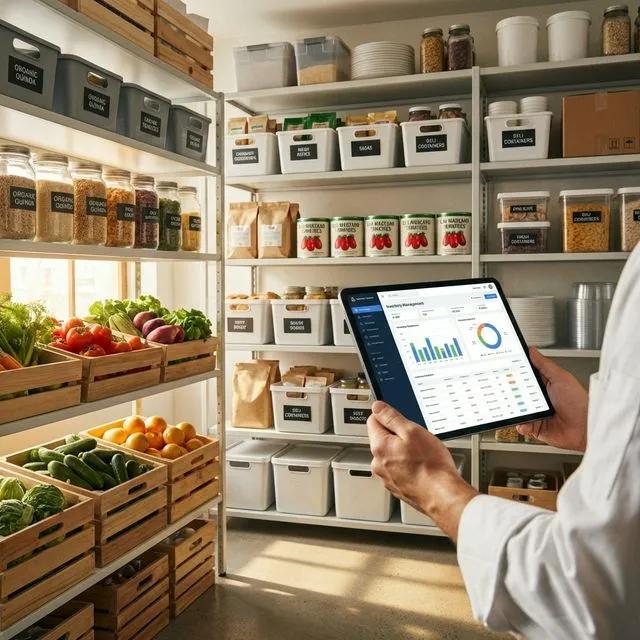
From Table to Kitchen to Delivery: Connecting the Moving Parts of a Modern Restaurant
A busy restaurant can look simple from the customer's side.
A guest sits at a table, places an order, receives the food, pays, and leaves.
Behind that experience, however, several processes have already happened.
The table has to be available. The order needs to reach the correct kitchen station. Ingredients need to be available. The kitchen needs to know what to prepare. The bill needs to reflect the actual order. If the restaurant offers delivery, the same operation has to coordinate orders coming from another channel. At the end of the day, management still needs to know what was sold, what was consumed, and where money was made or lost.
When these activities operate through disconnected systems, the customer may only see the final meal, but the restaurant feels the operational friction everywhere else.
Code-Ox approaches restaurant operations through Odoo-based solutions that connect point of sale, table management, kitchen workflows, inventory, recipe costing, delivery, loyalty, and financial operations. The company's restaurant sector offering specifically highlights table and floor management, split billing, kitchen-station order printing, recipe and cost control, delivery integrations, and fleet management.
The Restaurant Floor Is More Than a Collection of Tables
Imagine a restaurant with 40 tables during a Friday dinner service.
At 8:00 PM, several tables are occupied, two reservations are arriving, one table is waiting for its bill, and another group wants to move from a four-person table to a larger table.
If table information is maintained separately from the point-of-sale system, staff have to coordinate seating and billing manually.
That becomes particularly difficult when multiple servers are handling different sections.
A Digital Floor Plan Creates an Operational Record
A restaurant POS can represent the dining area as an actual floor plan, with tables associated with their current orders and status.
Instead of asking another employee whether Table 18 is occupied, a server can see the table status in the POS environment.
When an order is opened against the table, the order remains associated with that table until it is settled.
This becomes even more useful when guests request separate bills.
Split Bills Are a Small Feature with a Big Operational Effect
Consider a table of six guests who want to divide the bill between three people.
In a manual process, staff may have to calculate the split, identify which items belong to which guest, make adjustments, and then verify the total before payment.
The larger the order, the greater the chance of an incorrect calculation.
Keep the Order Intact While Splitting the Payment
A restaurant POS can allow staff to divide the payment without reconstructing the original order from scratch.
The important distinction is that the system knows the relationship between the table, the order, the ordered items, and the payments.
That means a split bill is not simply a manual calculation. It becomes an operation performed against the actual restaurant order.
Code-Ox's restaurant solution specifically includes split-bill functionality as part of its POS and floor-management capabilities.
The Kitchen Should Not Depend on the Waiter Carrying Information
Now consider what happens after an order is placed.
A table orders two pizzas, a pasta dish, a steak, and drinks.
The pizza needs to go to one preparation area. The steak may belong to another station. Drinks may be handled somewhere else.
If the entire order is written on one paper ticket and manually passed between stations, every additional handoff creates an opportunity for delay or misunderstanding.
Route the Order to the Workstation
A connected restaurant POS can send relevant order information directly to the appropriate kitchen station.
Instead of the kitchen receiving a generic message that “Table 18 ordered food,” the relevant station receives the items it needs to prepare.
This changes the workflow from:
Customer → Waiter → Paper → Kitchen → Verbal Instructions
to:
Customer → POS Order → Relevant Kitchen Station
Code-Ox's restaurant sector page specifically identifies printing orders directly to kitchen stations as part of its restaurant POS workflow.
The Menu Price Is Only One Side of the Equation
A dish selling for $18 does not tell the restaurant whether it is profitable.
The actual economics depend partly on what goes into the dish.
Suppose a restaurant changes the portion size of a popular chicken dish. The selling price remains unchanged, but the ingredient consumption increases. If that change is not reflected in the recipe data, the restaurant's expected margin is no longer based on the actual portion being served.
Recipes Turn Menu Items into Costed Products
A recipe structure can define the ingredients required to prepare a menu item and the quantities involved.
For example, a single menu item might consume:
- 250 g of chicken
- 150 g of rice
- 50 g of vegetables
- 20 ml of sauce
- Specified quantities of other ingredients
If ingredient prices change, the calculated cost of preparing the dish can change as well.
This gives management a more useful basis for evaluating menu pricing than simply looking at the final selling price.
Code-Ox's restaurant solution includes recipe and cost control for tracking ingredient costs and raw-material inventory.
Food Cost Is an Inventory Problem Too
Recipes explain what should be consumed. Inventory records what is actually available.
Imagine a restaurant has enough ingredients on paper to prepare 200 portions of a popular dish.
During service, however, the kitchen discovers that one key ingredient is nearly finished.
The issue is not simply that the ingredient was forgotten. It may indicate that actual consumption has diverged from expected consumption, purchasing quantities were insufficient, or demand exceeded the forecast.
Connect Recipes to Raw-Material Inventory
When menu items and ingredients are connected, sales can contribute to a more meaningful picture of ingredient consumption.
The restaurant can then monitor stock levels against expected requirements rather than treating menu sales and inventory as unrelated processes.
This also creates a foundation for more accurate purchasing decisions.
Code-Ox highlights precise inventory forecasting as one of the benefits of its restaurant-sector approach, specifically in relation to reducing food waste.
Waste Does Not Always Look Like Waste
Food waste is often associated with spoiled ingredients, but operational waste can appear in several forms.
An ingredient may be purchased in quantities that exceed actual demand. A menu item may be prepared in excess. Portion sizes may vary. A product may expire before it is used.
If the restaurant only monitors purchasing and sales totals, it can miss the operational reasons behind those differences.
Compare Expected Consumption with Actual Operations
Recipe-based inventory creates a reference point.
If a restaurant sells 100 portions of a dish and the recipe says each portion requires a defined quantity of an ingredient, management has an expected consumption level.
That expectation can then be compared with actual inventory movement and purchasing information.
The comparison does not automatically explain every discrepancy, but it gives the restaurant a place to start investigating.
A Restaurant May Have Three Different Sales Channels
Many restaurants no longer rely exclusively on dine-in customers.
A single operation may receive:
- Dine-in orders
- Takeaway orders
- Online delivery orders
If each channel operates independently, the kitchen may receive fragmented information while inventory and sales data are reconciled later.
Bring Orders into the Same Operational Flow
Integrating online ordering and third-party delivery channels allows orders from different sources to enter the restaurant's operational environment.
The restaurant can then process the order through the relevant preparation and fulfillment workflow rather than manually re-entering it.
Code-Ox's restaurant sector offering includes integration with third-party food delivery aggregators and the ability to manage an in-house delivery fleet.
Delivery Creates a Second Operational Clock
A dine-in customer is already inside the restaurant.
A delivery customer is waiting somewhere else.
That changes the operational requirement.
The restaurant needs to prepare the order, package it, assign it for delivery, and get it to the customer within an acceptable window.
If the restaurant operates its own drivers, management also needs to know which orders have been assigned and which deliveries remain outstanding.
Connect Order Fulfillment with Delivery
A connected delivery workflow can associate the customer's order with its delivery status and assigned driver or delivery process.
That creates a traceable sequence:
Order received → Food prepared → Order packed → Driver assigned → Delivery completed
The restaurant no longer has to treat delivery as a completely separate activity from the original sale.
Code-Ox identifies both third-party delivery integration and own-fleet management as part of its restaurant solution.
Menu Changes Should Not Require Rebuilding the System
Restaurants change menus for seasonal promotions, new dishes, ingredient availability, pricing changes, and customer demand.
Suppose a restaurant introduces a new lunch menu for three months.
The change affects more than the printed menu.
New recipes may need to be defined. Ingredient requirements may change. Prices need to be updated. Inventory requirements may shift. Staff need to prepare the new dishes correctly.
Keep Menu Data Connected to Operations
A digital menu structure can associate a menu item with its selling price and recipe or ingredient information.
When the menu changes, the operational information surrounding the item can be updated within the same environment.
This is particularly useful when a restaurant runs multiple locations with different menus or pricing rules.
Code-Ox's restaurant offering includes dynamic menu customization as part of the broader restaurant workflow.
Multi-Branch Restaurants Need More Than One POS
Imagine a restaurant group with five locations.
Each location has different customer volumes, staffing patterns, and inventory requirements.
If each branch operates as a completely independent system, management may have difficulty comparing performance or understanding group-wide purchasing and inventory requirements.
Local Operations, Central Visibility
A connected ERP structure can allow each restaurant to manage its own day-to-day transactions while maintaining the broader organizational view.
Management can then examine sales, inventory, purchasing, and other operational information across locations without forcing every branch to operate as if it were identical.
The key is maintaining the right separation between local operations and centralized information.
Loyalty Is More Useful When It Is Connected to Transactions
A loyalty program is not simply a collection of points.
Consider a customer who visits a restaurant several times a month. The value of the loyalty relationship comes from understanding the customer's actual transaction history and applying rewards according to the restaurant's rules.
Connect Loyalty with the POS
When loyalty information is integrated into the point-of-sale process, staff do not have to maintain a separate record of rewards.
Points, rewards, and qualifying purchases can remain associated with the customer and their transactions.
Code-Ox's restaurant sector page includes integrated loyalty and gift-card functionality as part of the restaurant solution.
The Restaurant Manager Needs More Than Daily Sales
At the end of a busy service, “today's sales were $12,000” is useful but incomplete.
Management may also want to understand:
- Which menu items sold most frequently?
- What was the ingredient cost associated with those items?
- Which tables or service periods created the highest demand?
- Which ingredients need replenishment?
- How much of the business came through delivery?
- Which promotions or loyalty activities generated transactions?
These questions require sales, inventory, recipe, and customer information to be connected.
Turn Restaurant Data into Operational Decisions
Code-Ox's wider technology offering includes real-time dashboards, reporting, business intelligence, and data visualization.
For a restaurant, those capabilities can be used to build reporting around the questions management actually needs to answer rather than simply producing a generic sales dashboard.
A Connected Restaurant Workflow
Consider a customer placing an order at a restaurant during a busy evening.
- Table selected: The server opens the relevant table from the digital floor plan.
- Order entered: Food and drinks are recorded in the POS.
- Kitchen routing: Relevant items are sent to the appropriate kitchen station.
- Preparation: Kitchen staff prepare the order according to the defined recipe.
- Inventory impact: Ingredient consumption contributes to the inventory picture.
- Service: The order is delivered to the customer.
- Payment: The bill is settled, including split payments if required.
- Loyalty: The customer's transaction can contribute to the applicable loyalty workflow.
- Reporting: Sales and operational data become available for management analysis.
If the customer orders through an online delivery channel instead, the beginning of the process changes, but the operational chain can still connect to preparation, inventory, delivery, and payment.
That is the real value of integration: different customer experiences can feed into the same operational foundation.
Where Code-Ox Fits Into Restaurant Technology
Odoo provides a broad foundation for point of sale, inventory, purchasing, accounting, and related business processes.
But a restaurant does not operate like a generic retail store.
Its workflows revolve around tables, orders, kitchen stations, recipes, ingredients, preparation times, delivery, menus, and customer relationships.
Code-Ox can adapt Odoo around those restaurant-specific processes through implementation, customization, integration, automation, reporting, and supporting digital applications.
The wider Code-Ox service portfolio includes Odoo implementation and customization, integrations, dashboards and analytics, AI and automation, web applications, and mobile applications.
That matters when a restaurant needs more than a standard POS—for example, when it needs to connect external delivery platforms, customize operational workflows, integrate another business system, or build a supporting mobile or web experience.
The Goal Is Not More Restaurant Software
A restaurant can accumulate technology surprisingly quickly.
One application handles POS. Another handles delivery. Another manages loyalty. Another stores recipes. Another handles accounting.
The number of applications is not the measure of digital maturity.
The more important question is whether those applications understand the same business transaction.
When a customer places an order, the restaurant should not have to recreate that information five times.
The order should become the starting point for the operational activities that follow.
From a Transaction to an Operational Chain
The strongest restaurant technology connects what happens in front of the customer with what happens behind the scenes.
The table connects to the order.
The order connects to the kitchen.
The menu item connects to the recipe.
The recipe connects to ingredients.
The ingredients connect to inventory.
The payment connects to the sale.
The delivery order connects to fulfillment.
The customer transaction can connect to loyalty.
And all of those records contribute to the restaurant's operational picture.
Once those relationships are visible, technology becomes more than a POS system. It becomes the infrastructure connecting the restaurant's front of house, back of house, delivery operation, and management team.
Building a Restaurant Operation That Can Keep Up
If your restaurant is relying on separate spreadsheets for ingredients, manual communication between servers and kitchen staff, independent delivery systems, or repeated data entry between POS and accounting, the first step is to map where information currently changes hands.
Look at the complete journey:
- How does a customer place an order?
- How does the kitchen receive it?
- How is the recipe linked to ingredient consumption?
- How does the restaurant know when to reorder?
- How are dine-in and delivery orders reconciled?
- How are split bills handled?
- How is customer loyalty recorded?
- How does management measure the economics of the menu?
Those connections reveal where a restaurant can benefit from a more integrated system.
Make Every Order Part of a Bigger Picture
Restaurant technology should not exist simply to make the cashier's screen faster.
It should help connect the customer order to the kitchen, the kitchen to inventory, inventory to purchasing, purchasing to cost, and customer transactions to long-term relationships.
That is the operational foundation Code-Ox aims to build with Odoo for restaurant and food-service businesses.
Talk to Code-Ox about connecting your restaurant POS, kitchen operations, recipes, inventory, delivery, loyalty, and reporting into one workflow designed around how your business actually runs.